

How do AEC firms keep project data secure with remote and outsourced teams?
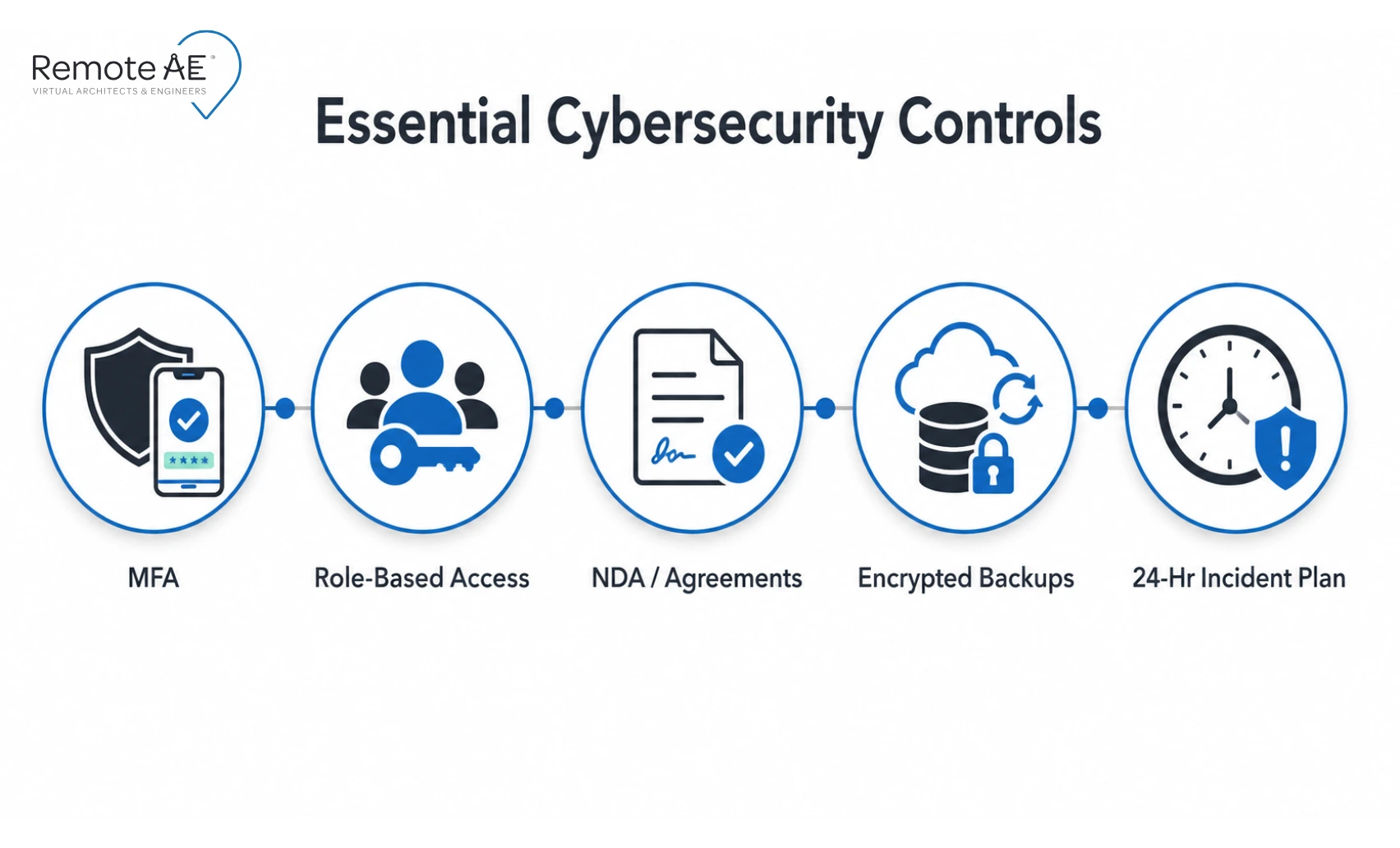
AEC firms protect project data by layering five controls: multi-factor authentication on every account, role-based access limited to a team member’s assigned project folders, signed NDAs and data-handling agreements before any file access, encrypted cloud storage with automated backups, and a documented incident-response plan that can act within 24 hours
AEC data is valuable. Drawings, models, contracts, site details. Attacks keep rising, and losses are real: the FBI logged $16B in reported cyber losses for 2024, up 33% year over year (FBI/IC3; Reuters). Phishing and pretexting continue to drive breaches (Verizon DBIR). Your virtual team, partners, subcontractors, and assistants add speed, but also expand the attack surface. This guide shows where AEC firms get hit, how to harden cloud workflows, and the exact steps to deploy: MFA, role-based access, training, backups, CDE hygiene, and a 24-hour incident playbook.
Key Takeaways
- The FBI reported $16B in cyber losses for 2024, a 33% year-over-year increase, per FBI/IC3 data.
- 77% of AEC firms report they could not function beyond five days if ransomware locked them out of project files.
- Microsoft data shows 99.9% of accounts compromised in credential takeover attacks were not protected by multi-factor authentication.
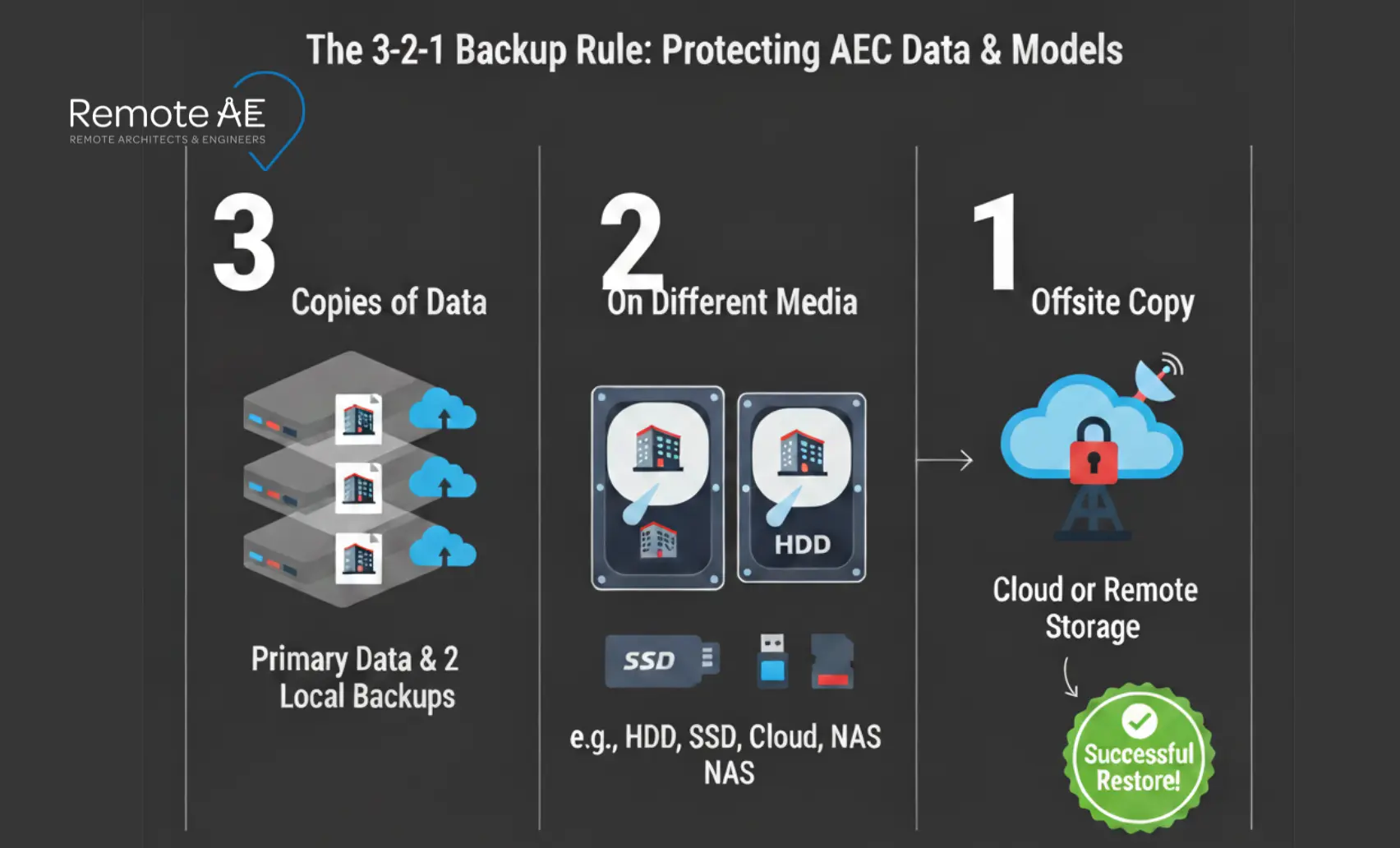
- AEC ransomware defense requires 3-2-1 backups: three total copies, two different media types, one stored offsite.
- AEC firms need a documented incident-response plan to isolate, preserve, and notify within 24 hours of a suspected breach.
Why AEC Firms Are Prime Targets?
AEC files reveal layouts, systems, and client data. That’s sensitive and profitable for attackers. A recent AEC Data Insights Report from Egnyte (2024) paints a troubling picture of the industry’s cybersecurity resilience. Nearly eight out of ten firms (77%) admit they couldn’t function beyond five days if locked out of their files during a ransomware incident. Yet, recovery from such attacks often stretches past the 20-day mark, leaving project schedules and client commitments in jeopardy.
The risk isn’t hypothetical; it’s happening. Over the last two years, 59% of AEC organizations have suffered some form of cybersecurity breach. General contractors have been hit hardest: 70% reported at least one cyber event, and 30% faced ransomware directly since 2021.
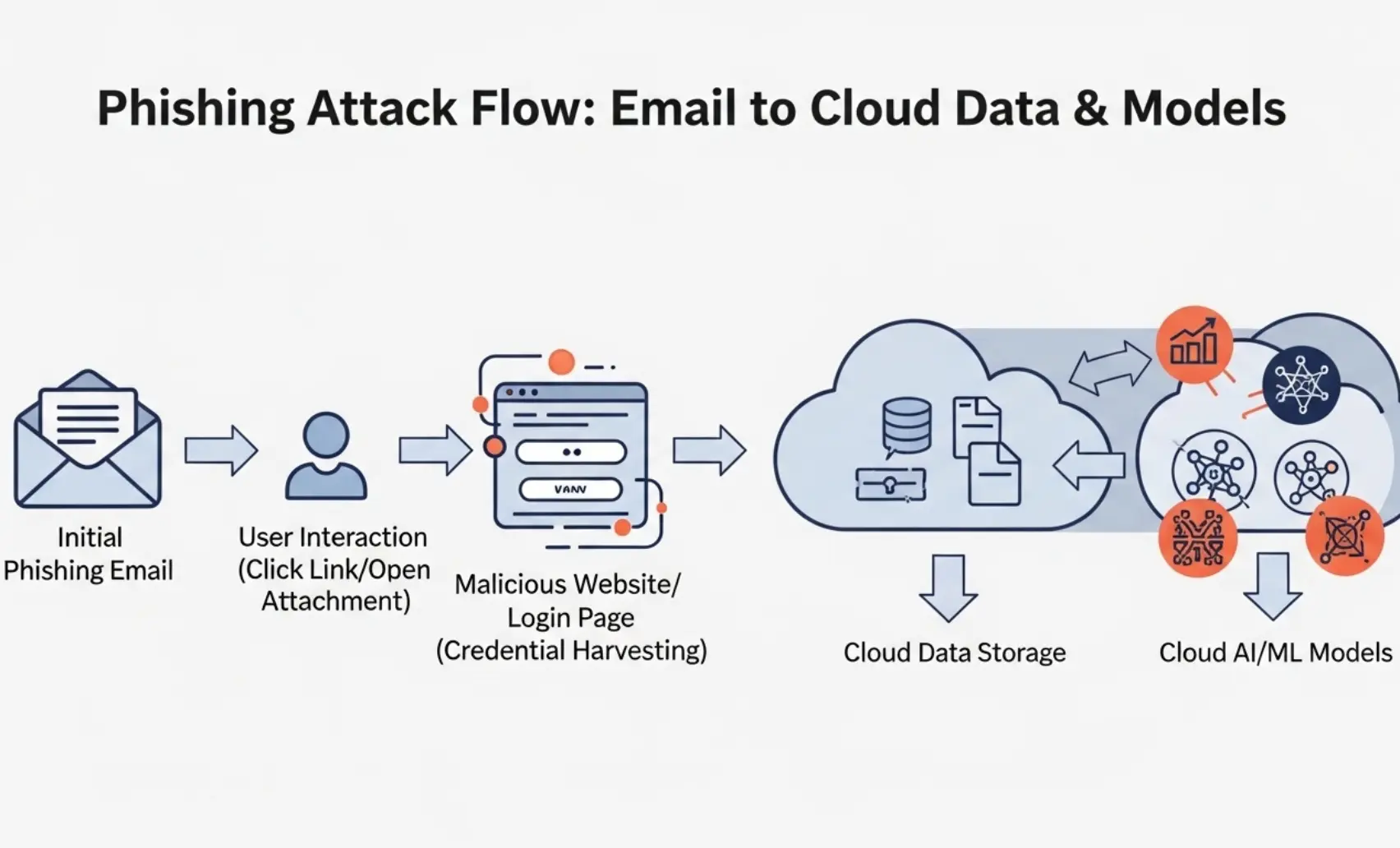
Ransomware continues to disrupt critical sectors and lock operations. In distributed AEC teams, with outsourced staff, consultants, and many cloud tools, one weak account can expose an entire project.
Business impact
- Financial: ransom, recovery, downtime, penalties.
- Reputation: client trust and prequal scores.
- Schedule: delayed RFIs, halted BIM coordination, missed submittals.
Top Cybersecurity Risks in the AEC Industry
AEC firms face serious cybersecurity threats due to distributed teams, shared cloud platforms, and sensitive project data. Below are the most common risks, summarized clearly and practically.
- Phishing and Social Engineering: PMs, coordinators, and assistants get targeted with vendor look-alike emails. DBIR notes social engineering’s outsized role in breaches. MFA blocks the vast majority of account takeover attempts. Microsoft reports 99.9% of compromised accounts lacked MFA.
- Ransomware on BIM and CAD Systems: Firms have lost access to shared drives and model servers, stalling projects. IC3 reports ransomware pressure on critical sectors and rising complaints. Real-world construction victims have reported encrypted file servers and halted work.
- Unauthorized Cloud Access: Weak passwords or shared logins give outsiders a path into Autodesk accounts or shared drives. Autodesk advises 2-step verification and privacy controls at the account level.
- Insider and Partner Risks: Third-party involvement is a rising factor in breaches. Least-privilege access and audits reduce blast radius.
- Unpatched or Outdated Systems: Old AutoCAD, Revit, or VPN versions leave open vulnerabilities. Missing patch management allows malware or credential theft. Common issue for firms working with freelancers using mixed hardware.
How Remote AE Assistants Are Held to These Standards
Bringing a remote assistant onto your project should shrink your risk, not grow it. Before a Remote AE assistant touches a single file, three controls are already in place:
- Signed NDA and data-handling agreement, executed before any project access is granted, covering confidentiality of drawings, models, and client data. They are trained with proper data security standards for AEC virtual assistants.
- Role-based access, scoped to the job; the assistant sees only the project folders and platforms their defined scope requires, never your full environment.
- MFA + session logging on all remote access; every login is multi-factor protected and logged, closing the unsecured RDP gap that is one of the most common ransomware entry points in distributed AEC teams.
In practice, a vetted outsourced assistant working inside these guardrails is often more controlled than an ad-hoc local hire on a shared login, because the access model is deliberate from day one.
Key Cybersecurity Measures to Safeguard AEC Data
Remote and hybrid AEC environments demand a layered defense approach. The goal isn’t just compliance; it’s about keeping live design files, BIM models, and client data secure while maintaining productivity. Below are essential cybersecurity best practices for AEC remote teams based on NIST CSF 2.0 and CIS Critical Security Controls.
1. Strengthen Access Control and Identity Management
Access should never be universal. In distributed AEC setups, implement role-based access control (RBAC) so each architect, engineer, or subcontractor only reaches the data relevant to their task.
Action points:
- Use multi-factor authentication (MFA) for Autodesk Construction Cloud, BIM 360, and project email accounts.
- Apply least privilege principles; limit admin roles to designated project leads.
- Use password managers to reduce credential reuse.
- Deactivate credentials immediately after offboarding remote staff.
2. Train Virtual Teams on Cyber Awareness
Human error drives many incidents. Most breaches come from simple mistakes, clicking a phishing link, or using weak passwords. Continuous training keeps virtual engineers and BIM teams alert.
Action points:
- Conduct monthly awareness sessions covering phishing, ransomware, and secure document handling.
- Run simulated phishing tests to gauge awareness.
- Include cybersecurity modules in onboarding for remote assistants and drafters.
- Reinforce secure practices for email attachments, submittals, and RFI workflows.
3. Protect Project Data in the Cloud
AEC firms depend on cloud tools like Autodesk Construction Cloud, Revit Cloud Worksharing, and shared drives. The right configuration determines whether they’re secure or exposed.
Action points:
- Choose vendors compliant with ISO 27001, SOC 2, or FedRAMP.
- Enable encryption at rest and in transit for design and coordination files.
- Restrict link sharing; use permission-based document sharing inside your Common Data Environment (CDE).
- Schedule automatic cloud backups with retention policies to restore BIM and CAD data if compromised.
4. Secure Devices and Remote Endpoints
Distributed AEC teams often use personal laptops or BYOD setups. Without endpoint protection, these devices can serve as gateways for attacks.
Action points:
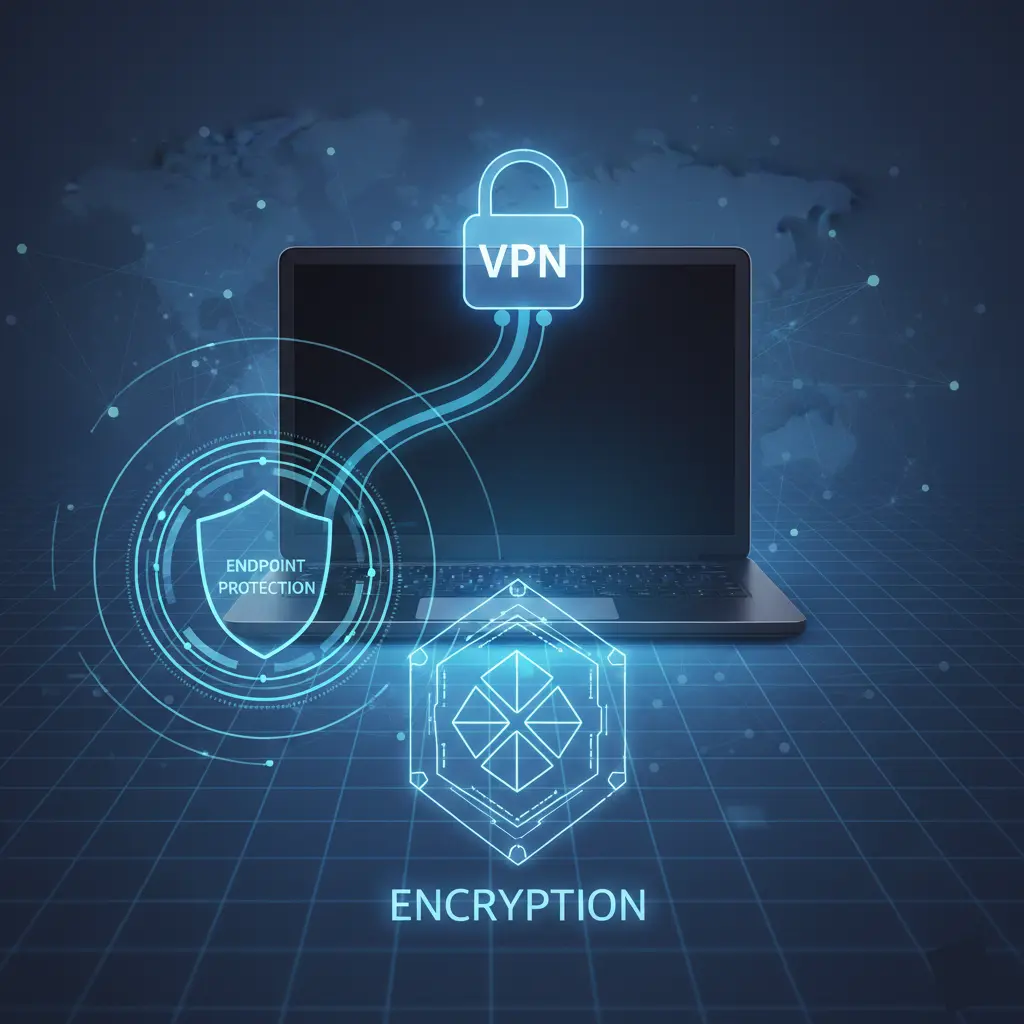
- Require all users to access systems via VPN.
- Install endpoint detection and response (EDR) tools to monitor activity.
- Enforce disk encryption for drives containing sensitive project files.
- Patch and update all design software, especially AutoCAD, Revit, and Navisworks, to prevent exploits.
5. Manage Collaboration Platforms Securely
Autodesk, Slack, and Teams are powerful and risky if permission sprawl.
Action points:
- Audit user permissions regularly; disable inactive accounts.
- Control guest access for external consultants.
- Monitor audit logs for file-sharing and chat data.
- Configure message retention and version history to meet compliance standards.
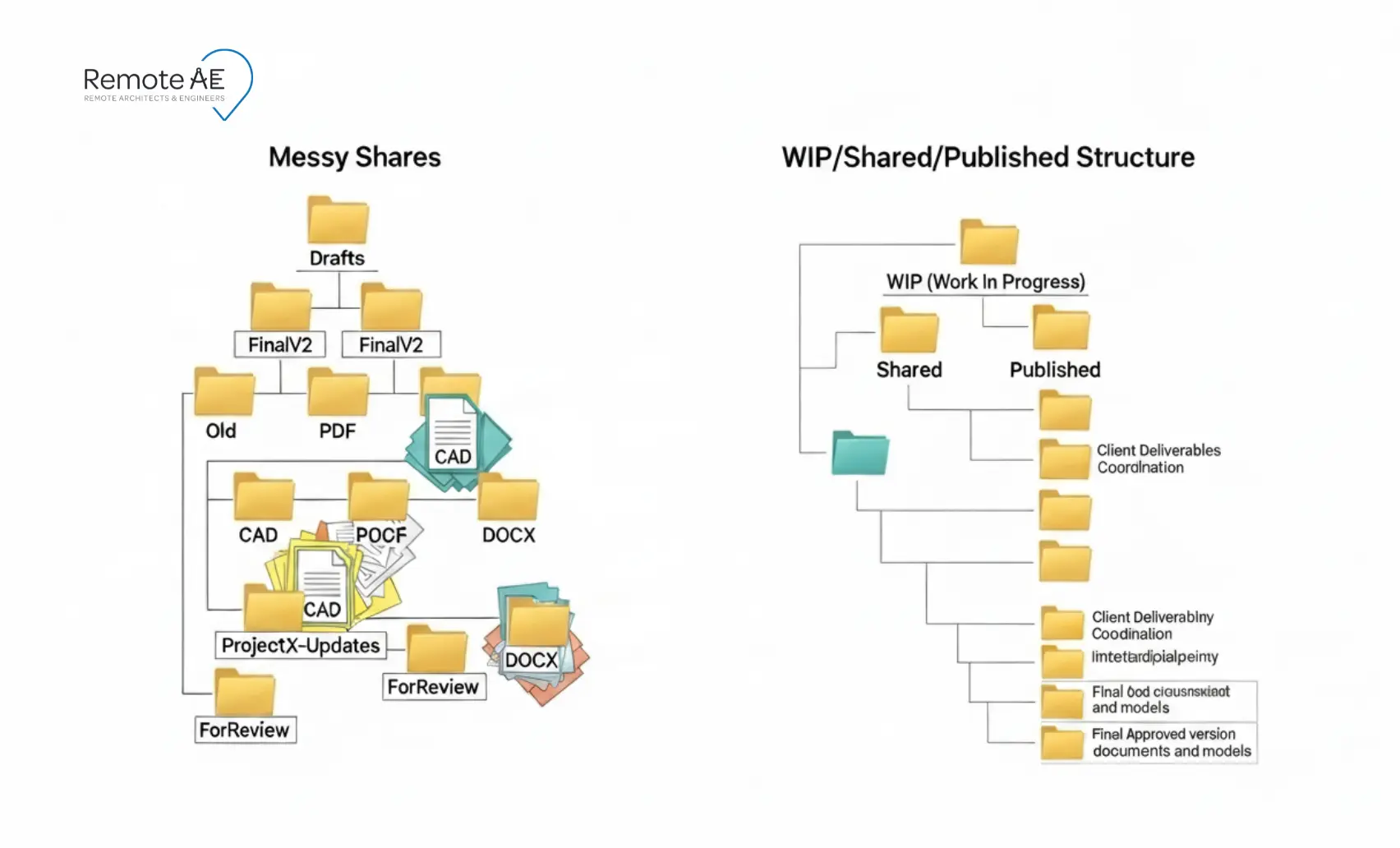
6. Securing Remote & Cloud Access
Most breaches in distributed AEC teams don’t start with a sophisticated attack; they start with an open door. Unsecured remote desktop (RDP) access is one of the most common ransomware entry points, and shared logins into Autodesk or a common data environment (CDE) hand outsiders a path straight to your models. Closing that gap is straightforward when you treat the connection itself as something to be hardened, not just the accounts behind it.
For teams standing this up from scratch, a Revit-ready encrypted connection can be running in under an hour: route it through a VPN, mount the shared cloud folder, and lock down access before the first file ever moves. That connection is the practical foundation everything else in this section builds on.
7. Backup and Disaster Recovery
Ransomware can pause a project. There should be a proper backup and disaster recovery plan. Keep 3-2-1 backups (three copies, two media, one offsite). Store snapshots in separate accounts/regions so malware can’t reach them. Test restores, not just backups, every quarter and script a ransomware recovery plan that covers who declares, who communicates, and how you stage clean data. IC3 notes ransomware’s continued impact; construction-targeted writeups echo growth in extortion.
8. Control Vendor and Third-Party Risks
Your firm’s cybersecurity is only as strong as your weakest partner. Every subcontractor, outsourcing vendor, or remote assistant accessing your Common Data Environment (CDE) must follow the same security standards.
Action points:
- Conduct due diligence and verify partner compliance with NIST CSF 2.0, CIS Controls, or equivalent frameworks.
- Sign Non-Disclosure Agreements (NDAs) and include data protection clauses in every Service Level Agreement (SLA).
- Limit external access by project phase and role.
- Example: Remote AE enforces SOC 2-aligned protocols and requires all staff to use VPNs, MFA, and encrypted file systems.
9. Conduct Regular Security Audits and Monitoring
Proactive monitoring helps AEC firms catch threats before they escalate.
Action points:
- Perform quarterly vulnerability assessments on both cloud and local systems.
- Review access logs monthly for anomalies.
- Use endpoint detection and response (EDR) tools for remote laptops and workstations.
- Partner with external auditors to validate compliance with ISO or SOC standards.
Incident Playbook for Distributed Teams
Even with robust defenses, breaches can still happen. A defined incident response plan guarantees you react fast, limit damage, and maintain control.
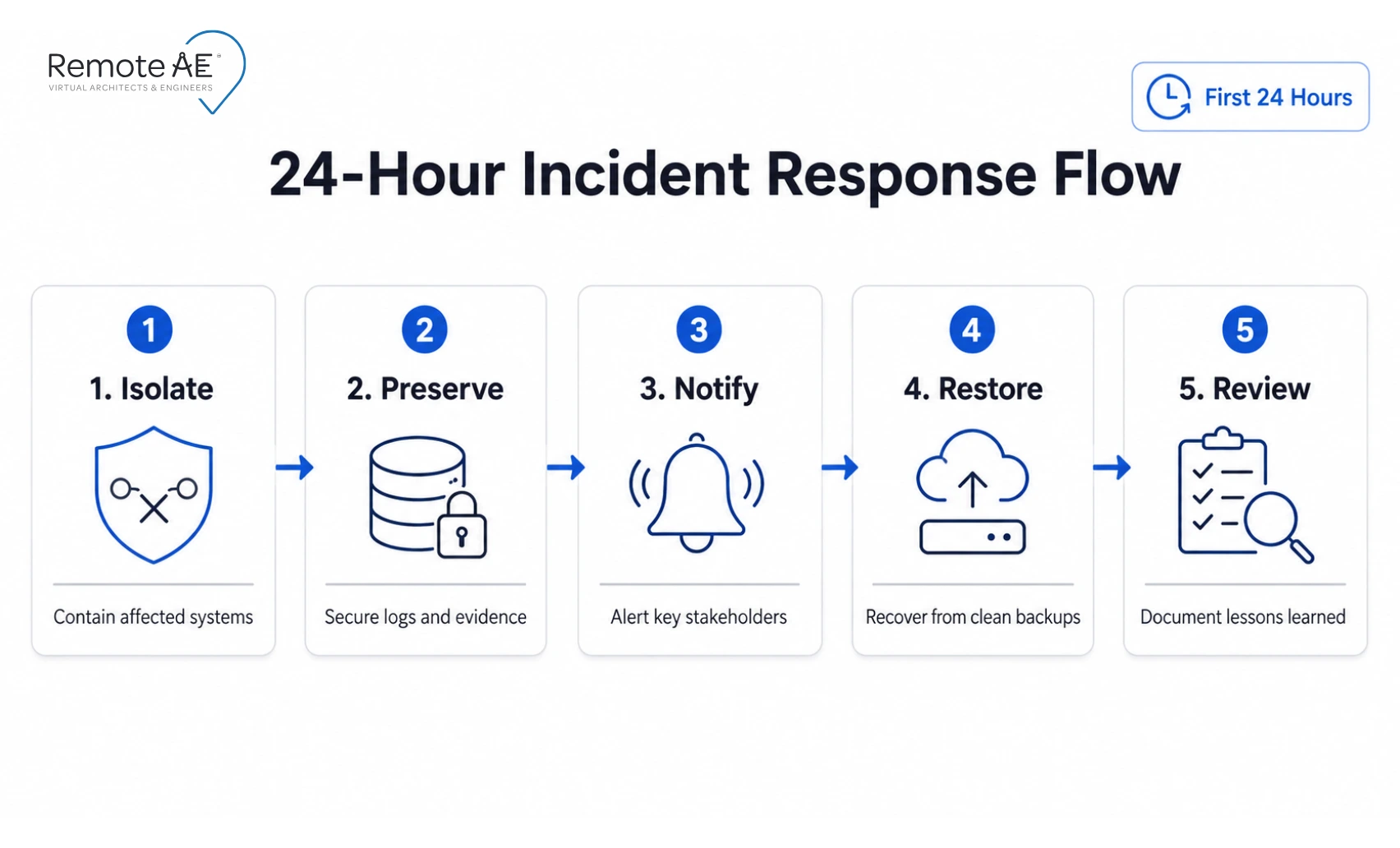
The First 24-Hour Checklist
- Isolate compromised accounts or devices immediately.
- Collect logs and digital evidence.
- Notify your IT lead or security vendor.
- Activate backup restoration if data loss occurs.
- Communicate transparently with clients and team members through secure channels like Slack, Microsoft Teams, or Zoom.
A documented incident response plan aligned with CISA and NIST guidelines can save thousands in downtime and restore trust quickly.
Your First 24 Hours After a Suspected Breach
Speed limits damage. If a firm suspects a compromise, these are the first moves, documented in advance, so no one improvises under pressure:
- Isolate: disconnect affected machines, and revoke the suspected account’s access and active sessions.
- Preserve: do not wipe or “clean” yet; capture logs and system state so you can trace scope.
- Notify: alert your IT lead, cybersecurity counsel, and platform support (Autodesk, Microsoft, or your CDE provider), using contacts documented before the incident.
- Restore: Recover from your most recent clean backup using ISO 19650-aligned version control so the restore point is unambiguous.
- Review: Within the week, run a post-incident review and close the gap that allowed entry
Not sure your current setup covers all five controls? Use our secure VPN + cloud folder walkthrough to close the most common gaps in under an hour.
Building a Cyber-Resilient AEC Team with Remote AE
Remote AE isn’t just about remote staffing; it’s about secure collaboration. Every virtual professional we deploy follows strict cybersecurity protocols, built around confidentiality, compliance, and reliability.
Our commitment includes:
- Encrypted communication channels and VPN-based file access.
- Secure onboarding/offboarding aligned with least privilege principles.
- Mandatory cyber-awareness training for all team members.
- Governance policies aligned with NIST CSF, CIS Controls, and ISO frameworks.
Remote AE helps AEC firms scale with confidence, knowing every model, drawing, and document remains protected.
Alt text: The role of cybersecurity in the virtual AEC industry.
Frequently Asked Questions
Do remote AEC assistants sign an NDA before accessing project files?
Yes. A signed NDA and data-handling agreement are executed before any remote assistant is granted access to project files, covering the confidentiality of drawings, models, and client data.
How is data access controlled for a remote or outsourced team member?
Access is role-based and scoped to the assistant’s defined work. They can reach only the specific project folders and platforms their tasks require, never your full environment, and all remote access uses multi-factor authentication with session logging.
Who owns the intellectual property and project files when work is outsourced?
Your firm retains full ownership of all project files and intellectual property. Data-handling agreements signed before access confirm that drawings, models, and deliverables remain your property.
What should an AEC firm do in the first 24 hours after a suspected breach?
Isolate affected machines and revoke access, preserve logs before cleaning, notify your IT lead and platform support, restore from the most recent clean backup using version control, and run a post-incident review within the week.
Want a team that meets these standards from day one? Every Remote AE assistant works under signed NDAs, role-based access, and MFA-secured logins before they touch a single file. Talk to us about adding vetted, security-ready AEC support to your team.
Stay Protected. Stay Productive.
You don’t need a bigger perimeter; you need the right habits, tools, and people. Remote AE helps AEC firms harden virtual teams without slowing delivery. Partner with Remote AE to build a cyber-resilient remote team for your AEC projects. Secure collaboration. Certified professionals. Global support.