

Permit delays rarely come from design complexity alone. They come from missed intake items, unclear ownership, and slow follow-ups with the Authority Having Jurisdiction (AHJ). Remote permit coordination fixes this gap by assigning clear responsibility to trained virtual assistants who manage submittals, tracking, and resubmittals end-to-end. Instead of engineers chasing permit numbers or project managers digging through email threads, a remote permit coordinator keeps applications moving across building departments, plan examiners, zoning offices, and fire marshals.
This guide explains where permit timelines break down, how virtual assistants for construction permits fit into AEC teams, and why firms now rely on structured permit submittal tracking to reduce review cycles and avoid resubmittal chaos.
Why Permit Submittals Stall (and Where Time Disappears)
Permit delays almost always trace back to process gaps, not intent. Teams submit on time, then lose momentum once plans enter review.
Incomplete Intake Packages Create “Holds”
Most stalls happen before the first plan review even starts. A missing form, an unsigned sheet, or incorrect file naming can trigger a completeness check failure at the building department. Once placed on hold, applications often sit idle for days.
Common issues include:
- Missing discipline sets during application intake
- Incorrect permit numbers tied to the wrong address
- Inconsistent file names across revised uploads
- No centralized permit submittal tracking
Without ownership, resubmittal deadlines slip quietly.
Plan Review Timelines Vary by Jurisdiction
Plan review speed depends heavily on where the project is filed. There is no universal standard.
Examples commonly referenced by AEC teams:
- Santa Clara County: ~30 days for initial plan review and ~15 days for resubmittals (minimum guideline)
- Larkspur: ~3-4 weeks initial review and ~2-3 weeks for resubmittals
- Miami-Dade: Plan reviews range from 24 hours to 10 business days, depending on permit type and complexity
When teams assume timelines instead of tracking them, schedules drift.
Review Cycles and Third-Party Reviews Add Friction
Engineering forums consistently flag the same pain point: stacked review cycles. A correction notice from the plan examiner often triggers parallel reviews by fire marshals or zoning departments. Each resubmittal restarts the clock.
Without a clear response letter, comment matrix, and revision clouds, reviewers struggle to verify changes. This increases the likelihood of another correction notice.
What “Remote Permit Coordination” Means in AEC
Remote permit coordination assigns day-to-day permit management to a dedicated remote permit coordinator. This role focuses on administration, tracking, and communication, not design decisions.
In plain terms, a virtual assistant for construction permits:
- Prepares and organizes submittal packages
- Uploads files through ProjectDox or ePlan resubmittal processes
- Tracks plan review status and permit numbers
- Coordinates response letters and resubmittals
How It Differs From In-House Permit Handling
In-house teams often treat permitting as a background task. Remote permit coordination treats it as a defined workflow with ownership, SLAs, and escalation rules.
Projects that benefit most include:
- Residential construction with frequent revisions
- Commercial build-outs under tight lease deadlines
- Renovations and tenant improvements with phased permits
What a VA Can Own vs. What Stays With the Licensed Team
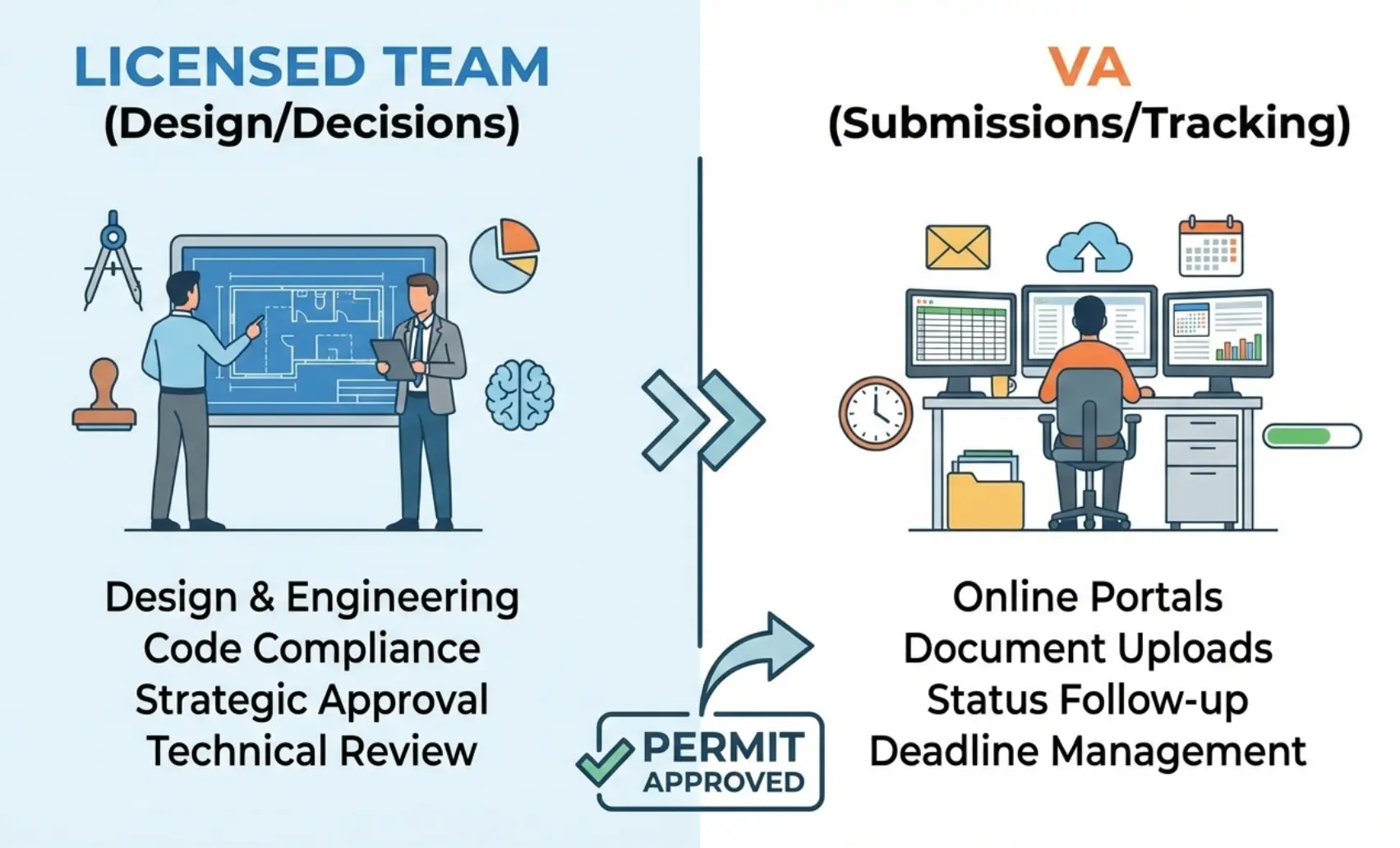
A Virtual construction Assistant can own the admin steps that keep permits moving. Your licensed team keeps code calls, final design decisions, and sealing.
- Document preparation and uploads
- Portal monitoring and notifications
- Permit submittal tracking and follow-ups
Licensed professionals retain:
- Code interpretation under IBC and NFPA 70 (NEC)
- Design decisions and sealing
- Formal technical responses to AHJ comments
Clear boundaries protect liability while keeping momentum.
How Virtual Assistants Keep Permit Submittals Moving
A remote permit coordinator prevents “silent stalls.” They do it by running a checklist-driven process, staying inside portals daily, and keeping a weekly cadence.
Managing Documentation From Day One
Permit delays often start with disorganized files. Virtual assistants for construction permits set orders before anything reaches the AHJ.
They handle:
- Organizing drawings, forms, and supporting documents
- Applying consistent file naming and version control
- Running a pre-submission completeness check
This reduces first-round rejections by the building department.
Handling Online Permit Portals
Most jurisdictions now rely on digital systems. A remote permit coordinator stays inside these portals daily.
Common systems include:
- ProjectDox / ePlan resubmittal process for plan review and corrections
- Accela Citizen Access for application intake and status tracking
The assistant uploads files correctly, watches portal alerts, and flags review comments as soon as they appear.
Tracking Reviews, Corrections, and Approvals
Once plans enter review, momentum depends on visibility. Remote permit coordination introduces active tracking instead of passive waiting.
Key actions include:
- Maintaining a live permit status log
- Tracking correction notice dates and resubmittal windows
- Flagging stalled applications before deadlines slip
This prevents weeks of silent delay.
Consistent Follow-Ups With Jurisdictions
Many permits stall because no one follows up. Engineers often report friction with third-party reviewers and inconsistent criteria, which increases cycles and back-and-forth. Virtual assistants schedule professional check-ins with plan examiners, zoning offices, and fire marshals.
Every contact is logged:
- Date and method of communication
- Response received
- Next action required
This creates a clear audit trail and keeps pressure off engineers.
The Remote Submittal Workflow That Keeps Momentum
Remote permit coordination works best when it’s a repeatable workflow with checklists, portal discipline, and a weekly cadence.
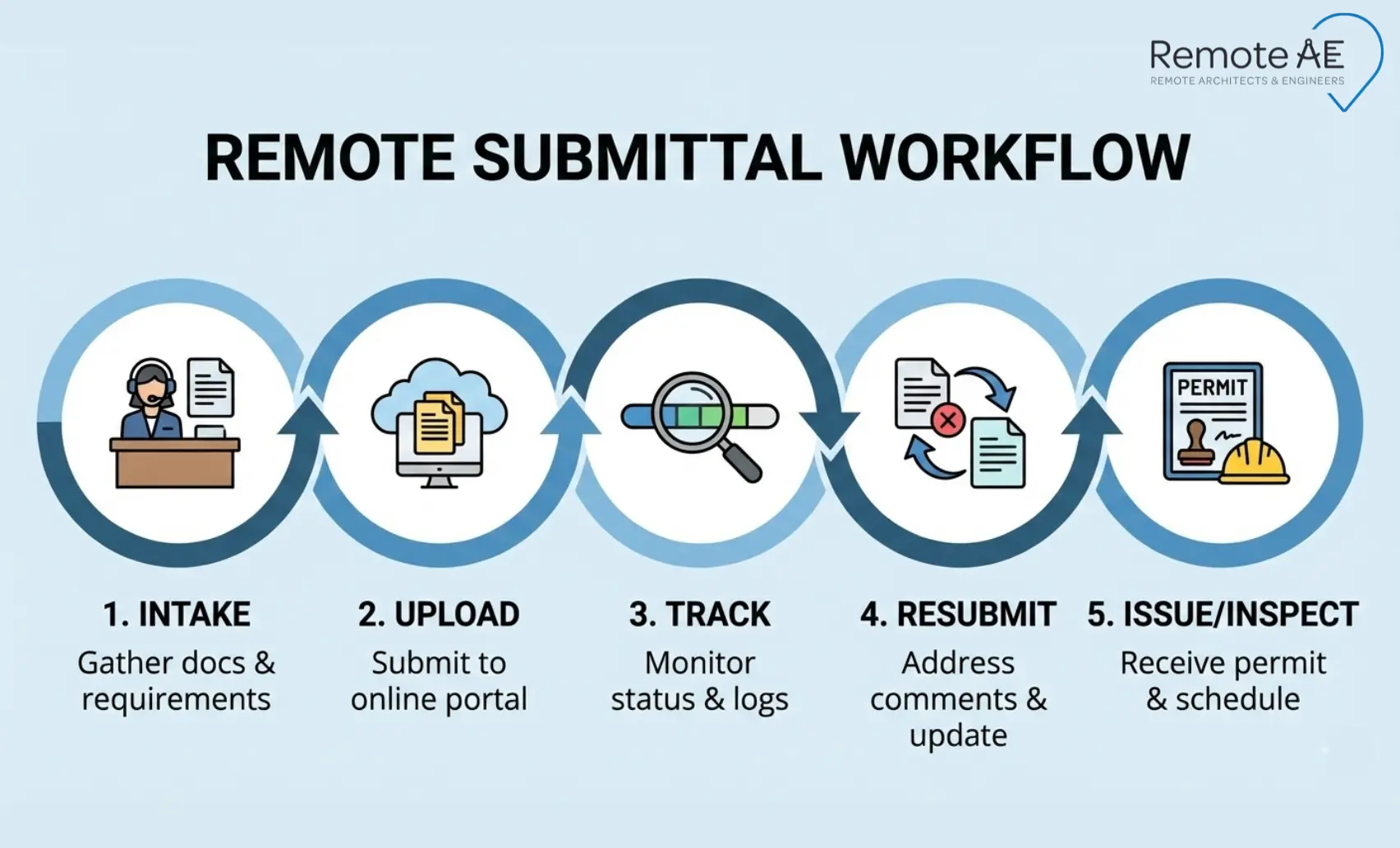
Step 1: Intake and Completeness Check
Before uploading anything, the assistant verifies:
- All discipline sets are present
- Required signatures and forms are included
- File naming matches jurisdiction rules
This step alone eliminates many initial holds.
Step 2: Portal Setup and Upload
The remote permit coordinator:
- Uploads documents to ProjectDox or ePlan
- Confirms file acceptance
- Verifies the permit number and review routing
Errors here can reset review clocks, so accuracy matters.
Step 3: Status Tracking and Weekly Cadence
“No news” is treated as a task. The assistant runs weekly follow-ups based on jurisdiction norms and escalates when reviews exceed typical timelines.
Step 4: Plan Check Comments to Response Letter
Most AHJs require a written response per comment. The assistant prepares:
- A comment matrix
- Draft response letters
- Resubmittal packages with revision clouds
The licensed team reviews content. The VA manages the process.
Step 5: Fees, Conditions, and Issuance
Final steps include:
- Tracking outstanding fees
- Logging conditions of approval
- Coordinating inspection scheduling
Nothing closes without confirmation.
Where Remote AE Fits Into Remote Permit Coordination
Remote AE provides structured remote permit coordination built specifically for AEC teams. This is not generic admin support.
- Virtual assistants trained in AEC permit workflows
- Experience built over 15+ years serving architecture, engineering, and construction projects
- Ability to scale permit coordination without internal hiring
- No long-term commitment
- Weekly staffing from $499/week
- No upfront consultation cost
- Risk-free replacement in the first year
Support spans architecture, engineering, and construction teams under one model.
Tools and Systems Your Remote Permit Coordinator Should Be Fluent In
Remote permit coordination breaks down fast when the assistant does not understand the tools jurisdictions actually use. A strong remote permit coordinator works inside the same systems as building departments and plan examiners.
ePlan / ProjectDox Workflows
Many cities and counties rely on ProjectDox or similar ePlan platforms for plan review and resubmittals.
A capable virtual assistant for construction permits knows how to:
- Upload discipline sets correctly
- Track plan review status by cycle
- Download correction notices and marked plans
- Package clean resubmittals
This familiarity shortens every review loop.
Accela Citizen Access
Accela Citizen Access is common for application intake, fee tracking, and permit number assignment.
Your remote permit coordinator should:
- Monitor application status daily
- Track fee requirements and approvals
- Flag when permits are approved but not issued
Missed Accela updates often cause avoidable delays.
Bluebeam for Markups and Multi-Party Review
Many teams rely on Bluebeam Studio Sessions to review plan check comments and prepare responses.
Remote permit coordination includes:
- Extracting AHJ comments from marked PDFs
- Supporting response letter drafting
- Applying revision clouds consistently
This keeps resubmittals clean and traceable.
Your Internal Stack
Remote assistants work inside your environment, not around it.
Common tools include:
- Shared drives or cloud folders
- Spreadsheet-based permit trackers
- Email templates and contact lists
- Procore or PM platforms for coordination
Consistency matters more than tool choice.
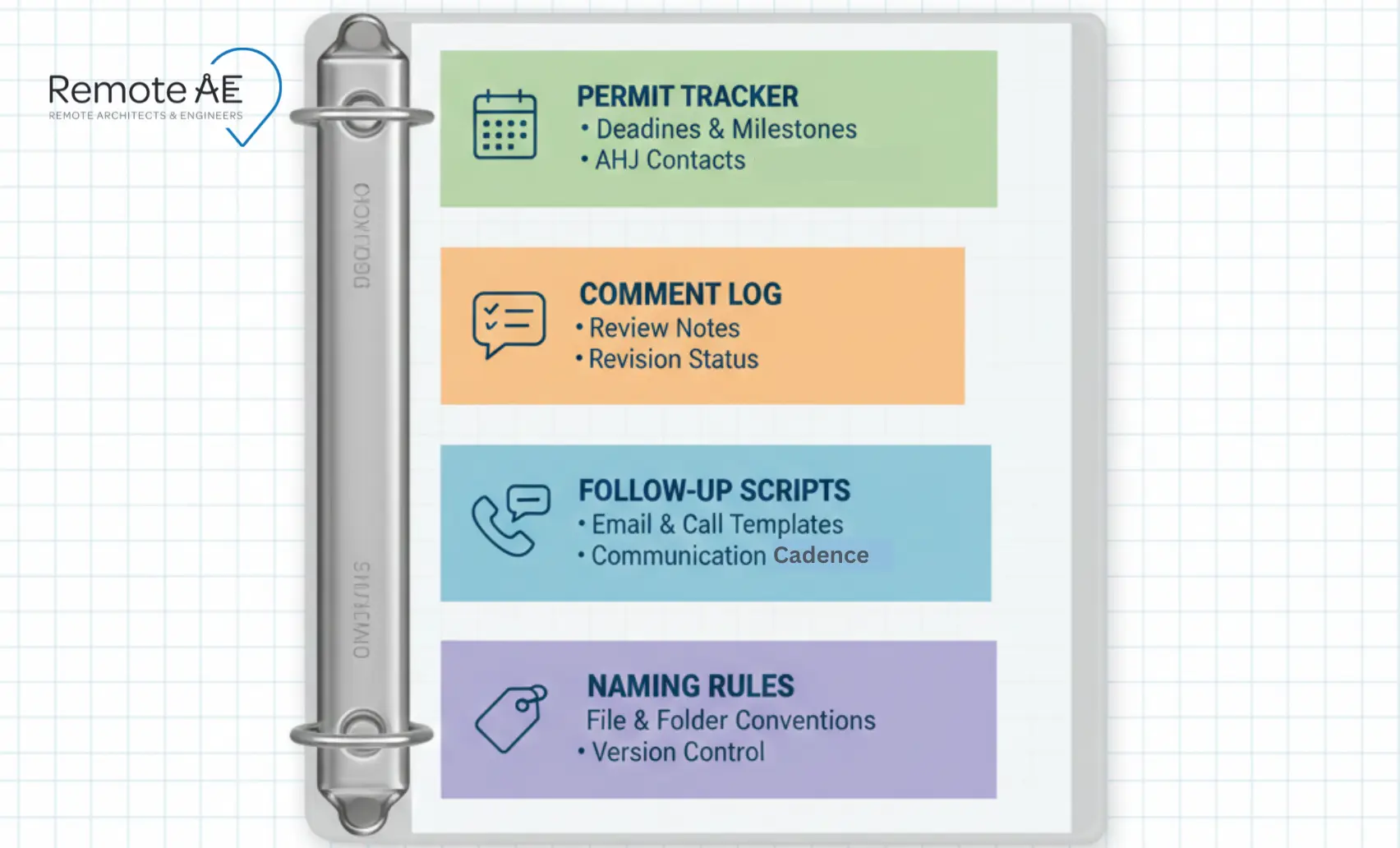
SOP Pack You Should Build (and Hand to a VA on Day One)
Remote permit coordination works best when expectations are written down. A simple SOP pack prevents rework and confusion.
Permit Tracker Template
A solid tracker includes:
- Permit number
- Jurisdiction and AHJ contacts
- Current review cycle
- Next action and due date
This becomes the single source of truth.
Comment Log and Resubmittal Checklist
Every correction notice should flow into:
- A comment matrix
- A response letter draft
- A resubmittal checklist
Nothing moves forward without full closure.
Follow-Up Scripts and Escalation Rules
Clear language matters when contacting plan examiners.
Define:
- Follow-up intervals
- Approved email templates
- When to escalate to the project manager
This protects relationships while keeping momentum.
File Naming and Version Control Rules
Version confusion causes rejected uploads.
Set rules for:
- Discipline prefixes
- Revision numbering
- Date stamps
ISO-style structure reduces errors.
Hiring a Remote Permit Coordinator (Scorecard and Interview Prompts)
Not every assistant fits the permit work. Screening matters.
Must-Have Experience
Look for:
- Hands-on experience with permit portals
- Familiarity with AHJ workflows
- Availability aligned with your time zone
Generic admin experience is not enough.
A Short Skills Test
Test in 30-45 minutes:
- Organize a sample intake pack
- Name files correctly
- Populate a permit tracker
- Draft a status follow-up email
Time-box it. Process matters more than speed.
KPIs for the First 30–60 Days
Track:
- % of submittals accepted on first upload
- average time from comments received → resubmittal packaged
- number of stalled permits caught early
- weekly reporting consistency (on-time status updates)
These indicators predict long-term success.
Stop Letting Permits Stall Your Projects!
Remote permit coordination removes the daily friction that slows approvals. With Remote AE, you gain a dedicated remote permit coordinator who keeps permit submittals moving without pulling your licensed team into admin work.
Schedule a call today for a fast scope review and a clear weekly quote. You stay focused on design and decisions. We handle tracking, follow-ups, and resubmittals.
FAQs – Remote Permit Coordination
What does a permit coordinator do in construction?
A permit coordinator manages the permit lifecycle, preparing submittal packages, tracking plan reviews, responding to comments, and coordinating with consultants. They act as the link between designers, contractors, and the Authority Having Jurisdiction (AHJ) to keep approvals moving and avoid missed resubmittals or expired permits.
Is a permit expediter the same as a permit coordinator?
Not exactly. A permit expediter focuses on pushing applications through an AHJ, often leveraging local process knowledge. A permit coordinator manages the broader workflow, documents, responses, schedules, and consultant inputs across multiple permits and jurisdictions.
What is an AHJ in construction?
AHJ stands for Authority Having Jurisdiction. It’s the local or regional body, city, county, state, or utility that reviews plans and issues permits. AHJs interpret codes, enforce local amendments, and decide approval timelines, which is why requirements can vary widely by location.
How long does a plan review take for a building permit?
Plan review timelines vary by jurisdiction and project size. Small projects may take 2–4 weeks, while complex commercial work can take 6–12 weeks or longer. Fast-track programs and phased permits can shorten timelines, but only if submittals are complete and responses are timely.
What should be included in a plan check response letter?
A response letter should list each AHJ comment, your response, and where the fix appears in the revised drawings or specs. Reference sheet numbers and revisions clearly. Concise, point-by-point replies reduce follow-up comments and help reviewers approve resubmittals faster.
Can a virtual assistant submit permits on my behalf?
Yes, with limits. A VA can prepare applications, upload documents, track reviews, and manage responses if given portal access. Final certifications or affidavits must be signed by the licensed professional or owner. Use role-based access, written authorization, and audit logs to stay compliant.