

Permit delays are one of the most controllable and most consistently mismanaged risks in construction project delivery. According to the National Association of Home Builders, regulatory costs, including permitting, account for nearly 24% of the final price of a new single-family home, and delays compound that exposure with holding costs, schedule penalties, and lost contractor productivity. For commercial and multi-family projects, the stakes are even higher. Expedited permitting services reduce that exposure, not by bypassing the Authority Having Jurisdiction, but by eliminating the administrative friction, missed corrections, and tracking failures that turn a 30-day review into a 90-day stall. This article shows exactly how.
What Are Expedited Permitting Services?
Expedited permitting services are professional coordination services that accelerate the building permit process, from application package preparation through plan review tracking, correction response, resubmittal management, and final permit issuance.
They are not magic. They are process disciplines applied at every friction point between your project and the Authority Having Jurisdiction.
Simple Definition for AEC Teams
A permit expediter, also called a permit coordinator or permit runner, depending on their service scope, manages the administrative and coordination workflow between a project team and the regulatory agencies responsible for approving construction.
The permit expediter does not replace your architect, engineer, or contractor. They ensure that your project’s permit application moves through the review process as efficiently as the AHJ allows, with no missed comments, no unread portal notices, and no correction cycles that sit idle because no one owns the follow-up.
What “Fast-Track” Does and Does Not Mean
Fast-track is frequently misunderstood, and that misunderstanding sets up client relationships for friction.
- It does not guarantee instant approval. The Authority Having Jurisdiction sets its own review timelines. No expedited permitting service can compel a building department to review faster than its workload and staffing allow.
- It does not bypass code review. Every building permit application goes through plan review, zoning review, and, depending on project type, fire marshal, health department, or public works review. Expedited service does not shortcut that process.
- It does not replace licensed design judgment. Code compliance decisions, structural responses, and technical correction resolutions require licensed professionals. A permit coordinator manages the process around those decisions, not in place of them.
- It does reduce friction, errors, missed comments, and slow follow-ups, which is where most permit timelines actually lose days and weeks.
Why Permitting Is Local by Nature
Every building permit is issued by a specific Authority Having Jurisdiction, a city, county, or state agency with its own application forms, plan review rules, portal systems, and reviewer expectations. What works in one jurisdiction fails in another.
- AHJ requirements vary; some jurisdictions accept digital stamps, others require wet seals on paper submissions
- Local zoning codes add requirements that the International Code Council model codes do not anticipate
- Plan review comment styles differ; some reviewers cite specific code sections, others write general comments that require interpretation
- Online municipal portal systems vary dramatically; some are intuitive, others require AHJ-specific navigation knowledge to use effectively
- Agency-specific comments from the fire marshal, health department, or public works often use terminology and reference local amendments not found in any published code
Why Building Permits Get Delayed
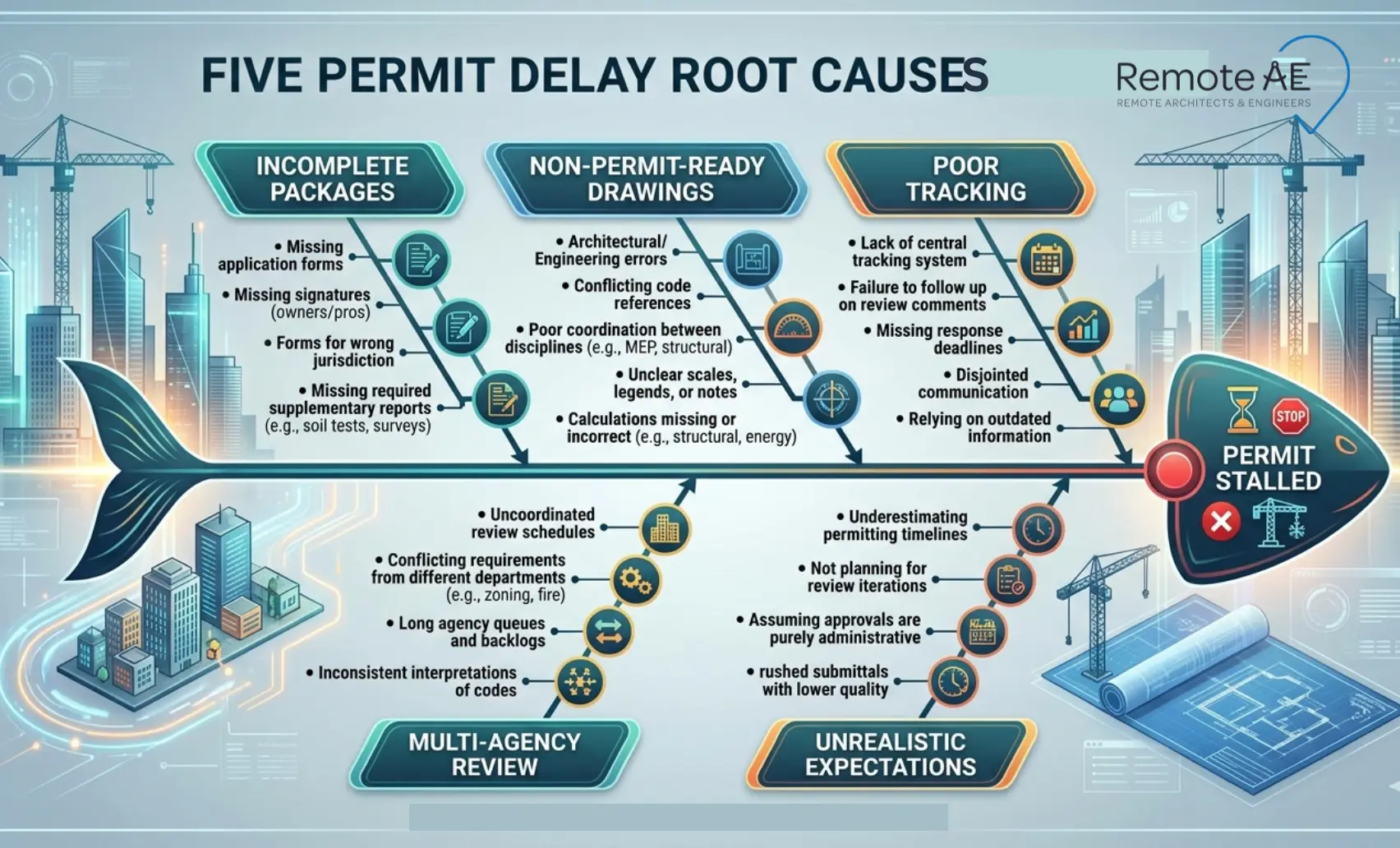
Most permit delays are not caused by slow AHJ review times. They are caused by avoidable application errors, drawing deficiencies, and tracking failures that push projects to the back of the review queue, repeatedly.
Incomplete Application Packages
The most common cause of permit delay is submitting an application package that is missing required components. The building department flags it incomplete, issues a notice, and the clock resets.
Common missing items that trigger incompleteness notices:
- Owner authorization: Missing or improperly formatted authorization letter from the property owner, required in most jurisdictions when the applicant is not the owner
- Wrong permit type: Selecting a building permit when a separate fire, health, or public works permit is also required, or selecting a minor permit type for a scope that triggers full plan review
- Missing contractor license details: Many AHJs require a valid contractor license number, insurance certificate, and workers’ compensation documentation before a permit application is accepted
- Incorrect valuation: Project valuation that doesn’t match the scope, either understated to reduce fees or inconsistent with the AHJ’s valuation table, triggers correction before review begins
- Missing site plan, life safety sheet, or energy compliance form
Drawings That Are Not Permit-Ready
Permit drawings are not construction drawings reformatted as PDFs. They are code-facing document sets that demonstrate scope, code intent, and plan review information to an AHJ reviewer who has never seen the project before.
Drawings that skip the code summary, omit the occupancy group, show no egress path, or reference details not included in the submitted set send a plan reviewer searching for information that should have been on the cover sheet. That search generates correction notices, and correction notices add review cycles.
Poor Tracking After Submission
Many permit delays happen after a clean submission because no one is actively managing the review cycle.
- Comments posted to the municipal portal sit unread for days because no one is checking the account daily
- Review cycle milestones, first review complete, comments issued, resubmittal received, are not logged against target dates
- Correction notices are not assigned to the responsible discipline immediately upon receipt
- Portal status changes from “under review” to “corrections required” without triggering any action from the project team
Multi-Agency Reviews
Commercial construction projects rarely involve a single reviewing agency. The building department is the lead, but the full review process typically spans multiple agencies, each with its own timeline and comment cycle.
Common agencies involved in multi-agency permit review:
- Building department: Primary code compliance and plan review
- Planning and zoning: Use permits, conditional use approvals, zoning variances
- Fire marshal: Fire protection systems, egress, occupancy load, life safety plans
- Health department: Food service, medical, or childcare facilities with specific health code requirements
- Public works: Utility connections, stormwater, grading, and site access
- Environmental review: Projects triggering CEQA, NEPA, or local environmental overlay requirements
- Utility reviewers: Electrical, gas, and water utility departments with separate connection approval processes
A project waiting on a fire marshal comment while the building department is ready to issue, with no one tracking the fire marshal’s review status, loses weeks that active coordination would have recovered.
Unrealistic Client Expectations
Permit timelines are set by AHJ capacity, not by project urgency. A client who expects a permit in two weeks on a project that requires full plan review, fire marshal approval, and zoning sign-off in a high-volume jurisdiction is going to create pressure that no amount of expediting can satisfy.
How to Fast-Track Building Permits: Step-by-Step Workflow
Step 1: Confirm the Exact Permit Path Before Drafting
The most expensive mistake in permit coordination is preparing a drawing set for the wrong permit type. Confirm every variable before a single sheet is drafted.
- Permit type: building, fire, health, public works, or a combination
- Project scope: new construction, tenant improvement, change of occupancy, or addition
- Occupancy group and construction type per the International Code Council framework
- Zoning district, special overlays, and any conditional use requirements
- Fire and life safety triggers, sprinkler requirements, occupancy load thresholds, egress distances
- Accessibility triggers, ADA path of travel obligations on alteration projects
One conversation with the building department before design begins saves multiple rounds of corrections after submission.
Step 2: Build an AHJ-Specific Intake Checklist
Every Authority Having Jurisdiction has its own application requirements. Generic checklists miss jurisdiction-specific items that trigger incompleteness notices.
Build a checklist specific to the project’s AHJ covering:
- Completed application forms, correct version, correct permit type selected
- Drawing set requirements, sheet size, scale, discipline coverage, stamp, and seal rules
- Energy compliance forms, COMcheck, Title 24, or local equivalent
- Structural calculations, when required by scope and construction type
- Fire protection documents, sprinkler drawings, alarm layouts, life safety plans
- Contractor documents, license number, insurance certificate, workers’ compensation
- Owner authorization, signed letter, or AHJ-specific form
- Fee schedule, correct valuation method, fee calculation, and payment method
- Municipal portal account setup, an active account with the correct project address and applicant details confirmed before upload day
Step 3: Prepare Permit-Ready Drawings
Permit drawings communicate code compliance to a plan reviewer who has no prior knowledge of the project. Every sheet must carry the information a reviewer needs without requiring them to request it.
A complete permit drawing set includes:
- Cover sheet with project address, scope description, occupancy group, construction type, and applicable code editions
- Sheet index and drawing list
- Code summary, occupancy, construction type, sprinkler status, occupant load, egress width calculations
- Site plan showing property lines, setbacks, parking, and utility connections
- Floor plans with room labels, dimensions, door and window schedules
- Elevations and building sections
- Life safety plan showing exits, exit signs, travel distances, and occupant loads
- Accessibility diagrams, ADA path of travel, accessible parking, and restroom compliance
- Structural, MEP, and fire protection sheets were required by the scope
Step 4: Submit Clean Documents Through the Right Channel
Submission errors trigger rejection before a reviewer opens the first sheet. Confirm every requirement before uploading or filing.
- Online municipal portal submission, confirm file naming rules, PDF size limits, and upload sequence before the submission day
- In-person filing, confirm counter hours, payment methods, and whether a physical set is required alongside a digital submission
- Digital stamp rules: Some AHJs accept digital signatures, others require wet seals on paper originals
- Fee payment confirmation, retain the receipt as proof of submission date, which starts the AHJ’s review clock
Step 5: Track the Review Cycle Daily
Active daily tracking is what separates expedited permitting from passive permit submission. Maintain a live permit log with these fields for every active application:
- Permit number and application ID
- Reviewer name and department
- Current review status
- Date submitted and target first-response date
- Aging days since submission
- Comments received and dates issued
- Next action owner, applicant, architect, engineer, or AHJ
Check the municipal portal every business day. Many AHJs post comments without sending email notifications; unread comments sitting in a portal account are the most preventable source of permit delay.
Step 6:Respond to Corrections Fast
A correction notice is not a rejection. It is a specific list of items the plan reviewer needs to resolve before approval. Speed and accuracy of response determine whether the project moves to the front of the next review queue or cycles back to the end.
The correction response workflow:
- Pull all comments from the portal into a shared correction log
- Assign each comment to the responsible discipline, architect, structural engineer, MEP engineer, or contractor
- Update drawings to address each comment, with revision clouds and revision deltas on every changed sheet
- Prepare a written response letter, address each comment by number, describe the resolution, and reference the specific sheet and detail where the change appears
- Resubmit with clean version control, clearly labeled revision set, superseded sheets removed, resubmittal cover letter included
Step 7: Keep Approval Boundaries Clear
This is the operational discipline that protects both the project team and the permit coordinator.
- Remote assistants and permit coordinators can track portal status, prepare correction logs, package resubmittal sets, format response letters, and manage document version control
- Licensed professionals, architects, engineers, and contractors, approve all technical responses, make code compliance decisions, and sign or seal documents requiring professional authorization
- The contractor of record or applicant of record handles legal submission duties where the AHJ requires the permit holder to file directly
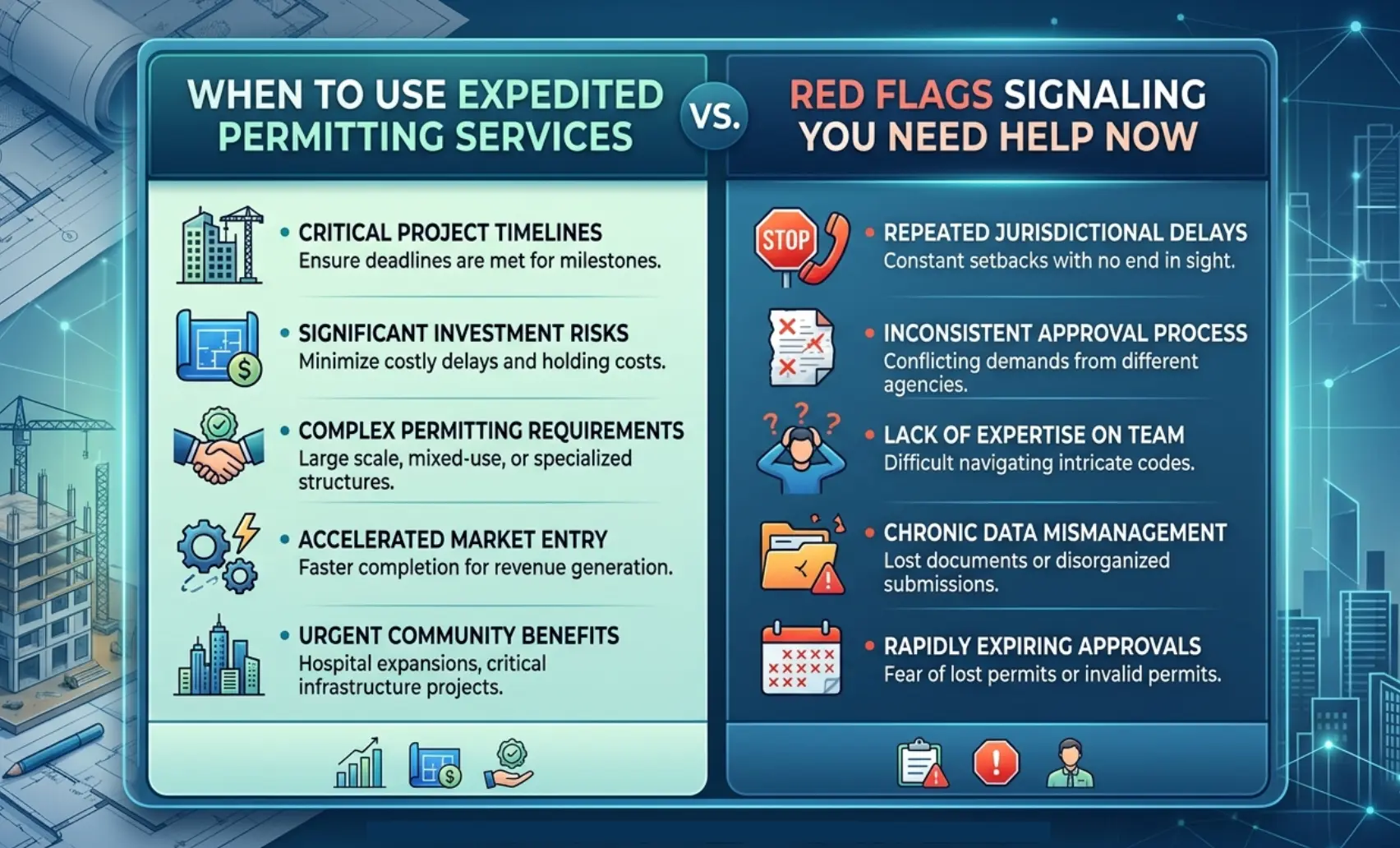
When Should You Use Expedited Permitting Services?
Good Fit Projects
Expedited permitting services deliver the clearest ROI on projects where permit complexity, timeline pressure, or multi-agency coordination creates risk that in-house teams cannot absorb.
- Commercial tenant improvements with a change of occupancy or a change of use
- Restaurant buildouts require health department and fire marshal approvals, alongside building permits
- Retail rollout programs manage permit applications across multiple jurisdictions simultaneously
- Medical offices triggering health department review and accessibility compliance requirements
- Data centers with fire suppression, electrical load, and structural coordination across multiple agencies
- Multi-family projects requiring planning, zoning, fire, and building department coordination
- Time-sensitive remodels where permit delay directly threatens a contract completion date
- Multi-jurisdiction programs where consistent permit tracking and application quality across locations requires dedicated coordination
Red Flags That You Need Help Now
If any of these conditions exist on an active project, permit coordination support is no longer optional.
- No clear permit owner, multiple team members think someone else is tracking the application
- Comments sitting unanswered in the portal for more than five business days
- Multiple resubmittals on the same application with recurring corrections
- No active permit log, status exists only in someone’s memory or email inbox
- Project managers manually check portals without a structured tracking system
- Permit drawings not aligned with the AHJ’s published checklist, rejections were predictable
- The client is asking for weekly permit status updates, and no one on the team owns the answer
What Do Expedited Permitting Services Cost?
Main Pricing Models
Permit coordination services use five common pricing structures, each suited to a different project type and engagement scope.
- Flat fee: Fixed price for a defined scope, one permit, one jurisdiction, one application package through issuance. Predictable cost, clear deliverables.
- Hourly support: Billed per hour for tracking, correction response, and resubmittal coordination. Best for projects with uncertain complexity or variable correction volume.
- Monthly retainer: Fixed monthly fee for ongoing permit tracking and coordination across one or more active applications. Best for developers and contractors managing multiple concurrent permits.
- Per-location fee: Flat fee per jurisdiction for rollout programs,, retail chains, restaurant brands, or franchise buildouts permitting multiple locations simultaneously.
- Program-level support: Comprehensive coordination for multi-site, multi-jurisdiction programs, including standardized application packages, permit log management, and AHJ relationship tracking across every location.
What Affects Price
No two permit coordination engagements cost the same. Key variables that determine pricing:
- Number of active permits and applications being managed simultaneously
- Number of agencies involved, building department only versus multi-agency review including fire marshal, health department, and public works
- Project type and occupancy complexity, a restaurant buildout costs more to coordinate than a simple office tenant improvement
- AHJ difficulty, high-volume urban building departments with long review queues and complex portal requirements take more active management than suburban jurisdictions with shorter timelines
- Drawing quality at submission, clean, permit-ready drawings generate fewer correction cycles and lower coordination cost
- Number of correction cycles, each resubmittal adds coordination time for comment logging, discipline assignment, response letter preparation, and resubmission management
- In-person filing requirements, jurisdictions that require counter filing add travel time and cost that remote-only coordination does not carry
- Number of locations, program-level engagements across many jurisdictions typically carry per-location pricing that decreases with volume
How Remote AE Support Helps Fast-Track Permits
Remote AE virtual assistants handle the permit coordination workload that consumes project manager and architect time without requiring licensed professional judgment.
Document preparation and stakeholder coordination:
- Assembling application packages, forms, drawings, contractor documents, owner authorization letters, and fee calculations, organized according to the AHJ’s specific checklist
- Maintaining active communication with the building department, fire marshal, health department, and public works contacts, logging every interaction, response, and status update
- Managing the municipal portal account daily, checking status, downloading comments, and flagging new notices before they age
Drafting Support That Reduces Review Comments
Remote AE connects permit coordination support directly to permit drawing production, reducing the drawing gaps that generate first-round plan review corrections.
Drawing support tasks that reduce AHJ review comments:
- Cover sheets: Project address, scope description, code summary, occupancy group, construction type, and applicable code editions, all in a format familiar to the reviewing AHJ
- Life safety plans: Exit locations, exit sign placement, travel distances, occupant load calculations, and corridor widths are the items fire marshals check first
- Sheet coordination: Cross-referencing detail callouts, sheet references, and drawing notes across the full permit set, so no reviewer has to search for information that should be explicitly referenced
- Redline updates: Incorporating plan review comments into revised drawing sheets with revision clouds, revision deltas, and updated title block information
- Revision tracking: Maintaining a revision log that records every change, the comment it addresses, and the sheet on which it appears, ready to reference in the correction response letter
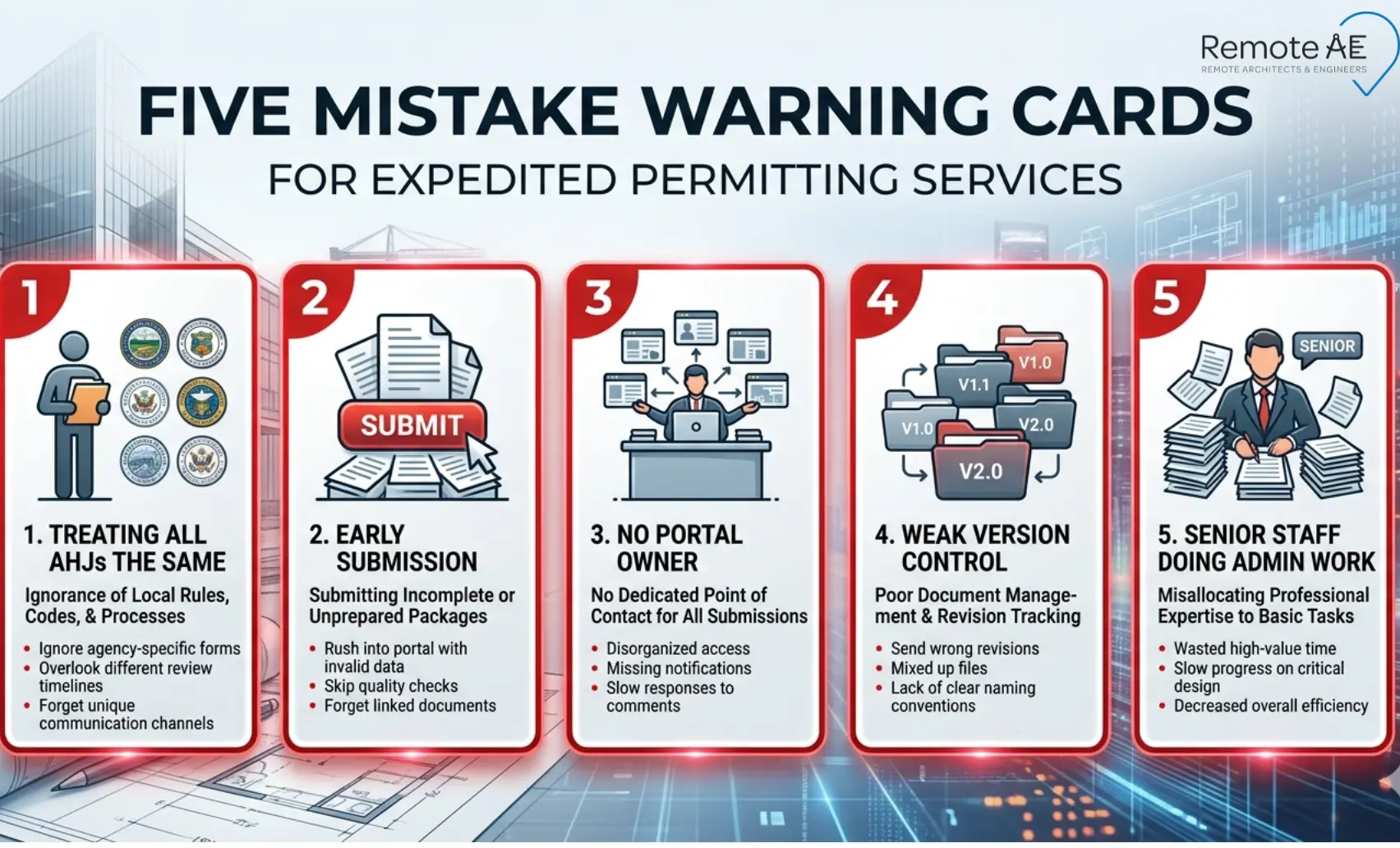
Common Mistakes That Slow Down Permit Approval
- Treating Every AHJ the Same: Each Authority Having Jurisdiction has its own forms, drawing requirements, and portal rules. A generic application package generates incompleteness notices across every jurisdiction it touches. Build an AHJ-specific checklist for every application, no exceptions
- Submitting Drawings Too Early: Submitting a preliminary set to start the review clock almost always backfires. Most AHJs reset the queue position after an incompleteness notice, costing more time than waiting for a complete set
- No Owner for Portal Tracking: Many municipal portals post comments without email notifications. Without a dedicated daily tracker, comments sit unread, and review cycles stall. Assign one person, or a remote permit coordinator, to check the portal status every business day
- Weak Version Control: Resubmitting with the wrong revision level or mixed current and superseded sheets triggers a new correction cycle. Every resubmittal package needs clean version control before it leaves the team
- Letting Senior Staff Do Admin Work: Licensed architects and engineers should own code decisions and technical correction responses, not portal checking or resubmittal formatting
Remote AE virtual assistants handle coordination, correction logging, and packaging. That division of labor frees licensed staff for the judgment calls only they can make
How to Choose the Right Expedited Permitting Partner
Questions to Ask Before Hiring
Ask these questions before engaging any permit coordination service:
- Which AHJs have you worked with, and how recently?
- Who owns the permit log, and how is it structured?
- How often do you check the portal status on active applications?
- Do you prepare correction response letters, or just flag comments?
- Do you manage resubmittal packages from comment receipt through upload confirmation?
- Can you work inside our project management tools, portals, and document systems?
- What tasks remain with our licensed team, and what is your process for routing technical items to them?
- How do you report permit status, and how often?
Skills to Look For
The strongest permit coordinators combine administrative discipline with AEC workflow knowledge:
- Demonstrated AHJ experience, knowledge of specific jurisdictions, not just general permitting concepts
- Active portal management capability, knows how to navigate municipal online plan review systems efficiently
- Drawing comprehension, can read permit drawings well enough to catch missing elements before submission
- Correction log management, organizes comments by discipline, tracks resolution status, and prepares response letter drafts
- Version control discipline maintains clean resubmittal sets with revision tracking at every cycle
- Clear communication provides structured status updates without requiring the project manager to ask
Stop Losing Schedule to Permit Delays!
Every week lost in permitting is a week of holding costs, schedule pressure, and client frustration that active coordination could have recovered.
Remote AE places pre-vetted virtual assistants trained in permit coordination workflows, application package preparation, AHJ-specific checklist management, daily portal tracking, correction response coordination, resubmittal packaging, and permit drawing support, ready to own your permitting workload from submission through occupancy permit issuance.
Stop letting permit administration consume your licensed team’s time.
Book a Free Consultation with Remote AE Today, no obligation, no pressure. Just a direct conversation about what your permit coordination workflow needs right now.
FAQs – Expedited Permitting Services
What are expedited permitting services?
Expedited permitting services help move permit applications through review faster by pre-screening submittals, coordinating with agencies, tracking comments, and scheduling reviews. They don’t bypass code checks, but they reduce delays caused by incomplete documents, missed requirements, or slow follow-ups.
Can a permit expeditor really speed up building permits?
Yes, within limits. Expediters speed things up by submitting complete packages, resolving comments quickly, and maintaining constant follow-up with the AHJ. They can’t shorten mandated review timelines, but they often reduce avoidable delays between review cycles.
What is the difference between a permit expediter and a permit runner?
A permit expediter manages the process—submittals, coordination, comment tracking, and agency communication. A permit runner handles logistics—delivering documents, picking up approvals, and filing paperwork. Expediters focus on strategy; runners focus on execution tasks.
How much does a permit expediter cost?
Costs vary by location and project complexity. Common pricing includes hourly rates, flat fees per permit, or monthly support. Simple permits may cost a few hundred dollars, while complex or multi-agency projects can cost significantly more due to coordination efforts.
Can permit drawings be outsourced?
Yes. Many firms outsource permit sets, drafting updates, and redline incorporation. However, licensed architects or engineers must still review, approve, and take responsibility for the drawings before submission.
Can a remote assistant manage permit applications?
Yes. A remote assistant can handle document preparation, uploads, tracking, status updates, and coordination with agencies. Access controls and clear workflows are important, and final submissions should still be reviewed by the responsible professional.