

Healthcare code compliance touches nearly every sheet in a medical project’s drawing set, from room data sheets to MEP coordination. Forty-two states have adopted some edition of the FGI Guidelines as a minimum standard for healthcare facility design (Facility Guidelines Institute, 2026), and AEC firms working on hospitals, outpatient facilities, and residential care settings have to track FGI Codes alongside NFPA 99, NFPA 101, ASHRAE Standard 170, and CMS requirements. Much of that work is repeatable: research, room data sheets, schedule coordination, RFI tracking, and QA/QC checks.
Remote AE provides remote AEC support for FGI standards so licensed architects, engineers, and code consultants spend their time on interpretation and sign-off, not documentation. This guide covers what remote FGI support can and cannot do.
What Are FGI Standards in Healthcare Design?
FGI Standards Set Baseline Requirements for Healthcare Spaces
The Facility Guidelines Institute (FGI) publishes the FGI Guidelines, the baseline design standard for U.S. healthcare facilities. FGI Codes apply across three categories:
- Hospitals
- Outpatient facilities
- Residential health, care, and support settings
Within each, the FGI Guidelines set minimum requirements for planning and design, room and space sizes, infection prevention, risk assessment, architectural details, surfaces and furnishings, and building systems.
Why FGI Standards Matter for Code Compliance
Forty-two states have adopted some edition of the FGI Guidelines as a minimum healthcare design standard (Facility Guidelines Institute, 2026). That adoption matters because:
- State health departments reference FGI directly in licensure review
- Federal and accrediting bodies, including CMS and The Joint Commission, point to FGI as a baseline
- Local AHJs expect drawings to reflect current FGI requirements
- Permit and licensure reviewers check projects against the FGI room and system criteria
- Patient and staff safety depend on FGI’s infection control and clearance requirements
- Construction document quality improves when FGI requirements are built in early, not added late
FGI Is Not the Only Standard in Play
FGI works alongside other codes and standards on most healthcare projects:
- NFPA 99 for healthcare facility systems
- NFPA 101 for life safety and egress
- ASHRAE/ASHE Standard 170 for ventilation
- CDC infection control guidance
- State health department rules
- Local building codes
- Accessibility requirements
- Facility-specific standards set by the owner or health system
A remote architect assistant tracking FGI also needs to flag where these other standards apply to the same room or system.
Why Healthcare Code Compliance Becomes a Bottleneck
FGI Requirements Touch Too Many Drawing Areas
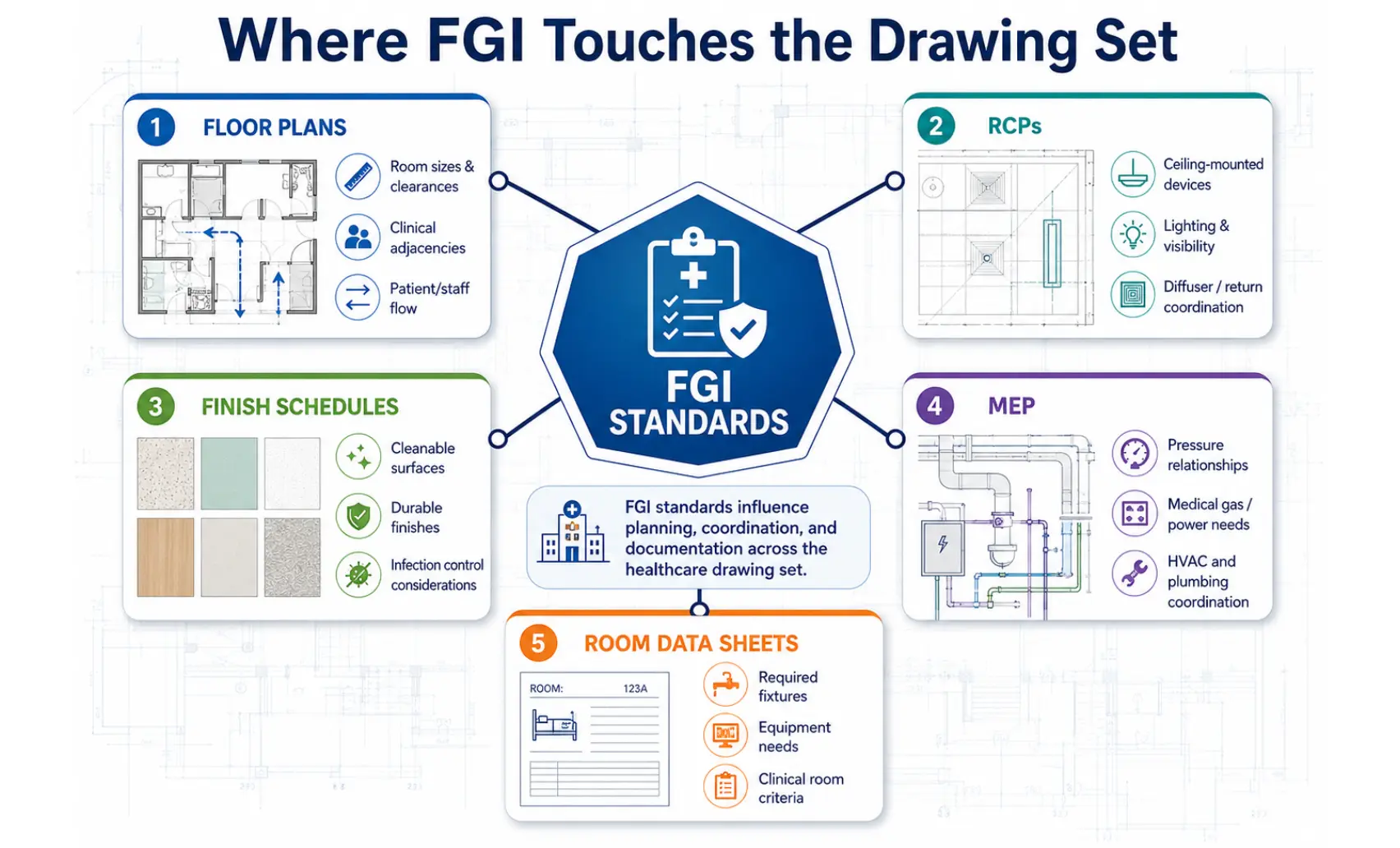
FGI compliance isn’t confined to one sheet. It threads through floor plans, reflected ceiling plans, finish schedules, door and hardware schedules, medical equipment plans, MEP coordination, room data sheets, life safety plans, and infection control notes.
Tracking every requirement across this many sheets by hand is where compliance work bogs down.
Compliance Gaps Often Start as Documentation Gaps
Poor project data and miscommunication cause 48% of all rework in U.S. construction, totaling $31.3 billion a year (PlanGrid/FMI, 2018). On FGI-driven projects, that shows up as:
- Old standards copied into new projects
- Room names that don’t match FGI terms
- Finish schedules missing cleanability notes
- Drawings updated, but room data sheets left behind
- Redlines that don’t get tracked across disciplines
- RFIs and submittals are disconnected from the original design intent
Senior Staff Spend Too Much Time on Repeatable Checks
PMs and senior designers should spend their time on interpretation and decisions, not repetitive checks. Many compliance support tasks are detail-heavy but repeatable. This makes them a strong fit for a remote AEC assistant to handle as first-pass work, before a licensed reviewer signs off.
What Remote Support for FGI Standards Can Actually Do
Ninety-two percent of AEC and construction firms report difficulty filling open positions (AGC/NCCER 2025 Workforce Survey). Remote support fills that gap with assistance across five areas of FGI compliance work.
FGI Research and Requirement Tracking
Remote AEC support can help with:
- Creating FGI requirement logs
- Tracking the applicable facility type
- Comparing room names against project standards
- Organizing state adoption notes
- Flagging sections for licensed review
- Keeping research notes tied to sheets and rooms
Room Data Sheet and Space Planning Support
Remote assistants can check room names, room numbers, department groupings, square footage notes, clearance callouts, finish requirements, equipment lists, door swings, and access notes.
Drawing and Schedule Coordination
Support tasks can include first-pass checklist reviews, cross-checking plans against finish schedules, updating drawing schedules, tracking consultant comments, maintaining redline logs, preparing issue trackers, and checking sheet-to-sheet consistency.
Submittal, RFI, and Construction Admin Support
Remote construction assistants can support RFI logs, submittal tracking, shop drawing routing, spec section tracking, comment response logs, closeout documentation, and as-built update coordination.
QA/QC Support Before Permit or AHJ Review
Remote assistants can prepare pre-review checklists, comment matrices, missing item logs, sheet index checks, file naming checks, PDF set quality checks, and drawing comparison notes.
Remote Support Tasks for Healthcare Code Compliance
Catching compliance issues early pays off. Up to 70% of rework in construction and engineering projects is design-induced , which is why remote FGI support should start before construction documents, not after.
- Pre-Design Phase: Research facility type requirements, build early compliance checklists, support programming documents, and organize owner standards.
- Schematic Design Phase: Review room sizes, check basic adjacencies, support blocking plans, and track early code risks.
- Design Development Phase: Update room data sheets, coordinate equipment layouts, support MEP coordination, and prepare review logs.
- Construction Documentation Phase: Update sheets, check schedules, support code notes, track permit comments, and prepare issue logs.
- Construction Administration Phase: Organize RFIs, track submittals, update record drawings, and support revision documentation.
FGI Compliance Areas Remote AEC Assistants Can Support
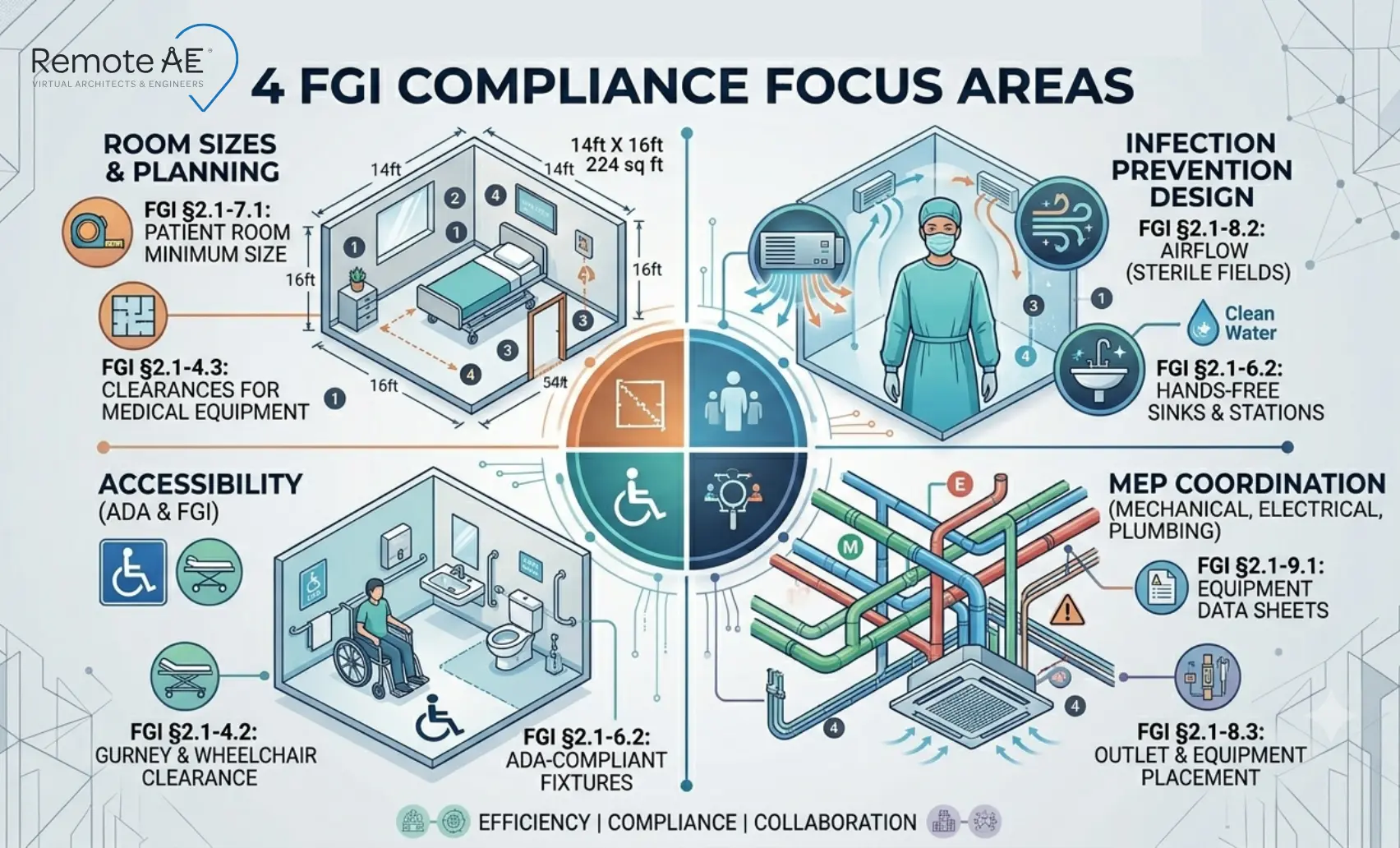
Room Sizes and Clearances
Remote assistants check drawn dimensions against FGI minimums for patient rooms, exam rooms, operating rooms, imaging rooms, and support spaces.
Infection Prevention Planning
On any given day, about 1 in 31 hospital patients has at least one healthcare-associated infection (CDC, 2024). Remote support tracks infection-prevention details tied to clean and soiled flow, handwashing station placement, isolation room support, and material and finish coordination.
Accessibility and Patient Movement
Remote assistants check door widths, turning clearances, corridor widths, toilet room layouts, and stretcher and wheelchair movement paths.
MEP Coordination Support
Coordination checks cover ventilation notes, medical gas coordination, electrical equipment locations, plumbing fixture coordination, and ceiling conflicts.
Remote FGI Support Workflow for Healthcare AEC Teams
Step 1: Define the Compliance Scope
Before assigning any task, define the facility type, project phase, jurisdiction, applicable FGI edition, related codes, deliverables, and review deadlines.
Step 2: Build a Room-by-Room Compliance Tracker
A simple tracker keeps every room accountable. Track these fields for each room: room name, department, FGI reference, sheet number, required notes, current drawing status, open questions, reviewer, due date, and status.
Step 3: Assign Remote Support Tasks by Risk Level
| Risk Level | Example Tasks |
| Low-risk | File organization, sheet index checks, comment logs, meeting notes, RFI logs |
| Medium-risk | First-pass drawing checks, room data sheet updates, schedule comparison, research summaries |
| High-risk (licensed review required) | Final interpretation, code conflict resolution, life safety decisions, infection control decisions, stamped documents |
Step 4: Add Licensed Review Checkpoints
Build licensed review into the schedule at the end of schematic design, mid-design development, pre-CD issue, pre-permit issue, post-AHJ comments, and construction administration changes.
Step 5: Keep a Single Source of Truth
Projects using cloud-based Revit-Navisworks coordination see up to 40% fewer design-related RFIs during construction (Autodesk data, cited in The AEC Associates, 2025). Keep one source of truth across tools like Bluebeam, Revit, BIM 360/Autodesk Construction Cloud, Procore, SharePoint, Google Drive, Excel or Google Sheets, and Notion or Airtable for trackers.
Why Remote AE Is Built for AEC Compliance Support
Remote AE provides virtual architects, virtual engineering assistants, BIM support, and construction documentation support.
More Than 15 Years Serving the AEC Industry
The median U.S. architect salary is $96,690 a year before benefits and overhead (U.S. Bureau of Labor Statistics, May 2024), before recruiting and onboarding costs on top. Remote AE has spent more than 15 years building industry-focused staffing, with dedicated remote assistants and support tailored to architecture, engineering, and construction workflows.
Remote AE works as an extension of your firm, helping with production, coordination, and documentation, and supporting teams through demanding phases of healthcare projects. That includes:
- Guaranteed quality and reliability
- No long-term commitment
- No upfront costs
- Risk-free replacement for up to two virtual assistants
When Should You Bring in Remote Support?
Bring Support In Early If You See These Signs
Watch for these signs:
- Senior staff are doing admin-heavy review work
- PMs are updating spreadsheets late at night
- Redlines are scattered across PDFs
- Room data sheets do not match drawings
- Consultants are working from different versions
- AHJ comments take too long to answer
- CD deadlines are compressing
Remote Support Works Best Before the Bottleneck
Best time: schematic design or early design development. Second-best time: before the construction document issue. Emergency use: AHJ comment response and construction administration support.
What Remote Support Should Not Do
Final Code Interpretation
Construction professionals already lose more than 14 hours a week, 35% of their time, to non-optimal tasks like hunting for information and fixing mistakes (PlanGrid/FMI, 2018). Remote support exists to cut into that number, not add to it:
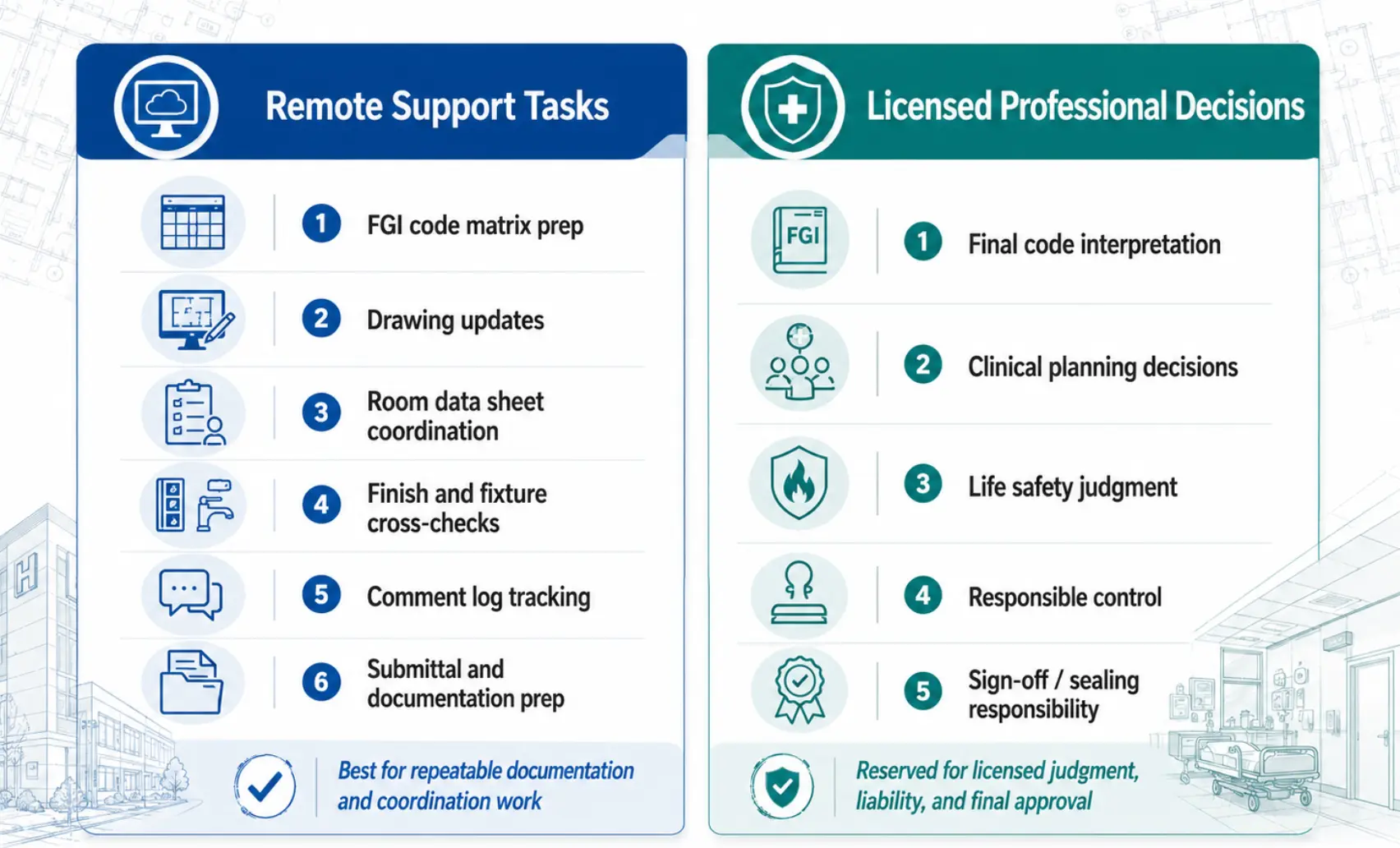
- Remote assistants organize and flag issues
- They do not make final compliance decisions
- They do not replace healthcare architects, engineers, code consultants, infection control professionals, or AHJs
Stamping, Sign-Off, and AHJ Communication
Some actions stay with licensed professionals every time: stamped drawings, formal code positions, variance requests, AHJ negotiations, infection control approval, life safety strategy, and MEP compliance decisions.
The Best Model: Support Plus Expert Oversight
Remote support does a first-pass organization. Licensed team members review, interpret, and approve. That combination gives firms speed without losing accountability.
Ready for Remote Support on Your Next Healthcare Project?
Remote AE provides remote AEC support for FGI standards, NFPA, ASHRAE 170, and CMS-aligned healthcare projects, handling the documentation work so your licensed team can focus on interpretation and sign-off. Share your project scope, and Remote AE will match you with AEC-trained remote architects, engineers, and BIM specialists within two weeks. No upfront cost, and a risk-free replacement guarantee if the fit isn’t right.
Book a free consultation with Remote AE today to scope your remote FGI compliance support.
FAQs – Remote Support for FGI Standards
Are FGI Guidelines legally required for healthcare projects?
Not automatically. FGI becomes enforceable when adopted by a state, federal agency, licensing authority, or referenced in applicable rules. Always confirm the controlling requirement with the local health department or AHJ.
Which healthcare facilities use FGI standards?
FGI is commonly used for hospitals, outpatient clinics, ambulatory surgery centers, emergency care, imaging centers, behavioral health, residential care, and support facilities. The exact volume depends on the facility type and jurisdiction.
Can remote AEC assistants support FGI compliance workflows?
Yes. Remote AEC assistants can support documentation, room data sheets, drawing checks, code matrices, and coordination logs. They should not make final code interpretations. Licensed healthcare architects, engineers, or code consultants should review all compliance decisions.
What FGI-related tasks can be handled by remote AEC support?
Remote support can help with room data sheets, space planning checks, drawing markups, equipment schedules, door schedules, finish tracking, and compliance matrices. They can also compare drawings against FGI-based checklists before senior review.
How can remote support help with healthcare drawing reviews?
Remote assistants can review drawings for missing room tags, incorrect sheet references, inconsistent room names, incomplete schedules, and unresolved redlines. They help clean up documentation before the healthcare architect, engineer, or code consultant performs the final review.