

AI adoption in the AEC industry is accelerating, and the firms that figure out which tools actually fit their workflows are gaining a measurable delivery advantage. According to a 2026 Bluebeam Report, 94% of AEC firms currently using AI plan to increase their use of AI in the upcoming year. But adopting AI and using it effectively are different things. This guide covers the ten best AI tools for AEC workflows in 2025, from code compliance and BIM detail reuse for architects, to AI construction takeoff for estimators and robotic layout for contractors, with an honest assessment of where human review is still essential.
What Is AI in the AEC Industry?
How AI Is Changing Architecture, Engineering, and Construction Workflows
AI in the AEC industry applies machine learning, computer vision, natural language processing, and generative algorithms to the specific workflows that architecture, engineering, and construction teams run every day. These include design iteration, BIM coordination, quantity takeoff, code compliance checking, field capture, and project delivery.
The shift is not theoretical. AI tools are now embedded in Revit plugins, AutoCAD workflows, Civil 3D data pipelines, construction document production, site planning, and jobsite progress monitoring, shifting where human judgment is most needed rather than eliminating it.
Benefits of AI Adoption for AEC Firms
- Faster project delivery: AI reduces the time spent on repetitive production tasks, drawing updates, schedule maintenance, and quantity measurement, freeing engineers and architects for design and coordination decisions
- Reduced rework: AI-assisted QA/QC and code compliance checks catch errors before they reach the permit counter or the construction field
- Better decision-making: AI feasibility and site planning tools evaluate more options faster than manual analysis, giving owners, developers, and design teams better data earlier
- Improved project visibility: Field capture AI connects jobsite conditions to BIM and drawings in near real-time, giving project managers and BIM managers accurate progress data without manual site walks
- Increased productivity: Estimators using AI construction takeoff software report significant time savings on quantity measurement, allowing more bids per cycle with the same team
- Support for lean staffing models: AI tools help small AEC firms operate with more production capacity per person, and pair effectively with remote staffing to multiply their impact
Quick Comparison Table: Best AI Tools for AEC by Workflow
| Tool | Best For | Main Users | Workflow Stage | Key AI Function | Human Review? |
| Ichi | Code QA/QC, RFIs, submittals | Architects, QA leads | CD, permit, CA | Code compliance flagging | Yes, always |
| Pirros | Revit detail reuse | BIM managers, architects | DD, CD | Firm knowledge search | Yes, verify before use |
| SWAPP | Architectural documentation | Architecture firms, BIM leads | SD, DD, CD | Model and doc automation | Yes, review generated sheets |
| Veras | AI visualization | Architects, designers | SD, DD | Design rendering from the model | Yes, select and refine |
| Augmenta | Building systems design | MEP teams, electrical contractors | DD, CD | Automated system routing | Yes, an engineer review is required |
| TestFit | Site feasibility | Developers, architects, civil | Preconstruction | Generative site planning | Yes, validate assumptions |
| AirWorks | Geospatial CAD deliverables | Civil engineers, surveyors | Preconstruction, design | LiDAR/drone to CAD/GIS | Yes, layer and markup review |
| Togal.ai | Construction takeoff | Estimators, GCs | Preconstruction | AI quantity measurement | Yes, the estimator must review |
| OpenSpace | Field capture, progress | GCs, construction managers | Construction | Visual jobsite intelligence | Yes, PM interprets data |
| Dusty Robotics | Robotic field layout | VDC teams, contractors | Construction | BIM-to-floor printing | Yes, model prep and verification |
Best AI Tools for Architects and Design Teams
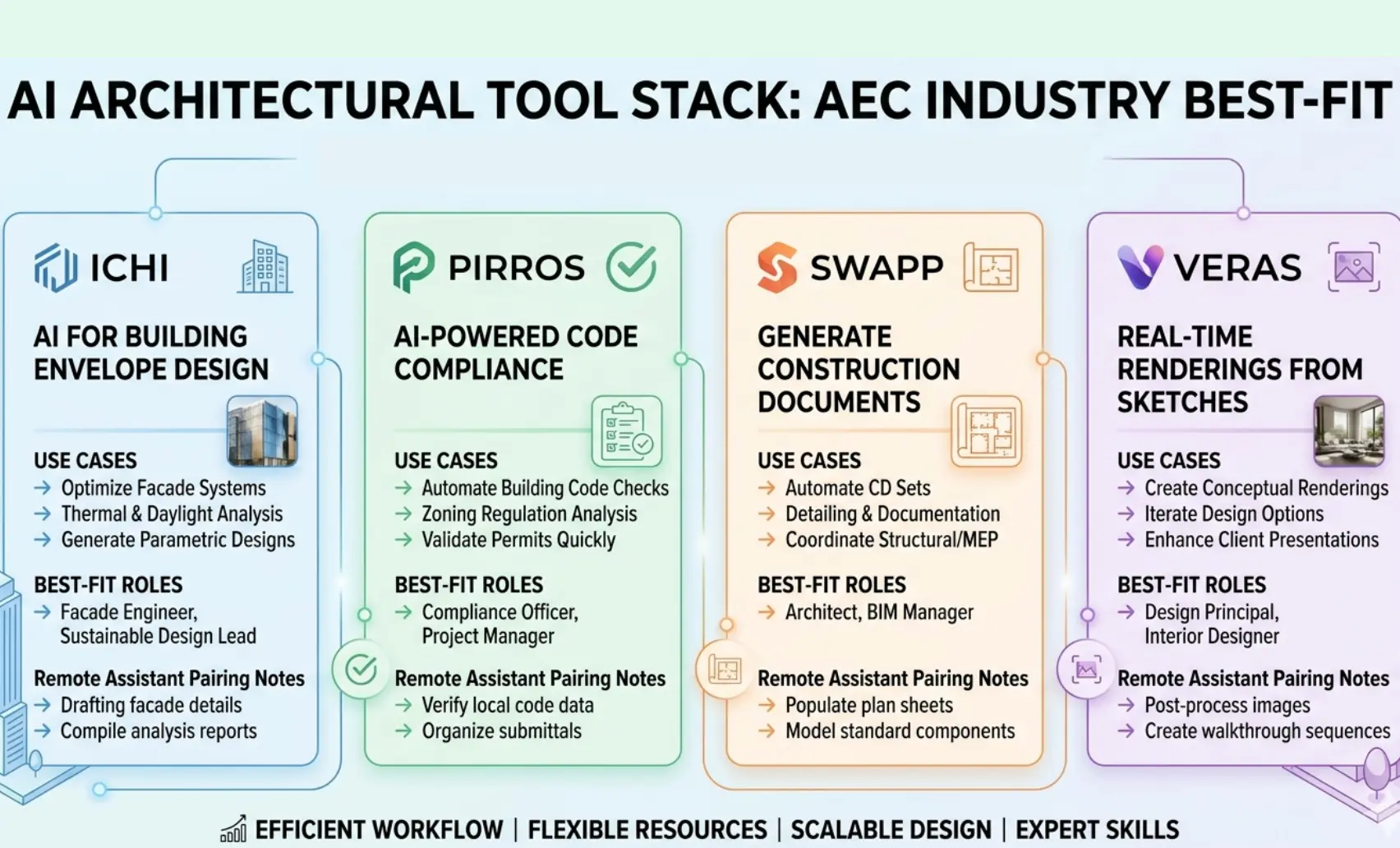
Ichi: Best for Code Compliance, QA/QC, RFIs, and Submittal Reviews
Ichi is an AI platform built for architecture and engineering firms that need faster answers on code questions, QA/QC checks, RFI responses, submittal reviews, and missing drawing references.
It processes construction documents and specifications against building codes to flag compliance gaps before they reach the plan reviewer or the field.
Best for: Architects, code reviewers, QA/QC leads
Use case: Flag missing detail references and code compliance issues before permit submission, saving the revision cycle that typically follows an AHJ comment
A remote architect assistant can prepare, organize, and pre-check plan sets before Ichi review, ensuring the AI processes clean, complete inputs and reducing false flags from disorganized documentation
Pros
- Reduces time spent manually searching code sections
- Catches drawing coordination gaps before permit submission
- Useful for RFI and submittal response drafting
Limitations
- Final code interpretation requires a licensed architect or engineer
- Effectiveness depends on the drawing and specification quality submitted
Pirros: Best for Revit Details, Families, and Firm Knowledge Reuse
Pirros is an AI project hub that helps architects and engineers find, compare, reuse, and standardize Revit details and families from the firm’s own project history. For firms with years of completed projects, Pirros turns that archive into a searchable, usable production resource.
Best for: BIM managers, architects, engineers
Use case: Retrieve a vetted wall assembly detail from a past project instead of redrawing it from scratch, saving hours per drawing set
Remote BIM assistants can tag, clean, and organize the firm’s existing detail library, maximizing Pirros’ retrieval quality by ensuring the archive is properly structured
Pros
- Reduces time spent recreating standard details
- Helps enforce drawing consistency across projects
- Improves BIM standards compliance across the firm
Limitations
- Value scales with the quality and organisation of existing project archives
- Requires initial library tagging and cleanup investment
SWAPP: Best for AI-Assisted Architectural Documentation
SWAPP automates portions of BIM modeling and construction documentation, supporting SD/DD modeling tasks and CD set production for repetitive building types like multifamily, education, and commercial. It is most effective for structured project types where drawing sets follow predictable patterns.
Best for: Architecture firms, production teams, BIM leads
Use case: Speed up repetitive drawing set production for a multifamily project, reducing hours on sheet setup, plan generation, and schedule population
Remote architect assistants review SWAPP-generated sheets, update schedules, align drawings with firm standards, and prepare the set for licensed architect review before issue
Pros
- Reduces time on repetitive documentation tasks
- Useful for firms with high volumes of similar project types
Limitations
- Requires careful architectural review; the generated output is a starting point, not a final deliverable
- Less effective for complex, one-of-a-kind building types
Veras: Best for AI Visualization Inside Design Tools
Veras integrates AI visualization directly into the architect’s existing design workflow, working inside Revit, SketchUp, Rhino, Autodesk Forma, and web-based platforms. It converts existing models, drawings, and concept sketches into rendered visual options without requiring a separate rendering pipeline.
Best for: Architects, interior designers, visualization teams
Use case: Test multiple façade materials or interior finish concepts from an existing Revit model, generating client presentation options in minutes rather than days
Remote visualization assistants prepare model views, set up camera angles, run prompt variations, and compile presentation boards from Veras outputs for principal architect review
Pros
- Works inside tools the team already uses
- Fast iteration on design concepts for client presentations
Limitations
- Output quality depends on the model detail level and the input prompt quality
- Not a substitute for the final rendered construction document imagery
Best AI Tools for Engineering, BIM, and Building Systems
Augmenta: Best for Automated Building Systems Design
Augmenta is an autonomous building design platform focused initially on electrical routing and coordinated MEP models. It generates coordinated routing options from BIM data, reducing the manual coordination time that consumes MEP and VDC team hours during design development and construction document phases.
Best for: Electrical contractors, MEP teams, BIM and VDC teams
Use case: Generate multiple coordinated electrical routing options from a Revit MEP model before the coordination meeting, giving the team real options to evaluate rather than starting from a blank model
Remote MEP assistants review Augmenta routing outputs, update Revit models with approved routing decisions, and prepare coordination notes for the engineer of record’s review
Pros
- Reduces time on repetitive MEP routing tasks
- Generates coordination-ready options faster than manual modeling
- Useful for contractors under tight coordination schedules
Limitations
- Final engineering review is mandatory; Augmenta generates options, and engineers validate them
- Most mature for electrical routing; broader MEP application is evolving
Best AI Tools for Site Planning, Civil, and Feasibility
TestFit: Best for Real Estate Feasibility and Site Planning
TestFit is an AI-driven site-planning platform that evaluates development constraints, parking configurations, unit layouts, and financial assumptions in real time. Developers, architects, civil engineers, and preconstruction teams use it to test site options before committing to a design direction.
Best for: Developers, architects, civil teams, preconstruction teams
Use case: Compare ten site layout configurations, varying building footprint, parking ratio, and unit count, before spending weeks on manual feasibility analysis
Remote civil or architectural assistants prepare site inputs (parcel data, zoning constraints, program requirements), test layout options, and summarize outputs for the principal’s review
Pros
- Dramatically faster than manual site feasibility studies
- Tests financial and physical constraints simultaneously
- Useful early in the development process, before design investment is significant
Limitations
- Outputs are planning-level, not permit-ready or construction-document quality
- Requires accurate input data; garbage in, garbage out applies directly
AirWorks: Best for AI-Powered Geospatial and CAD Deliverables
AirWorks is an AI-enabled field intelligence and geospatial mapping platform that converts LiDAR scans, drone imagery, orthomosaics, satellite imagery, and field data into CAD and GIS deliverables. Civil engineers, surveyors, telecom, power, and infrastructure firms use it to turn aerial data into usable design and planning drawings.
Best for: Civil engineers, surveyors, GIS teams, infrastructure firms
Use case: Convert drone aerial survey data into AutoCAD and Civil 3D-compatible deliverables for a site planning and permitting package, in a fraction of the time a manual digitization process would take
Remote civil assistants clean CAD layers from AirWorks outputs, check markup accuracy, and prepare drawing packages for civil engineer review and permit submission
Pros
- Converts geospatial data into usable CAD and GIS formats efficiently
- Reduces manual digitization time on large site areas
- Supports drone imagery, LiDAR, and satellite data inputs
Limitations
- Output accuracy depends on source data quality and resolution
- CAD layer cleanup and accuracy verification still require human review before use in construction documents
Best AI Tools for Construction Estimating, Field Capture, and Layout
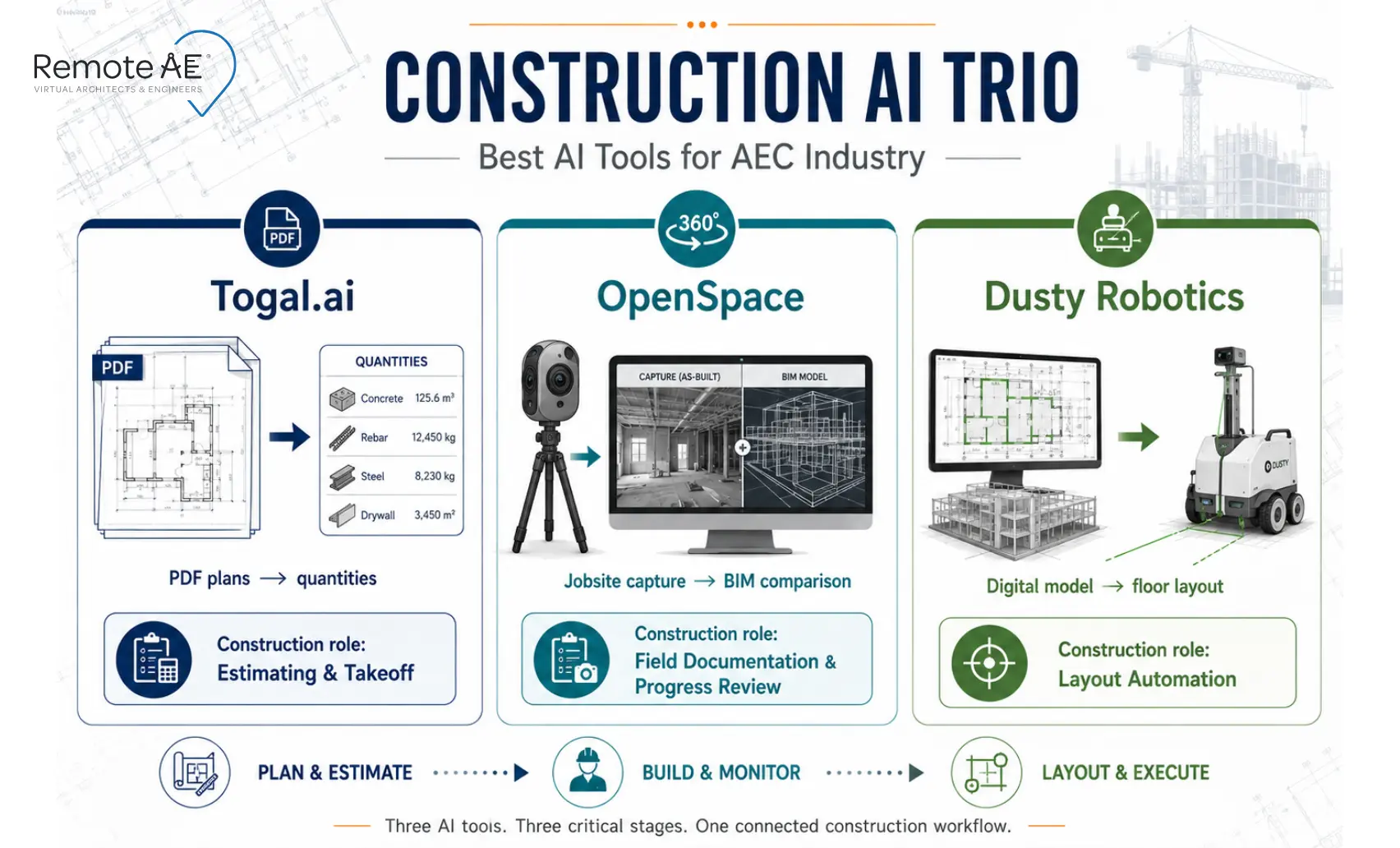
Togal.ai: Best for AI Construction Takeoff
Togal.ai is an AI-powered takeoff software that detects, measures, compares, labels, and counts elements from PDF construction drawings. Estimators and general contractors use it to accelerate first-pass quantity takeoff, moving faster through plan sets while maintaining the estimator’s control over scope interpretation and bid strategy.
Best for: Estimators, general contractors, preconstruction teams
Use case: Measure floor areas, count fixtures, and identify opening locations from a PDF plan set faster than manual on-screen takeoff, freeing the estimator to focus on scope gaps, subcontractor coordination, and bid risk assessment
Remote estimating assistants run first-pass takeoffs using Togal.ai, organize quantities by trade and CSI division, and prepare the quantity summary for senior estimator review and bid leveling
Pros
- Significantly faster than manual takeoff for area and count measurements
- Useful for bid screening and early budget estimates
- Comparison tool helps identify drawing changes between addenda
Limitations
- Estimator review is essential; AI measurement does not replace scope judgment, exclusion decisions, or trade-specific knowledge
- Complex scopes and non-standard drawing sets may require more manual verification
OpenSpace: Best for AI-Powered Field Capture and Visual Jobsite Intelligence
OpenSpace is a visual intelligence platform for builders that captures jobsite imagery using smartphones, 360-degree cameras, drones, and laser scans, mapping every capture automatically to plans and BIM models.
General contractors, owners, trade contractors, and construction managers use it to track progress, verify conditions, and document the jobsite without walking every area manually.
Best for: General contractors, owners, trades, construction managers
Use case: Capture a weekly site walk using a 360 camera and compare field conditions directly against BIM models and current drawing sets, identifying discrepancies before they become RFIs or rework
Remote construction assistants organize OpenSpace captures, prepare progress reports from captured data, and track open issues identified in field-to-BIM comparisons
Pros
- Creates a continuous visual record of jobsite conditions tied to plan locations
- Reduces miscommunication between field and office teams
- Supports remote project monitoring without requiring constant site presence
Limitations
- Requires consistent capture cadence to be useful; gaps in coverage reduce value
- Photo documentation requires human interpretation, OpenSpace surfaces data, and project managers analyze it
Dusty Robotics: Best for BIM-to-Field Robotic Layout
Dusty Robotics‘ FieldPrinter prints digital BIM models directly onto jobsite floors, transferring wall locations, sleeve positions, equipment footprints, and trade coordination layouts from the coordinated digital model to the physical building surface.
It connects BIM intent to actual field execution with greater speed and accuracy than manual chalk-line layout.
Best for: General contractors, VDC teams, trade contractors, field layout teams
Use case: Print wall locations, mechanical sleeve positions, and electrical rough-in layouts directly from a coordinated Revit model, reducing layout time and eliminating transcription errors between digital plans and field marks
Remote BIM and VDC assistants prepare layout files, verify model data accuracy and coordination before printing, and support field teams with documentation updates after layout is complete
Pros
- Dramatically faster than manual layout for complex floor plans
- Reduces rework caused by layout errors and misread drawings
- Directly connects the coordinated BIM model to field execution
Limitations
- Requires a well-coordinated, accurate BIM model before layout; errors in the model print directly onto the floor
- Most applicable on commercial and institutional projects where layout complexity justifies the investment
How to Choose the Right AI Tool for Your AEC Workflow
Start With the Bottleneck: Not the Software
The most common AI adoption mistake in AEC firms is evaluating tools before identifying the workflow problem they need to solve. The right question is not “what AI tools are popular?”, it is “where is our team losing the most time?”
Map your bottleneck before evaluating software:
- Design iteration: Veras for visualization, TestFit for site options, SWAPP for documentation acceleration
- Code research and QA/QC: Ichi for compliance flagging and drawing gap detection
- Drawing and detail reuse: Pirros for BIM detail and family retrieval
- Estimating and takeoff: Togal.ai for AI construction takeoff and quantity measurement
- Field progress and documentation: OpenSpace for visual field capture and BIM comparison
- BIM-to-field coordination: Dusty Robotics for robotic layout from digital models
- Geospatial drafting: AirWorks for LiDAR and drone imagery to CAD deliverables
- Building systems coordination: Augmenta for automated MEP routing
One clearly identified bottleneck leads to one clearly justified tool. Multiple unfocused AI subscriptions produce adoption overhead without operational benefit.
Check Integration With Your Current Stack
Every AI tool on this list sits alongside existing AEC software, not as a replacement for it. Confirm integration before committing.
Platform compatibility checklist:
- Revit: Pirros, SWAPP, Augmenta, Dusty Robotics, and Veras all work within or alongside Revit workflows
- AutoCAD and Civil 3D: AirWorks outputs are compatible with AutoCAD and Civil 3D for civil and infrastructure applications
- BIM 360 / Autodesk Construction Cloud: OpenSpace and Dusty Robotics connect to BIM platforms for model comparison and layout preparation
- SketchUp and Rhino: Veras integrates with both for design visualization workflows
- Drone and LiDAR data: AirWorks and OpenSpace both accept field capture data from drone and laser scan sources
- PDF plan sets: Togal.ai and Ichi both process PDF construction documents, the most common input format in estimating and QA/QC workflows
- Procore and Bluebeam: OpenSpace connects to project management platforms for issue tracking; Ichi processes documents formatted for Bluebeam workflows
Decide Who Will Own AI Output Review
Every tool on this list requires human review before its output enters a construction document, a permit set, a bid, or a field operation. Decide who owns that review step before the tool is deployed, not after the first output is produced.
Remote AE provides the trained AEC professionals who make AI output review practical for small and mid-size firms:
- Remote architect assistants review AI-generated sheets from SWAPP, check Pirros detail reuse against current standards, prepare Ichi inputs, and organize Veras visualization outputs for principal review
- Remote engineering assistants review Augmenta routing outputs, prepare and verify Dusty Robotics layout files, and update Revit MEP models after coordination decisions
- Remote construction assistants run Togal.ai first-pass takeoffs, organize OpenSpace captures into progress reports, prepare RFI and submittal documentation, and support QA/QC tracking across active projects
AI Tools Do Not Replace AEC Teams: They Change the Work
The AEC professionals who benefit most from AI adoption are not the ones who hand everything to the algorithm. They are the ones who use AI to remove repetitive tasks from their day and apply their expertise to the decisions that AI cannot make.
AI tools in the AEC industry reduce time spent on: drafting support, sheet checks, quantity takeoff, visualization options, field capture organization, Revit detail reuse, site planning iterations, and code research. That is genuine, measurable value.
But the work that determines project quality, professional liability, and client trust- that stays with the human.
Tasks AI Can Help With
- Drafting support: Sheet updates, drawing cleanup, schedule population, and redline incorporation
- Sheet checks: Drawing completeness and coordination gap flagging before permit submission
- Quantity takeoff: Area measurement, fixture counts, and opening identification from PDF plans
- Visualization options: Design rendering and concept visualization from existing models
- Field capture organization: Jobsite imagery mapped to plans and BIM for progress review
- Revit detail reuse: Finding and retrieving vetted details from the firm’s project archive
- Site planning options: Generative feasibility layouts tested against development constraints
- Code research: Flagging potential compliance issues in construction documents and specifications
Tasks That Still Need Human Judgment
- Final code interpretation: AI flags potential issues, and architects and engineers resolve them
- Design intent: The creative and strategic decisions behind every project remain with the licensed professional
- Constructability: Field experience and engineering judgment determine what can actually be built
- Bid risk: Estimators assess scope gaps, exclusions, and subcontractor reliability, and AI measures quantities
- Client communication: Relationship management and project strategy belong to the principal
- QA/QC approval: AI assists in the check; the licensed professional owns the approval
- Final deliverable ownership: Every stamped document, issued permit set, and submitted bid carries the professional’s accountability
How Remote AE Helps Firms Get More Value From AI Tools
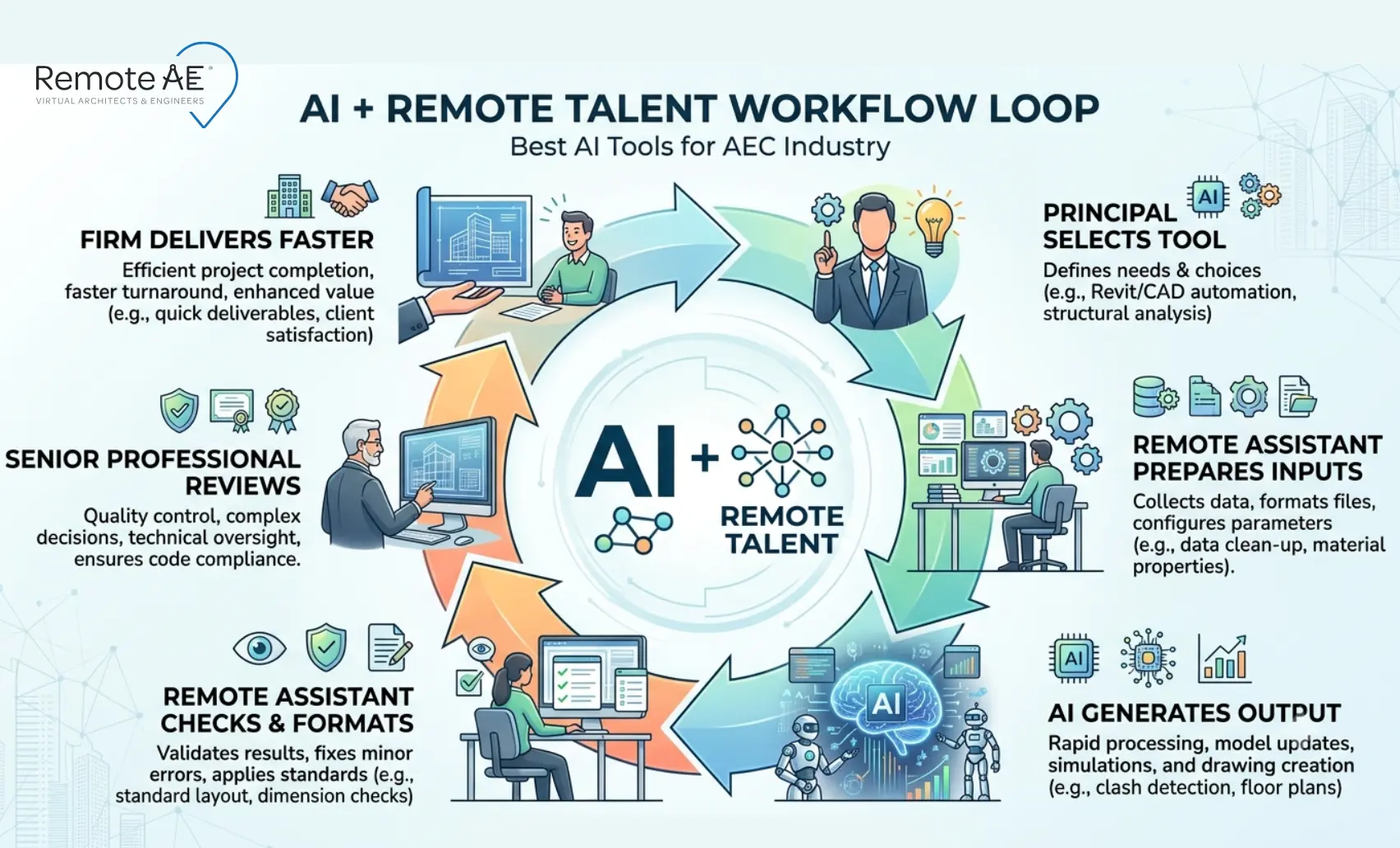
AI tools generate output. Remote AEC assistants make that output usable, cleaning inputs, checking results, formatting deliverables, and freeing senior professionals for the judgment-heavy work that drives project quality and client trust.
Remote AE provides AEC-focused virtual assistants with genuine industry experience across architecture, engineering, construction, estimating, documentation, coordination, and project reporting.
Every remote assistant arrives trained in the workflows, tools, and professional standards that AEC firms depend on, not general business administration.
Why this matters for AI adoption:
Small and mid-size AEC firms face the same AI adoption challenge; the tools exist, but someone needs to prepare the inputs, review the outputs, and integrate the results into the firm’s existing deliverables. Without that human layer, AI adoption creates more review burden than capacity relief.
Remote AE solves this by providing the trained AEC professionals who sit between AI tool output and final professional review, absorbing the production and coordination work so senior architects, engineers, estimators, and BIM managers can focus on the decisions only they can make.
Remote AE engagement terms:
- Guaranteed quality and reliability: Every assistant delivers to defined AEC standards, and issues are resolved immediately
- No long-term commitment: Engage per project, per phase, or as an ongoing production resource
- No upfront costs: Consult without financial obligation, no cost until the contractual phase begins
- Risk-free replacement: Up to two risk-free replacements in year one if the placement does not meet the firm’s standards
Multiply the Value of Your AI Tools With AEC-Trained Remote Support!
AI tools are changing what AEC teams can deliver, but they work best when trained professionals manage the inputs, review the outputs, and connect AI-generated results to the firm’s real project deliverables.
Remote AE places dedicated remote architect assistants, virtual engineering assistants, and remote construction assistants with genuine AEC industry experience, ready to amplify your AI tool investment, absorb production and coordination work, and free your senior professionals for the decisions that drive project quality and client trust.
Book a Free Consultation With Remote AE, No Obligation, No Upfront Cost!
FAQs – Best AI Tools for AEC Industry
What are the best AI tools for the AEC industry?
Common tools include ACC, Revit add-ins, Procore AI, OpenSpace, Bluebeam, ChatGPT, and AI takeoff tools. Pick tools based on workflow: design, BIM, field tracking, estimating, or documentation.
Which AI tool is best for architects?
Architects often use ChatGPT, Revit automation, SketchUp AI tools, and Adobe AI. The best tool depends on whether you need drafting help, visualization, specs, or documentation.
Can AI tools create construction documents?
AI can help draft notes, schedules, details, and templates. Final construction documents still need an architect or engineer review.
Are AI tools replacing architects and engineers?
No. AI supports repetitive tasks and documentation. Licensed professionals still handle design judgment, code decisions, and liability.
How can remote AEC assistants help firms use AI tools?
They can prepare files, run AI workflows, check outputs, and organize results. They help turn AI output into usable drafts for professional review.