

A virtual drafting assistant is a vetted remote drafter who produces and updates your CAD and BIM deliverables, redlines, sheet setup, and drawing standards, inside AutoCAD and Revit, without adding in-house headcount.
At Remote AE, drafters or a CAD virtual assistant are pre-tested on real redline and sheet-production tasks before they join your team, and many pair their work with AI tools like Autodesk’s Markup Assist to speed repetitive edits. The result: faster drawing turnaround, fewer errors, and senior staff freed for design
This guide explains when to use a human or AI drafter, how to onboard one in 2 weeks, and which tools (like Markup Assist or IFC-based workflows) improve results. Most leaders expect AI to boost efficiency (Autodesk State of Design & Make, 2024). Pair that lift with vetted remote drafters, and you’ll cut cycle time without adding permanent headcount.
See how a vetted drafter fits your team. Book a free consultation.
Key Takeaways
- Onboarding takes about two weeks for a vetted virtual drafting assistant when standards, title blocks, and common data environment access are ready.
- Per-sheet drafting costs drop over 70% with a $15 per hour virtual drafting assistant versus $60 per hour in-house, assuming 30% AI lift.
- Redline processing runs 25 to 40% faster when AI tools and a remote CAD drafter work together.
- Remote drafters must follow AIA layer rules, ISO 19650 workflows, and IFC handoffs so CAD and BIM files stay portable.
- Stolen credentials were involved in 77% of breaches in the Basic Web Application Attacks pattern, per the 2024 Verizon DBIR.
What is a Virtual Drafting Assistant?
A virtual drafting assistant is either:
- A remote CAD drafter who works outside your office to support drawing production
- An AI-powered drafting feature inside tools like AutoCAD or Revit that speeds up manual work
In most AEC teams, it’s not a question of one or the other. The best workflows blend both.
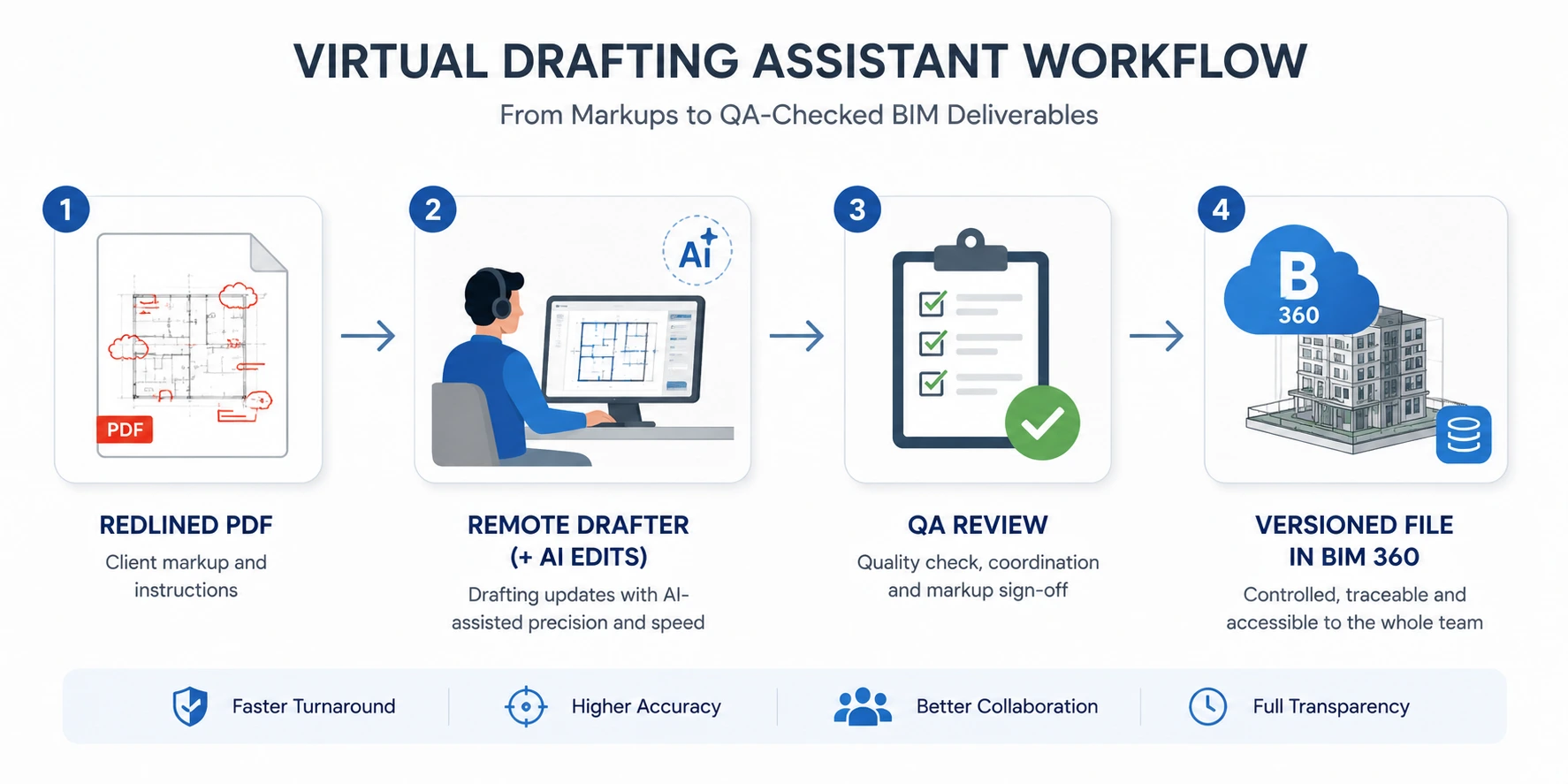
You might assign a human assistant to revise Revit sheets from a redlined PDF. At the same time, they could use Markup Assist in AutoCAD to auto-import annotations and convert them into editable DWG elements.
What a virtual drafting assistant does day-to-day (task list)
- Redline & markup updates, turning redlined PDFs into clean, revised DWG/RVT sheets.
- Sheet setup & drawing sets, title blocks, view templates, and sheet sequencing.
- CAD standards enforcement, layer keys, linetypes, naming conventions, and Xref management.
- BIM support, model updates, family creation, and view management in Revit.
- Deliverable handoff, uploading versioned files to BIM 360, Autodesk Docs, or SharePoint with revision tags.
- AI-assisted edits, running tools like Markup Assist to auto-import annotations, always tested in a cloned file first.
Autodesk’s 2024 report finds 79% of leaders say AI will make their industry more creative, and 78% say AI will improve their industry. (Autodesk State of Design & Make, 2024). Use AI to speed grunt work; keep humans on quality and coordination.
When to Choose Human, AI, or a Hybrid Model?
The best use of a virtual drafting assistant depends on the task and your workflow setup. Here’s how to decide:
Ideal for Human Drafters
- Custom title block setup and layering
- Sheet sets for large submittals
- Detail section callouts and sequencing
- Revit family creation from scratch
- Markup coordination with engineers
Best for AI Drafting Features
- Reading redlines via Markup Assist
- Generating door/window schedules
- Auto-tagging using Smart Blocks
- Layout suggestions from Macro Advisor
- Batch annotation or sheet renaming
Works Best as a Hybrid
- As-built documentation (PDF markups + AI cleanup)
- Repetitive plan updates across multiple levels
- CAD-to-BIM conversion workflows
- Submittal QA/QC before sending out
Benchmark: Autodesk reports up to 63% productivity gain using specialized AutoCAD toolsets versus base AutoCAD for common tasks. Even if your lift is half that, the hybrid model pays back quickly on large sheet sets (Autodesk study).
Human drafter vs. AI tool: when to use which
|
Task type |
Best handled by |
Why |
| Repetitive annotation import | AI tool | Fast, consistent, no judgment needed |
| Redline interpretation | Human drafter | Requires context and design intent |
| Sheet setup from a template | Human + AI | Humans set up, AI speeds edits |
| QA / standards audit | Human drafter | Catches errors AI misses |
Need drafting capacity this month? Talk to Remote AE!
Software & Standards to Expect
Your virtual drafting assistant should work inside your stack, not around it. Expect fluency in AutoCAD, Revit 2025, and your Common Data Environment. Require conformance to AIA layer rules, ISO 19650 workflows, and IFC handoff basics. These standards keep files portable and ready for review.
Core Platforms to Expect:
- AutoCAD: For redlines, 2D detailing, block libraries
- Revit 2025: For parametric modeling, scheduling, and annotations
- Navisworks: For clash detection and model aggregation
- SketchUp, Rhino, Grasshopper (optional for concept modeling)
AutoCAD AI Features to Know
AutoCAD’s latest AI-powered drafting tools:
- Markup Assist: Converts PDF redlines to DWG edits
- Smart Blocks: Suggests commonly placed blocks in real time
- Macro Advisor: Recommends automation for repetitive tasks
What to ask in screening:
- “Show a screen‑share applying PDF markups via Markup Assist.”
- “Demonstrate Smart Blocks: Search and Convert on repeated symbols.” (Autodesk Help: Smart Blocks Search and Convert).
These save time on cleanup, annotation, and legend building.
Revit 2025 Changes That Matter for Drafting
New Revit updates help virtual engineering assistants deliver faster:
- Better sheet set templates
- Smoother IFC export workflows
- Improved annotation scaling
- Direct linking of GBXML and COBie fields
Tip: Ask remote AutoCAD drafters to batch‑rename sheets and export an IFC sample. You’ll see who really knows Revit 2025 documentation.
BIM Information Delivery: ISO 19650 + IFC Basics
- ISO 19650: Defines how information is structured and delivered in BIM. It underpins roles, naming, approvals, and delivery timing.
- Industry Foundation Classes (IFC): Vendor‑neutral exchange standard (ISO 16739‑1:2024) that keeps models portable across tools.
- AIA CAD Layer Guidelines: Helps keep naming consistent in DWG files
Every virtual drafting assistant or AI workflow should follow these frameworks to ensure coordination.
CDE Options and Naming Standards
A Common Data Environment centralizes drawings, versions, and approvals. Set it up using:
- Autodesk Docs or BIM 360. Enforce naming and layers.
- SharePoint or cloud storage (with version control)
- Clearly named folders using ISO-compliant structures
Use AIA layer keys to standardize layers, tags, and visibility settings across files.
Quick policy snippet:
- Store live files only in the CDE; no local copies after delivery.
- Enforce AIA layer keys and status fields in audits.
- Require IFC test exports before the first milestone.
Security, IP, and QA/QC
When using outsourced CAD drafting services or AI tools tied to cloud platforms, security is critical. You’re sharing models, sheets, and sometimes confidential construction details.
Even if it’s a remote CAD drafter or a machine-driven markup system, always bake security and quality control into your process.
Basic Protections to Require:
- NDAs signed before onboarding
- Project files shared only via secure, cloud-based Common Data Environments (CDE)
- MFA-enabled access for platforms like Autodesk Construction Cloud
- Version tracking and rollback tools (e.g., BIM 360 Docs or SharePoint)
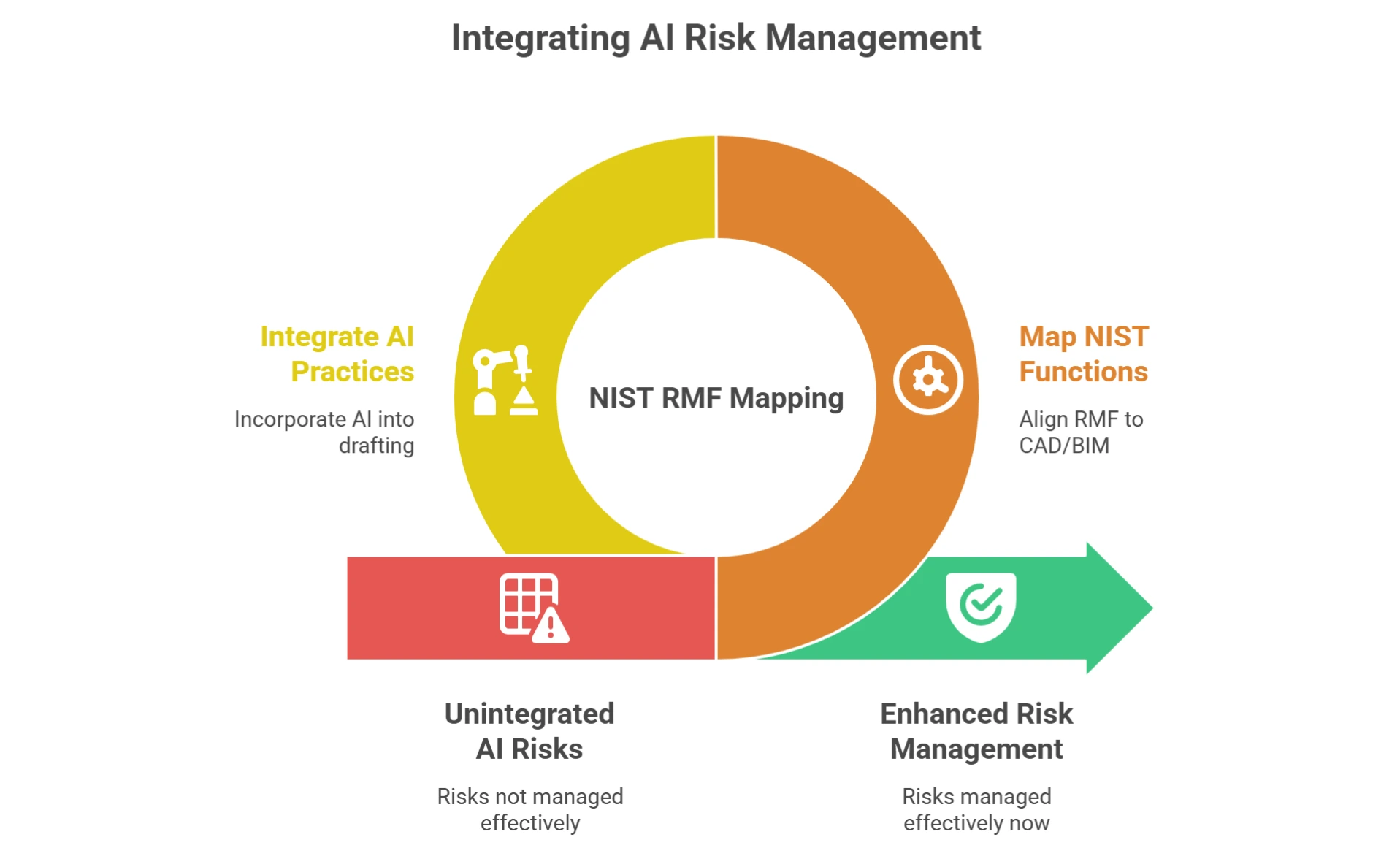
Risk Checklist Using NIST AI RMF
The NIST AI Risk Management Framework offers a solid structure for vetting both AI tools and external teams.
| NIST Pillar |
What to Check |
| Govern | Who owns the model and output? What are the access controls? |
| Map | Where are project files stored? What platforms are involved (BIM 360, CDE)? |
| Measure | Are deliverables meeting LOD requirements (e.g., LOD 300 or 400)? Any automation errors? |
| Manage | How are errors handled? Who signs off on redlines or submittals? |
Use it alongside NIST SP 800‑53 Rev.5 controls for MFA, least privilege, logging, and vendor oversight (NIST, 2020). Stolen or weak credentials remain a top risk: the 2024 Verizon DBIR shows 77% of breaches in the Basic Web Application Attacks pattern involved the use of stolen credentials (Verizon, 2024).
Plan for credential hygiene before you add remote seats. These checkpoints help you reduce security exposure, protect IP, and keep QA/QC aligned with BIM deliverables.
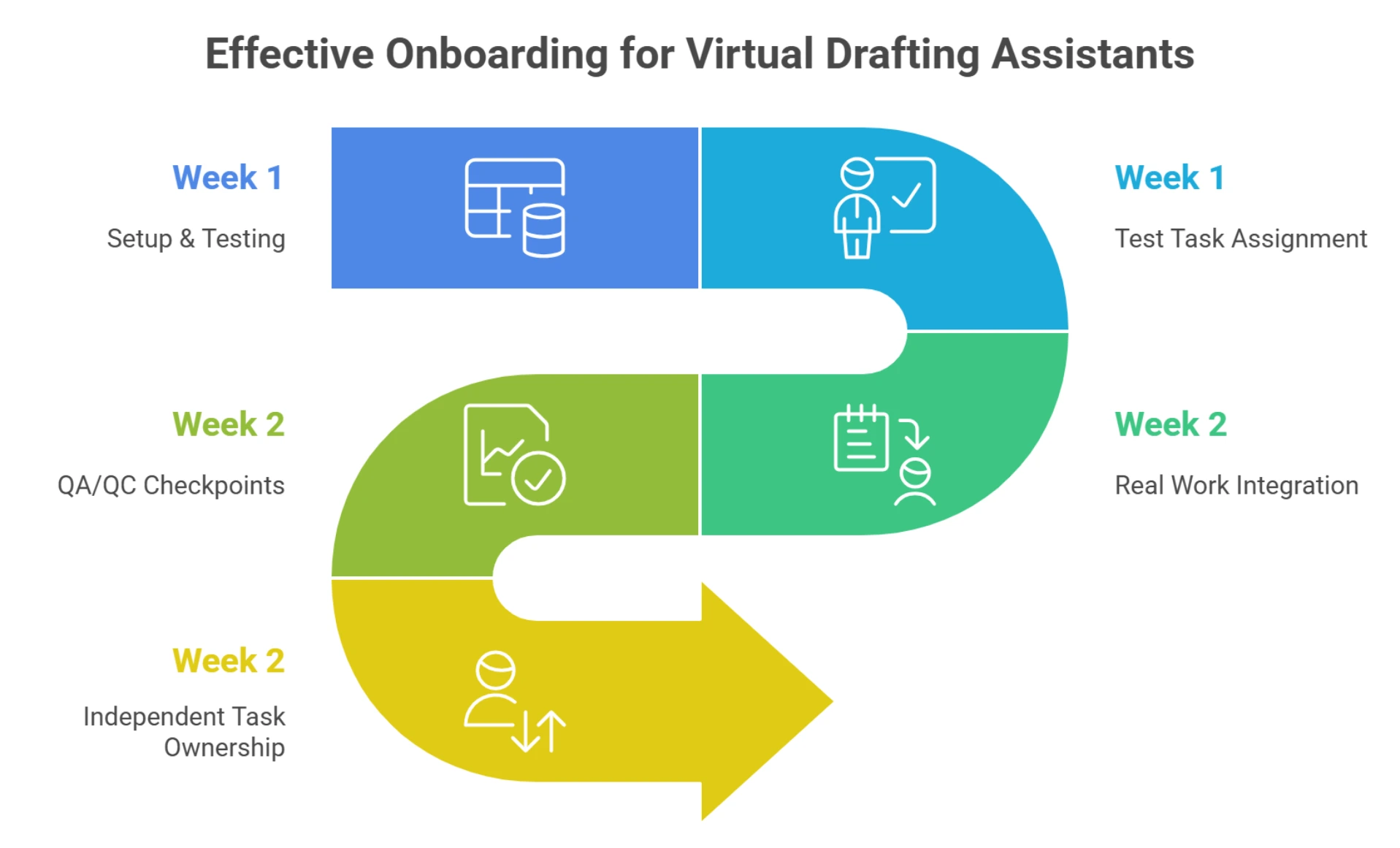
 Onboarding Plan (4 Weeks)
Hiring a virtual drafting assistant, human or hybrid, only works if you onboard them right. A structured process helps avoid confusion and wasted hours.
Only 29% of new hires feel prepared after onboarding, so make this count (SHRM, 2024). Teams with strong onboarding lift retention and productivity; studies report +82% retention and +70% productivity improvements (2015 Brandon Hall study).
Week 1-2: Setup & Testing
- Share title blocks, view templates, and CAD layer standards
- Set up file access: DWG, RVT, and PDF libraries
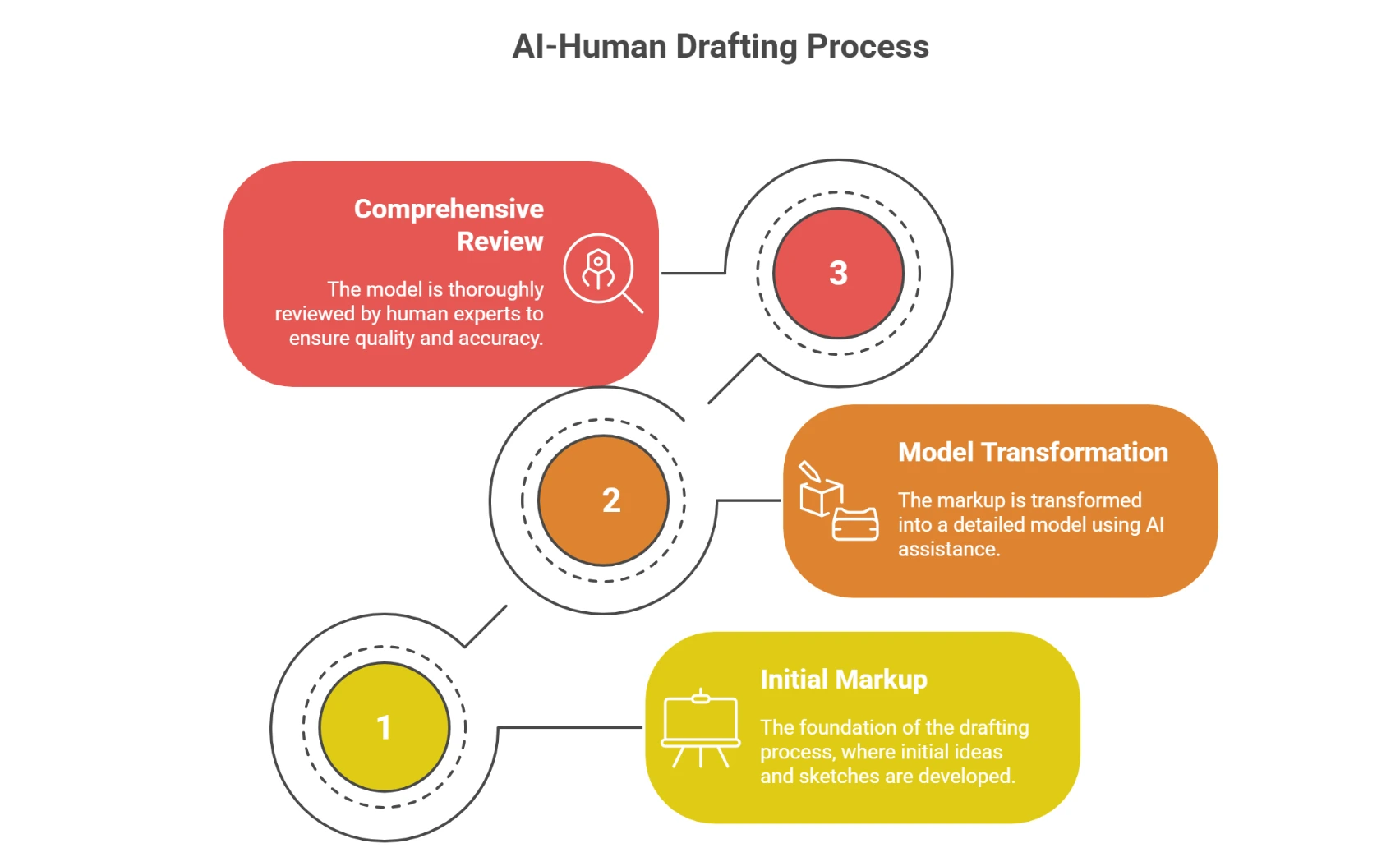
- Assign a test task (e.g., update a Revit floor plan with marked redlines)
- Use a feedback loop: review, comment, and revise
Week 3-4: Real Work Integration
- Assign live project tasks (e.g., finish sheet set or build annotation library)
- Introduce QA/QC checkpoints
- Confirm clash detection alignment if using BIM or Navisworks
- Gradually move toward independent task ownership
Optional Tools to Use:
- Markup Assist for importing PDF comments
- Macro Advisor to suggest automation paths
- Shared CDE with revision tracking (BIM 360 or SharePoint)
Tip: Even AI tools like Smart Blocks need testing. Run them in a cloned file before pushing to production sets.
Pricing & ROI
Pricing for a virtual drafting assistant varies depending on skill, scope, and project type. You’ll typically choose from:
Common Pricing Models
- Hourly: Best for flexible, ongoing work
- Per sheet: Ideal for drafting-heavy projects (e.g., full CD sets)
- Monthly retainer: For teams needing consistent support week to week
Learn what AEC outsourcing costs actually.
ROI: Productivity Uplift Benchmarks
- Toolset productivity: Across seven independent studies, users completed tasks ~63% faster with AutoCAD specialized toolsets than with base AutoCAD (Autodesk).
- Redline processing: 25–40% faster using hybrid AI + remote drafter
- Sheet set setup: 30% reduction in hours using Smart Blocks or templates
- Submittal revisions: Up to 50% fewer errors with built-in QA review
- Outsourcing results: Only ~25% of executives report direct vendor‑cost reduction so far; governance and change management determine gains (Deloitte Global Outsourcing Survey, 2024). Calibrate expectations and measure.
Fast math: If an in‑house drafter costs $60/hr fully loaded and a Virtual Drafting Assistant is $15/hr, and AI/toolsets lift output by 30% on sheet updates, the effective cost per finished sheet can drop by >70%. Validate these line hours.
Most bad drafting hires trace back to a handful of red flags you can screen for up front, from unverified Revit skills to weak data-security habits.
How Remote AE Helps?
Hiring a virtual drafting assistant is only easy when the hard parts- vetting, testing, and onboarding- are handled for you. That’s where Remote AE steps in.
Here’s how it works:
- Pre-Vetted Talent: All drafters are screened for experience with AutoCAD, Revit, BIM standards, and common AEC workflows. Outsource CAD drafting services in just days.
- Test Tasks: Candidates complete redline updates, Revit sheets, or DWG formatting before they’re assigned to clients.
- Drafting Playbooks: You get a pre-built framework, view templates, naming conventions, and standards for consistent deliverables.
- QA Reviews: Ongoing quality checks ensure LOD levels, redlines, and sheet sequences are met.
Virtual Drafting Assistant FAQs
What does a virtual drafting assistant do?
A virtual drafting assistant updates redlines, sets up sheets, maintains CAD and BIM drawing standards, and uploads versioned deliverables to platforms like BIM 360 or SharePoint, working remotely inside AutoCAD and Revit.
What’s the difference between a virtual drafting assistant and an AI drafting tool?
A: A virtual drafting assistant is a trained human drafter who interprets redlines and owns deliverables; an AI tool automates repetitive edits like annotation import. The strongest workflows use both: the human directs, and the AI accelerates.
Which software should a virtual drafting assistant know?
At minimum, AutoCAD and Revit, plus BIM coordination platforms such as BIM 360 or Autodesk Docs. Many also work in Civil 3D, Navisworks, or MicroStation, depending on discipline.
How quickly can I onboard a virtual drafting assistant?
A: With standards, title blocks, and CDE access prepared in advance, a vetted drafter can be productive within about two weeks. A structured onboarding checklist is the single biggest driver of first-pass accuracy.
Ready to simplify drafting and free up your core team?
Remote AE connects you with vetted virtual drafting assistants who can handle redlines, build Revit sheets, and even work with AI tools like Markup Assist and Smart Blocks.
- Pre-vetted talent
- Smooth onboarding
- Standards-ready (IFC, ISO 19650, AIA layers)
Hire a pre-vetted virtual drafting assistant; start in days, not months.