

Remote engineering support lets AEC firms scale fast, cut overhead, and tap global talent. Yet mistrust still blocks adoption. Security worries, fear of hidden costs, and doubts about code compliance keep leaders on the fence.
This article busts 10 persistent myths with real numbers, mini-case studies, and checklists you can use today. Read on to learn how ISO 27001 controls, follow-the-sun hand-offs, and zero-trust access protect your data and schedule. Finish with a step-by-step pilot plan and clear calls to action.
Why Myths Stick in Architecture, Engineering & Construction
Long project cycles. Strict codes. High-value IP. These factors push AEC leaders to guard every detail. When remote work rose after 2020, myths filled the gap left by limited field data. That mindset costs productivity and talent reach.
Myth 1: Remote Engineering Support Is Not Secure
Remote teams sit outside the office firewall, so they must be risky, right?
Fact: ISO 27001, SOC 2, and VPN Hardening Tips
Top providers pass annual ISO 27001 and SOC 2 audits. They run VPNs with split-tunnel off, MFA, and IP-restricted logins. One Remote AE client, a 50-person civil engineering firm, successfully transferred 120 GB of CAD data through a zero-trust gateway with no breaches in 18 months (Internal Audit Report, 2024).
Checklist
- Request the most recent ISO 27001 certificate.
- Require SOC 2 Type II attestation.
- Enforce MFA and user-level whitelisting.
Myth 2: Quality Drops When Work Happens Off-Site
Some believe remote drafters rush work and dodge reviews.
Fact: RFIs, Clash-Detection Rates, and Review Cycles
A Remote AE structural detailing pilot cut Requests for Information (RFIs) by 27 % and rework hours by 18 % compared with in-house drafts (Client KPI Dashboard, 2025). Daily screen shares, tracked redlines, and BIM 360 issue tags keep loops tight.
Example Workflow
- Draft sent to cloud CDE.
- QC lead reviews within 12 h.
- Signed PDF mark-ups returned.
- Final model synced to main branch.
Myth 3: Time-Zone Gaps Slow Projects
“Remote” equals “delay” in many minds.
Fact: Follow-the-Sun Hand-offs and 24-Hour Coordination
A GC in Chicago hands models off at 6 p.m. CST. A Remote AE BIM team in Manila picks up and delivers updates by 6 a.m. CST. The result: one extra revision cycle per day, shaving two weeks off a hospital project schedule (Project Close-Out Report, 2024).
Myth 4: Remote Teams Cost More in the Long Run
Budget fears stop many firms cold.
Fact: Total Cost of Engagement vs. W-2 Payroll
Compare apples to apples:
- TCE bundles salary, benefits, hardware, and training.
- Remote AE’s blended hourly rate undercuts U.S. payroll by 50% on a recent bridge rehab (Cost Analysis, 2025).
- Payroll taxes alone saved the client $112 k.
Example – Five-Person Drafting Team
For a quick yardstick, multiply the target engineer’s hourly rate by 1.35 to reflect hidden overhead (Forrester TEI study, Apr 2024). Remote partners charge a flat, transparent fee.
Action Steps
- List every hidden cost: PTO, insurance, software seats.
- Ask providers for all-in monthly pricing.
- Start a two-month pilot before committing.
Myth 5: Complex BIM Files Can’t Be Managed Remotely
Big Revit or Civil 3D models feel “too heavy” to ship offshore.
Fact: Cloud CDEs, 1 Gbps Pipelines, and Delta Sync
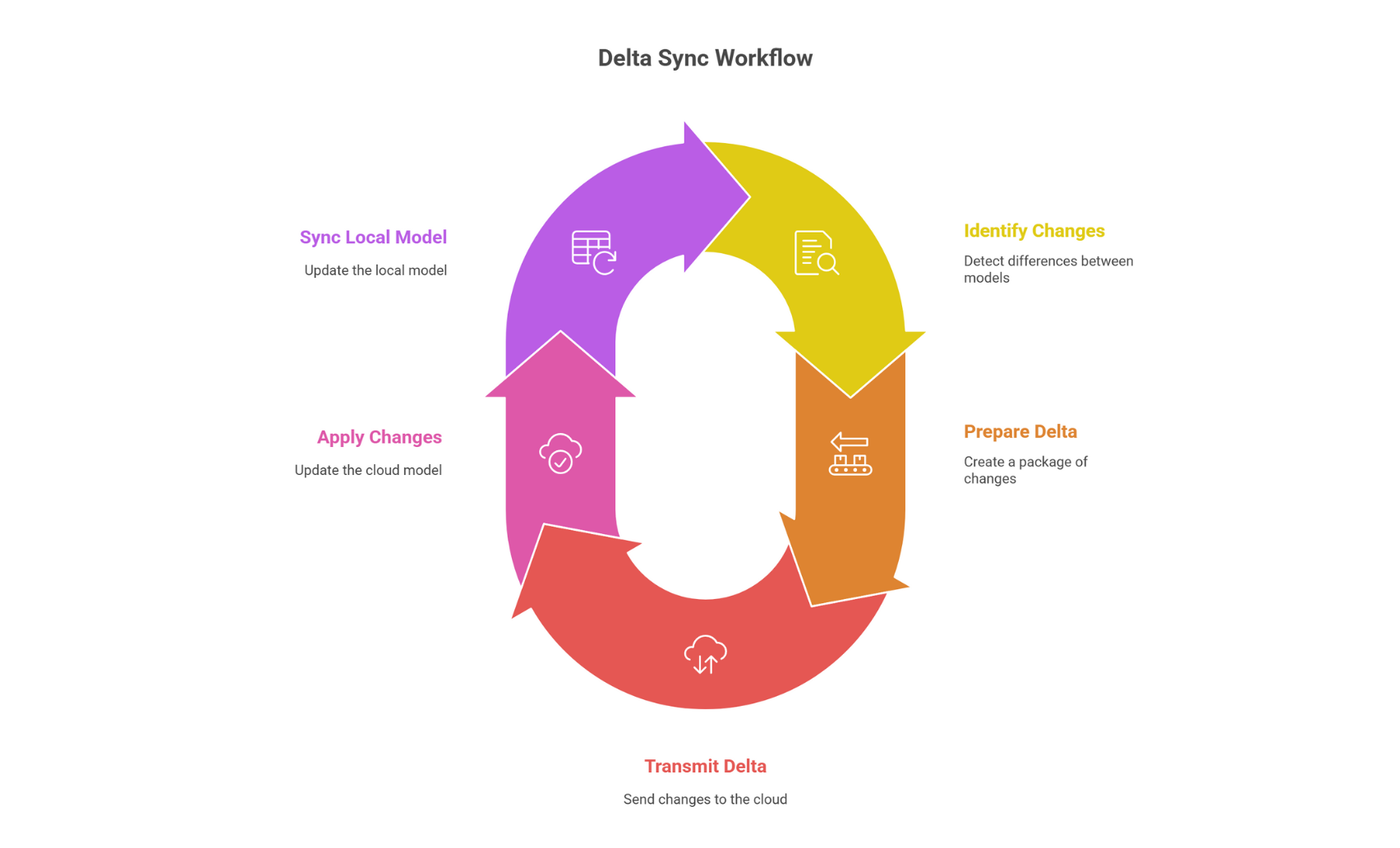
Remote AE pushes models through Autodesk Construction Cloud with delta sync. That means only the changed bits travel, not the full 600 MB file. An Autodesk University 2023 case study showed a California hospital project used Collaboration for Revit to let dispersed U.S. and overseas offices sync models efficiently, improving coordination. (Autodesk University, 2023)
Myth 6: Remote Engineers Don’t Know Local Codes
“Outsiders can’t pass plan check” is a stubborn refrain.
Fact: State-Licensed SMEs and Code-Check Playbooks
Remote AE employs ICC-certified reviewers in all 50 states plus provincial P.Eng. partners. Each deliverable runs through a code-check playbook keyed to IBC 2021 or local amendments.
Myth 7: Communication Barriers Hurt Collaboration
Language gaps and culture clashes worry project managers.
Fact: Daily Stand-Ups, Shared Dashboards, and SLA-Backed Response Times
Teams hold 15-minute stand-ups at 9 a.m. client time. All tasks are visible in a ClickUp board accessible to both parties. SLAs lock response time at ≤ 2 hours during overlap windows.
Quick Tips
- Use templated meeting notes.
- Rotate the screen-share host.
- Record calls for traceability.
Myth 8: Onboarding Remote Engineers Takes Too Long
Fact: 24-Hour Provisioning and Standardized SOPs
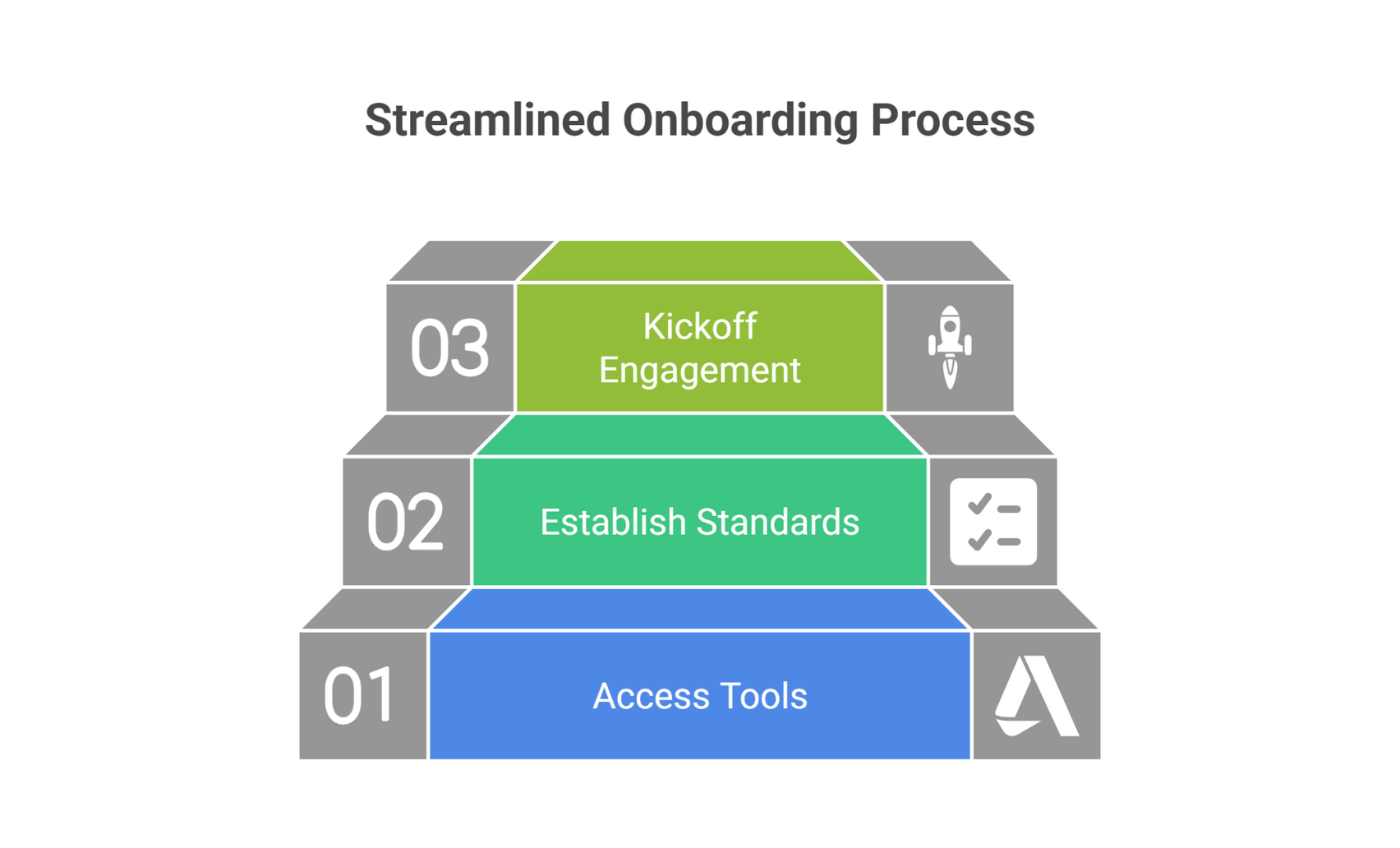
Remote AE provisions new team members in a single business day. How? Pre-approved hardware images, templated NDA packets, and cloud-based training modules.
Rapid-Start Checklist
- Share the project standards and layers table.
- Grant CDE access with role-based permissions.
- Schedule a kickoff screen share within 24 hours.
Myth 9: Intellectual Property Is at Risk
Fact: NDA Layers, Zero-Trust Access, and Audit Trails
Every Remote AE engagement stacks the client NDA + provider NDA. Zero-trust rules grant the least privilege needed. Audit logs record every file touch. When a Pacific Northwest architect lost a laptop in 2024, Geo-blocking stopped any off-shore IP from seeing the drive, even before IT wiped it (Incident Report, 2024).
IP-Safety Essentials
- Require device-level encryption.
- Use expiring file links.
- Review access logs weekly.
For deeper detail, see ISO 27001 certification.
Myth 10: Remote Support Works Only for Big Firms
Fact: Case Studies From 5- to 50-Person AEC Teams
A five-person landscape studio in Ohio sends grading plans to Remote AE two days a week. Their founder frees 12 hours for client meetings and wins new work worth $180k annually (Firm P&L, Q1 2025). Small shops benefit most from remote engineering staffing by shedding non-billable drafting time.
Fit Test for Small Firms
- Less than 10 staff, but seasonal spikes.
- Revit backlog > 40 hours/month.
- No QA manager on payroll—outsource QC instead.
Need pricing? Message us to get a free estimate.
Next Steps: Piloting Remote Support on a Live Project
A small, low-risk pilot turns talk into proof. Follow this five-step path:
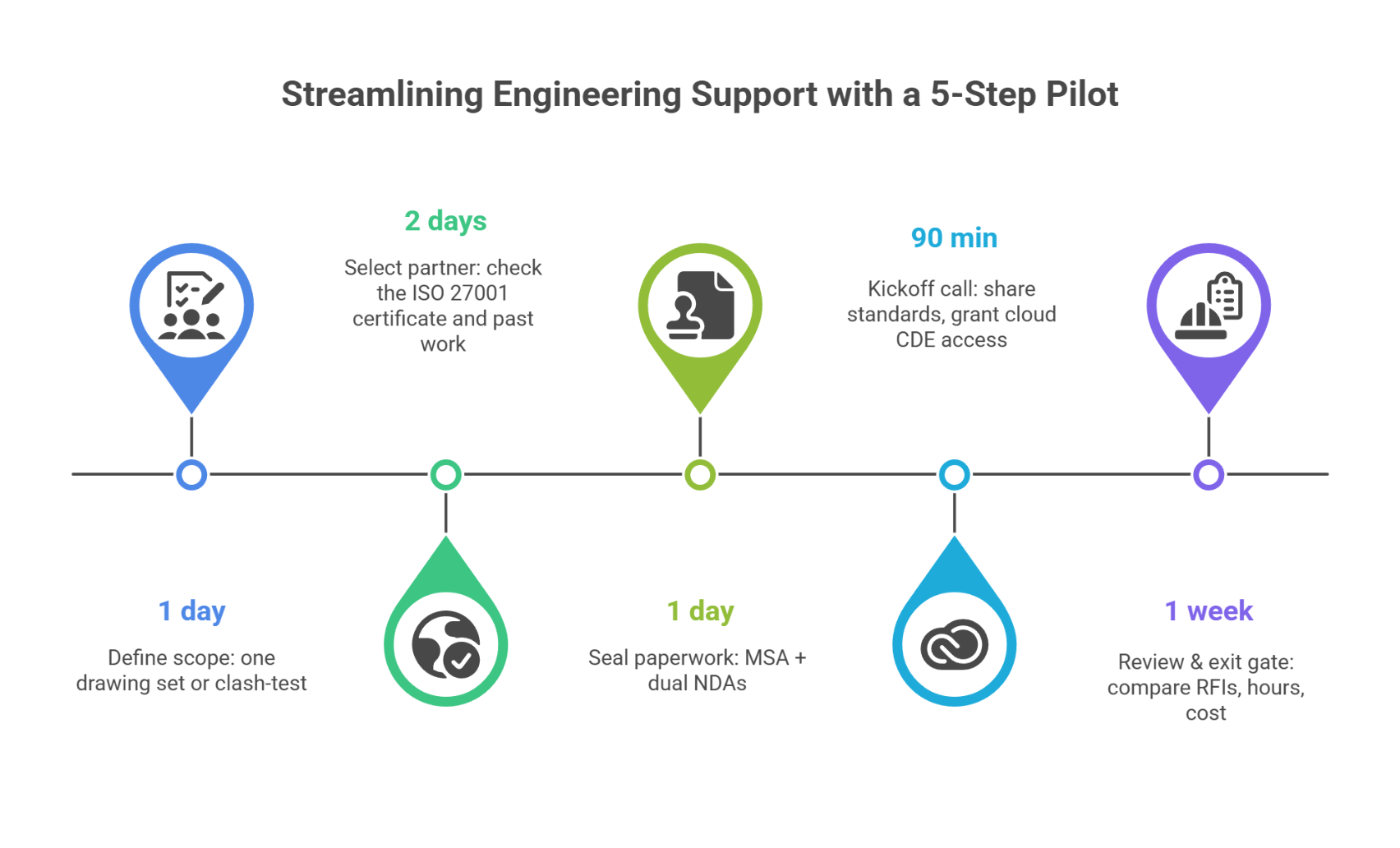
Tip: document metrics (RFIs, clash rate, hours), so your owners see gains, not guesses.