

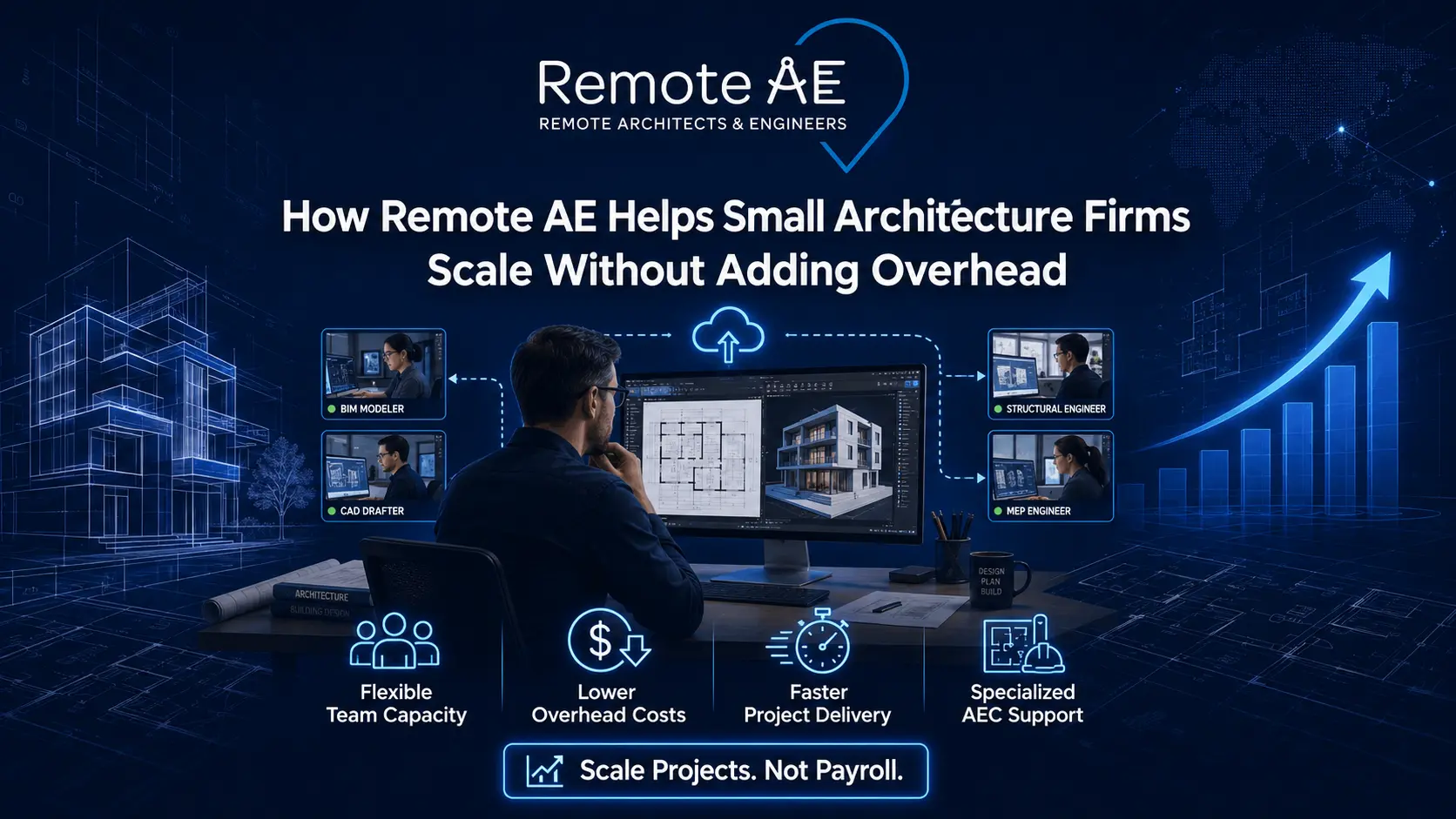
Small architecture firms consistently face the same growth ceiling: project demand rises, but adding permanent staff creates fixed overhead that shrinks margins and increases financial risk. According to the American Institute of Architects, firms with fewer than ten employees make up over 70% of all U.S. architecture practices, yet these firms carry the same client expectations as much larger studios with dedicated production staff. Remote AE solves this problem by providing dedicated remote architect assistants with a minimum of five years of AEC industry experience, giving small architecture firms the production depth of a larger practice without the payroll, office space, and overhead that come with a full-time hire.
Why Small Architecture Firms Struggle to Scale
Growth in a small architecture firm rarely stalls because of weak design work. It stalls because the operational infrastructure needed to deliver more projects, production staff, project coordination, and documentation support does not scale as smoothly as project fees do.
Unpredictable Project Workloads
Architecture project pipelines are not linear. A firm can move from three concurrent active projects to seven within a single quarter, and back to four after a planning delay or client programme change.
- Busy seasons create production backlogs that in-house teams cannot absorb without overtime or quality compromise
- Slow periods leave permanent staff underutilised, carrying fixed payroll costs that erode margins on every quiet month
- Staffing gaps during peak demand force principals to absorb production work themselves, pulling them away from design, client relationships, and business development
Rising Overhead Costs
Hiring a full-time architectural drafter or junior architect in a U.S. metro market carries a fully loaded annual cost that consistently exceeds the base salary by 25–40%.
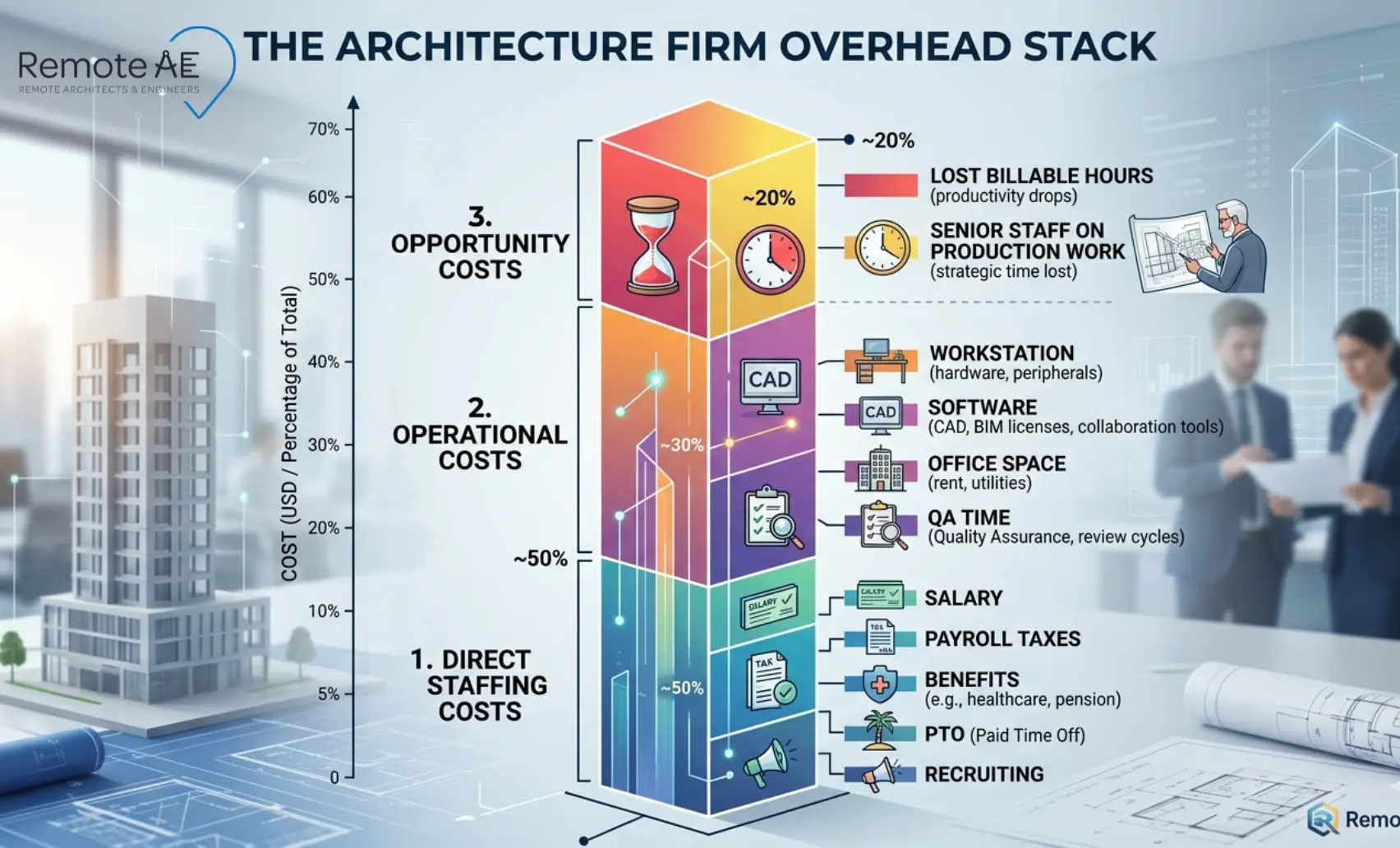
The overhead stack on a single full-time hire includes:
- Base salary, the starting point, not the total cost
- Payroll taxes, employer FICA contributions, adding 7.65% on every dollar of wages
- Benefits, health insurance, retirement contributions, and paid time off
- Recruiting fees, job boards, interview time, and potential agency costs
- Workstation and software, AutoCAD, Revit, and BIM licensing, plus hardware setup
For a small architecture firm managing tight project margins, this overhead structure creates real hiring risk.
Hiring Skilled Architectural Talent Takes Time
Finding an experienced Revit and CAD professional who understands construction documentation, can work independently, and fits a small studio culture is a months-long process in most markets.
- Recruitment cycles for architectural drafters commonly run six to twelve weeks from posting to the first day
- Training and onboarding consume additional weeks before a new hire reaches independent productivity on live projects
- The skills gap in the AEC industry, particularly for BIM-proficient drafters, means qualified candidates are in short supply relative to demand
Burnout Inside Small Teams
When production demand outpaces capacity, small teams absorb the excess through overtime, compressed deadlines, and reduced personal time. The result is predictable.
- Firm owners juggle design direction, client communication, project coordination, and production drafting simultaneously
- Senior architects handle redline cleanup and drawing schedule updates that should sit with junior production staff
- Overloaded teams produce more errors, which create QA/QC cycles that consume even more time
Burnout in small architecture practices is not a morale problem; it is a structural capacity problem with a structural solution.
What Overhead Looks Like Inside a Small Architecture Firm
Understanding the full cost of in-house staffing, not just the salary line, is the starting point for evaluating whether remote architecture staffing makes financial sense.
Direct Staffing Overhead
The visible costs of a full-time hire:
- Salary: The base compensation that anchors the cost calculation
- Payroll taxes: Employer FICA, FUTA, and state unemployment insurance contributions
- Benefits: Health insurance premiums, dental, vision, and retirement plan contributions
- Paid time off: Vacation, sick leave, and public holidays, typically 15–25 days annually
- Recruiting fees: Job board subscriptions, interview hours, and agency placement fees were used
- Training time: Onboarding hours, software training, and ramp-up period before independent productivity
Operational Overhead
The less visible but equally real costs of adding a team member:
- Workstation setup: Hardware, monitors, peripherals, and IT configuration
- Office desk space: Allocated square footage at the firm’s lease rate
- Project software: Revit, AutoCAD, BIM platform, and Bluebeam seat licences
- File management: Shared drive setup, naming convention training, and access permissions
- Admin supervision: Time spent managing timesheets, expenses, and HR administration
- QA/QC time: Senior architect hours reviewing and correcting production output during ramp-up
Opportunity Cost
The most overlooked overhead category, and often the most expensive one.
- Every hour a principal spends on production tasks is an hour not spent on client relationships, design development, or fee proposal work
- Senior architects handling low-value production tasks, view setup, sheet cleanup, drawing schedule updates, carry an internal cost that does not show up on any invoice
- Client service suffers when the team is buried in drawings, response times slow, presentation quality drops, and the firm’s competitive position weakens at exactly the moment it needs to be strongest
What Remote AE Does Differently
The remote staffing market is crowded with general virtual assistant platforms that place administrative support staff into roles that require genuine AEC expertise. Remote AE operates differently, and the distinction matters for small architecture firms whose project quality depends on the production staff behind it.
Remote AE Is Built for AEC, Not Generic Admin Support
Remote AE provides virtual architect assistants and remote architect assistants exclusively for architecture, engineering, and construction firms. Every assistant carries AEC-specific production experience, not repurposed admin skills applied to a technical role.
The company has focused on AEC-specific remote staffing for over 15 years, building a talent pool of professionals who understand construction documentation, drawing coordination, BIM workflows, and the pace and language of an active architecture practice.
Minimum Five Years of Industry Experience
This is the trust signal that matters most for small architecture firms evaluating remote architecture staffing.
A junior drafter with one year of experience creates a supervision burden; senior staff spend more time reviewing and correcting than they save by delegating. A remote architect assistant with a minimum of five years of AEC industry experience arrives understanding how permit sets are structured, what redline cleanup involves, how as-builts differ from construction documents, and what code compliance notes should appear on a drawing set.
Remote AE’s minimum experience threshold means the assistant contributes from week one, not after a months-long ramp-up that defeats the purpose of outsourced staffing.
Dedicated Full-Time Support
Remote AE places dedicated full-time assistants, not shared resources or task-based freelancers.
A dedicated remote architect assistant works exclusively for the client firm during contracted hours. Over time, they learn the firm’s drawing standards, file naming conventions, template structures, Revit families, and client communication preferences.
As that accumulated knowledge compounds, the assistant becomes faster, more accurate, and more proactive as they develop genuine familiarity with how the practice operates. This is fundamentally different from hiring a freelancer for isolated tasks who has no continuity of context between engagements.
Fully Managed Staffing Services
Remote AE manages the full staffing lifecycle; the client firm focuses on the work, not the hiring process:
- Talent sourcing: Identifying candidates from a pre-screened AEC professional pool
- Screening: Three-stage vetting process covering technical skills, software proficiency, and communication quality
- Onboarding: Structured introduction to the client firm’s workflows, tools, and project standards
- Administrative management: Payroll, compliance, and HR administration handled entirely by Remote AE, no employer obligations on the client side
How Remote AE Helps Firms Scale Without Adding Fixed Costs
Add Production Capacity Without Adding Office Space
A remote architect assistant requires no physical presence in the firm’s office, which means no additional overhead is attached to the staffing engagement.
- No extra desk or workstation to configure
- No additional office lease cost or facilities allocation
- No local IT setup or hardware procurement
- No expansion of physical space to accommodate a growing team
For small architecture firms operating in metro markets where office space carries high per-square-foot costs, this alone represents meaningful overhead avoidance.
Add Talent Without Long Hiring Cycles
Remote AE compresses the time between identifying a staffing need and having a productive assistant contributing to live projects.
The process:
- Remote AE consults with the client to define the role, skills, tools, project types, and communication requirements
- The recruiting team selects top candidates from a three-stage screened pool
- The client interviews two matched candidates and selects the best fit
- There is no financial obligation before the decision stage; the consultation and matching process carries no upfront cost
For a small architecture firm that cannot afford to lose six to twelve weeks to a traditional recruitment cycle during a busy project period, this timeline is a genuine competitive advantage.
Control Cost With a Predictable Staffing Model
Remote AE pricing starts from $499/week, a fixed, predictable weekly fee that covers the full-time dedicated remote architect assistant without employer contributions, benefit costs, or equipment overhead.
The predictable weekly fee also scales with project demand, engages full-time during busy phases, adjust based on workload without the fixed commitment of a permanent employment contract.
Additional Benefits
Faster Project Delivery
- Additional production support means that drawing sets move faster through review cycles
- Better deadline management, a dedicated assistant owns specific deliverable tracks without competing for senior staff attention
- Improved workflow continuity, no production gaps when the principal is in client meetings or site visits
Easier Team Scalability
- Add a second remote architect assistant during peak project phases without a new hiring cycle
- Scale back to a single assistant during quieter periods, matching staffing cost to actual project revenue
- No redundancy risk, no notice periods, and no HR complexity when project volume shifts
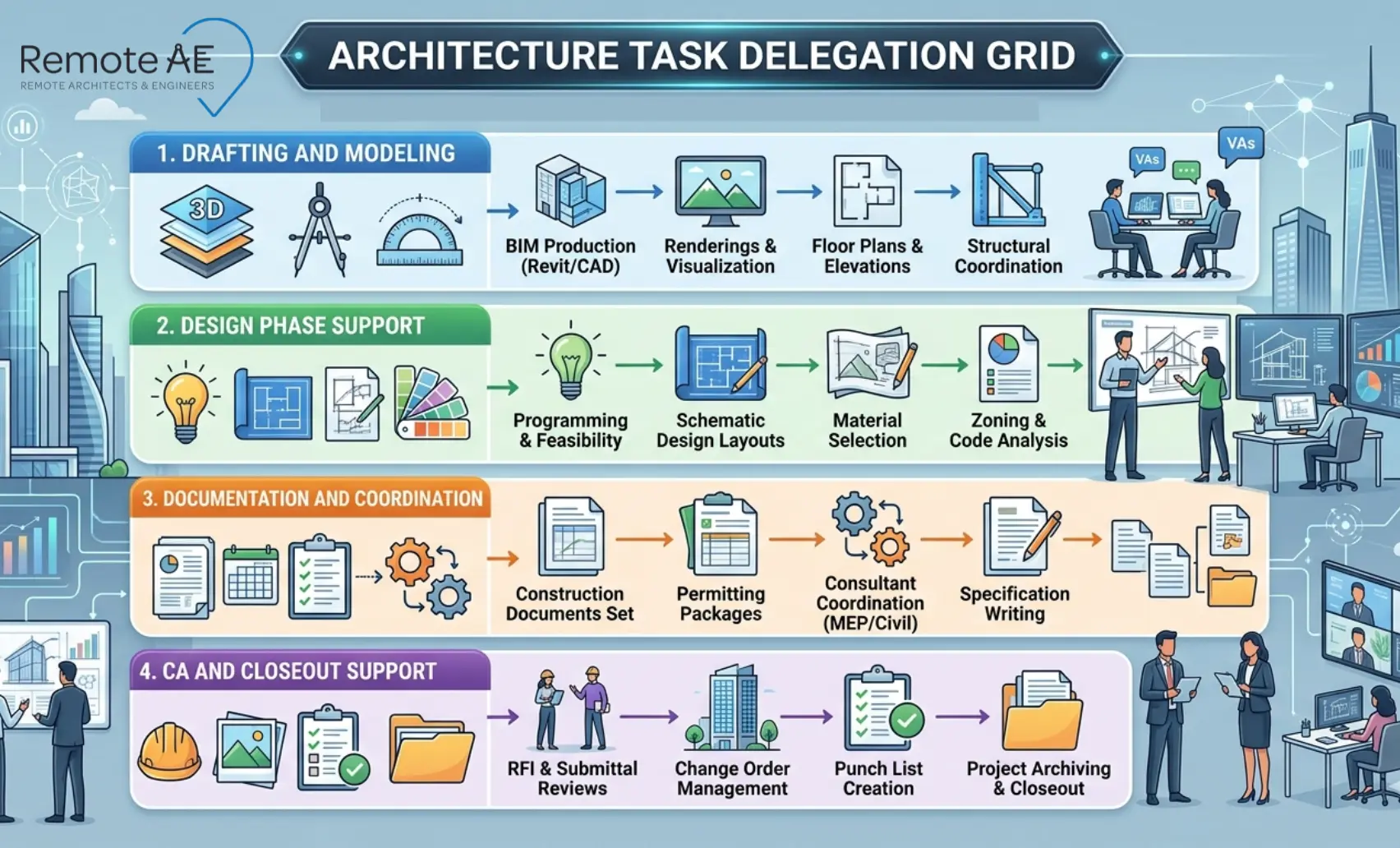
Architecture Tasks Small Firms Can Delegate to Remote AE
Remote AE’s virtual architect assistants cover the full range of production and coordination tasks that currently consume licensed architect time in small practices.
Drafting and Modeling Support
The highest-volume production tasks for most small architecture firms:
- AutoCAD drafting: Floor plans, elevations, sections, and details, clean, production-ready drawings to firm standards
- Revit modeling: BIM model updates, view setup, sheet population, and family management
- SketchUp modeling: Concept massing, furniture layouts, and space planning studies for design development
- Drawing updates: Incorporating design changes, consultant backgrounds, and review revisions into current drawing sets
- Redline cleanup: Converting marked-up PDFs and Bluebeam annotations into updated drawing sheets
- Existing condition updates: As-built drawing reconciliation from field notes and site photographs
Design Phase Support
Design phase production tasks that remote architect assistants handle under licensed architect direction:
- Schematic design support, plan options, massing studies, and preliminary area calculations
- Space planning, furniture layouts, circulation studies, and program compliance checks
- Mood board and concept board assembly for client presentations
- Programming support, area tabulations, adjacency matrices, and room data sheets
- Design development drawing production, coordinated floor plans, elevations, and wall sections
Documentation and Coordination Support
Construction documentation is where production time is densest, and where delegation delivers the clearest time savings:
- Drawing schedules, door, window, finish, and equipment schedules are maintained and updated
- Material and finish schedules, coordinated against specifications and client selections
- Reflected ceiling plans and flooring plans, updated to match the current design and consultant coordination
- Elevation layouts, interior elevations coordinated with room finish schedules, and millwork drawings
- Specification review, checking drawing notes and details against specification sections for consistency
- Scope clarifications, preparing RFI-style questions for consultant or contractor response
Construction Administration and Closeout Support
CA and closeout tasks that remote architect assistants manage under the architect of record’s oversight:
- Field note updates, incorporating site observation notes into construction document sets
- CA documentation, submittal logs, RFI logs, and architect’s supplemental instruction tracking
- Punch lists, compiling, formatting, and tracking contractor punch list items through to resolution
- As-builts, updating record drawings from contractor-marked construction sets
- Site visit reporting, structuring field observation notes into formal site report documents
- Due diligence support, existing condition documentation, code compliance research, and zoning analysis
How Remote AE Integrates Into Existing Architecture Teams
Communication and Workflow Alignment
A remote architect assistant integrates into the firm’s existing communication tools and project management systems, not the other way around.
- Daily async updates via Slack, Teams, or email, covering completed tasks, in-progress work, and open questions
- Shared cloud-based file environments, Autodesk Construction Cloud, BIM 360, Google Drive, or SharePoint, giving the remote assistant direct access to live project files
- Tool alignment, the assistant works in the same Revit templates, AutoCAD standards, and Bluebeam workspaces as the in-house team
Seamless Team Extension Model
Remote AE positions its assistants as team members, not vendors. The goal is seamless integration into the firm’s delivery process rather than a separate outsourced track that the principal has to manage separately.
- The remote architect assistant attends relevant project coordination meetings
- They receive the same project briefs, drawing issue logs, and consultant information as in-house staff
- Over time, they develop a genuine understanding of the firm’s client preferences, drawing standards, and quality expectations, which progressively reduces the principal’s review burden.
Long-Term Working Relationships
The dedicated model creates continuity that freelance and task-based platforms cannot provide.
- One consistent remote architect assistant works across multiple projects, building cumulative knowledge of the firm’s workflow
- Reduced turnover disruption, the firm does not restart the onboarding process every time a new project begins
- Long-term relationships allow the assistant to flag issues proactively, drawing coordination conflicts, a missing consultant response, and an approaching deadline, without waiting to be asked
This continuity is what transforms a remote architect assistant from a production resource into a genuine team member.
Signs Your Architecture Firm May Need Remote Staffing Support
Use this as a quick self-assessment. If two or more of these apply to your firm right now, remote architecture staffing is worth a serious evaluation.
- Missed Deadlines Becoming Common: Drawing sets consistently deliver late, not because of design complexity, but because the production queue has no capacity buffer. Consultants, contractors, and clients are regularly waiting on architectural backgrounds, permit sets, and presentation packages
- Internal Teams Constantly Overloaded: Senior architects are doing production work that should sit with junior staff. Principals are in Revit after hours, the team is delivering, but the pace is unsustainable. Error rates are climbing because overloaded staff have no time to check their own work
- Turning Down Projects Due to Limited Capacity: Your firm has declined project enquiries in the past year, not because the work was a poor fit, but because the production team could not absorb another active project. Every declined project is direct revenue that a competitor captured
- Spending Too Much Time Hiring Instead of Designing: You have had a drafter or junior architect role open for weeks or months with no suitable hire. The recruitment cycle is consuming principal time that should be generating billable project revenue
- Profit Margins Shrinking Due to Overhead: Fee income is growing, but margins are not; payroll, office space, and software costs are rising faster than project revenue. The firm is busier than ever, but not meaningfully more profitable
How to Get Started With Remote AE
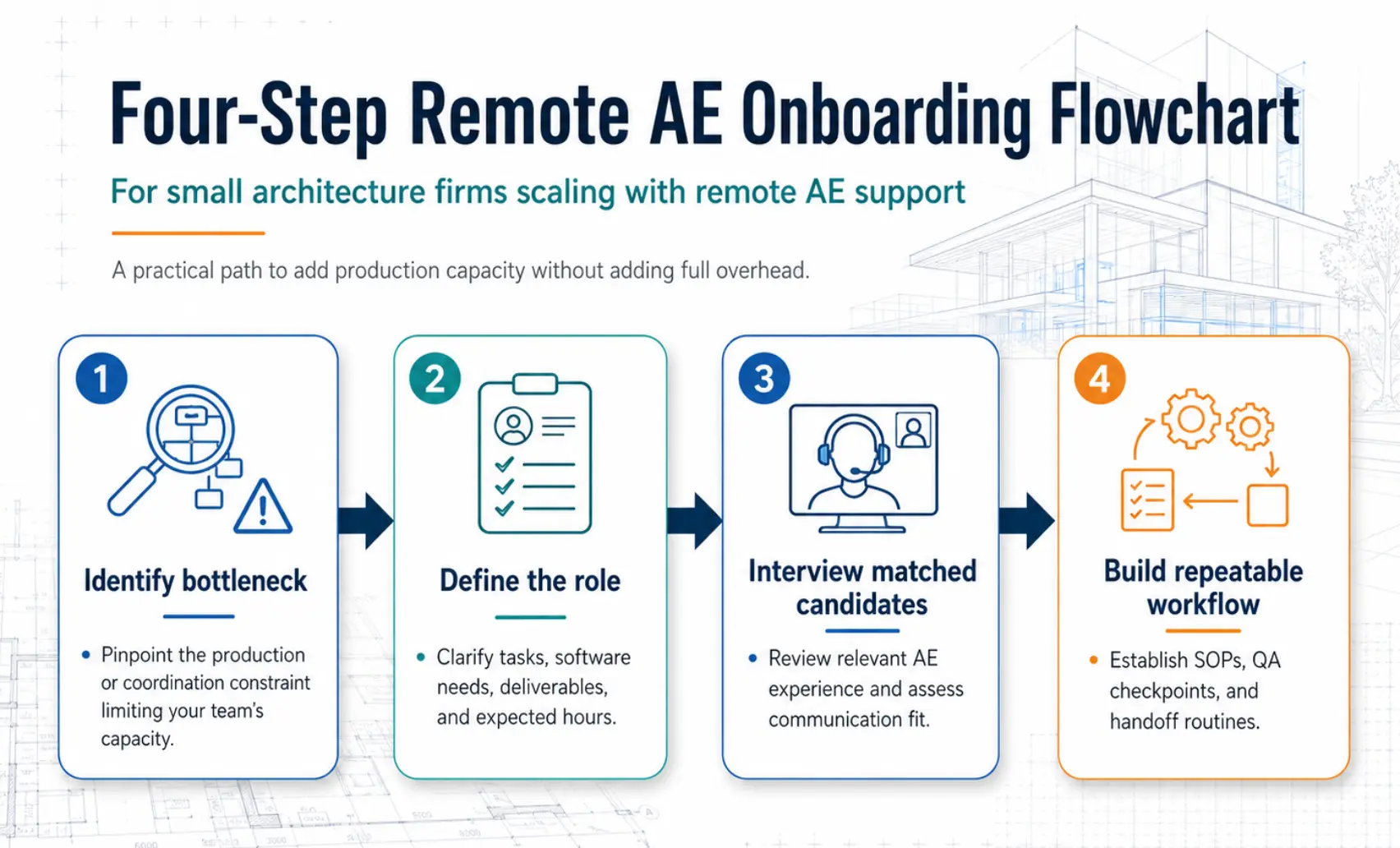
Getting a remote architect assistant working on your projects is a four-step process, and the first step costs nothing.
Step 1: Identify the Bottleneck
Before defining a role, identify where your team is losing the most time. The clearest bottlenecks are usually:
- Drafting backlog, Revit, and AutoCAD drawing updates are sitting in the queue
- Redline cleanup, marked-up drawings waiting to be incorporated into current sets
- CA admin, submittal logs, RFI tracking, and punch list management are falling behind
- Presentation work, mood boards, concept boards, and client decks were formatted too slowly
- Permit set support, drawing coordination, and code compliance notes consume senior architect time
One honest hour mapping where your team’s time actually goes will clarify the starting point better than any job description template.
Step 2: Define the Role
Once the bottleneck is clear, define the role around it. Common starting configurations for small architecture firms:
- Remote architect assistant: General production support, Revit, AutoCAD, drawing coordination, and documentation
- BIM modeler: Dedicated Revit and BIM platform production, model updates, sheet population, and coordination
- Drafting assistant: AutoCAD-focused, 2D drawing production, redline cleanup, and permit set support
- Project coordinator: Client communication support, drawing schedule management, and CA documentation
- Estimating support: Quantity takeoffs, specification review, and procurement coordination
A focused role definition produces better candidate matches than a broad wish list.
Step 3: Interview Matched Candidates
Remote AE handles the sourcing and screening; the client firm makes the final selection.
- Remote AE reviews the role definition and identifies candidates from its pre-screened AEC professional pool
- Two matched candidates are presented to the client for an interview
- The client selects the best fit; there is no financial obligation at this stage
- The process moves to contract and onboarding only after the client confirms their selection
Step 4: Build a Repeatable Workflow
The first two weeks determine whether the remote architect assistant integrates smoothly or requires constant management. A simple onboarding structure prevents most early friction:
- Daily check-ins: Brief async updates covering completed tasks, in-progress work, and open questions, reduce the need for reactive follow-up
- Weekly priorities: A shared task list issued at the start of each week, clear deliverables, deadlines, and dependencies
- File naming rules: One-page document covering project folder structure, drawing naming conventions, and revision numbering
- QA checklist: A simple pre-delivery checklist that the assistant runs before submitting any drawing or document for review
- Tool access: Revit, AutoCAD, BIM platform, and Bluebeam access confirmed and tested before the first live project task
- Delivery deadlines: Agreed turnaround times for standard task types, redline updates, drawing schedule revisions, permit set PDFs
After four weeks of this rhythm, most firms reduce the check-in frequency as the remote architect assistant builds independent familiarity with the practice’s standards.
Scale Your Architecture Practice, Without Scaling Your Overhead!
Your firm does not need more permanent staff to take on more projects. It needs the right production support at the right cost structure. Remote AE places dedicated remote architect assistants with a minimum of five years of AEC industry experience, trained in Revit, AutoCAD, BIM, SketchUp, and Bluebeam, and ready to own your drafting backlog, redline cleanup, permit sets, as-builts, and CA documentation from week one.
Book a Free Consultation with Remote AE today, No Obligation, No Upfront Cost.
FAQs – How Remote AE Helps Small Architecture Firms
What is a remote architect assistant?
A remote architect assistant supports architecture firms with tasks such as drafting, Revit modeling, permit documentation, redline updates, BIM coordination, scheduling, and project admin work. They work remotely inside the firm’s workflows and software stack while the licensed architect retains design control and final approval.
Can a remote architectural assistant work with Revit and AutoCAD?
Yes. Most remote architect assistants are trained in Revit, AutoCAD, Bluebeam, Autodesk Construction Cloud, and related AEC tools. They can update drawings, manage sheet sets, apply redlines, coordinate models, and support documentation under the architect’s standards.
Is remote staffing a good fit for small architecture firms?
Yes. Small firms often use remote staffing to handle production workload, deadlines, permit sets, and BIM support without hiring full-time local staff immediately. It gives firms more flexibility during busy periods while helping control payroll and overhead costs.
How does Remote AE vet architect assistants?
Remote AE-style firms typically screen for AEC software skills, drafting quality, communication ability, and understanding of architecture workflows. Many also use test tasks, portfolio reviews, and practical production exercises before assigning staff to client projects.
Will a remote architect assistant replace in-house staff?
Usually no. Most firms use remote assistants to support existing teams, not replace them. Remote staffing helps architects and project managers spend less time on repetitive production work and more time on design, coordination, and client communication.