


Remote design feedback fails when it stays vague, verbal, and untracked. In AEC, that turns into rework: wrong versions get updated, markups get missed, and decisions get re-litigated. A major industry report found that poor project data and communication caused 52% of rework. Good feedback is structured. It is visual. It is traceable. When done right, it reduces RFIs, submittal delays, and drawing rework. When done poorly, it creates confusion, version control issues, and endless revision cycles. This guide outlines best practices, tools, and workflows to give feedback to remote designers that AEC teams can use immediately.
Why remote design feedback breaks (and what “good” looks like)
Remote feedback breaks when it turns into opinions, loose language, and disconnected artifacts. “Good” looks boring: specific markups tied to a version, plus a short written note that ends with an owner and a due date.
Design critique vs preferences
Many teams confuse design critique with personal opinion. Good critique checks whether the design meets project objectives, codes, and constraints.
Bad feedback sounds like:
- “I don’t like this layout.”
- “This feels off.”
Useful critique sounds like:
- “Clearance does not meet code requirements.”
- “Clash detected between duct and beam.”
In AEC workflows, feedback must connect to:
- Drawings
- BIM model conditions
- Specifications
- RFIs or submittals
Not personal taste.
The remote shift: spoken feedback → written, async, traceable
In traditional offices, feedback happens verbally.
But remote teams rely on:
- PDF drawings
- BIM model markups
- Comment threads
- Issue tracking systems
This shift changes everything.
Written and visual feedback is:
- Traceable
- Verifiable
- Reviewable across time zones
A redline in Bluebeam Revu or an issue in Autodesk Construction Cloud (ACC) can be tracked. A hallway conversation cannot. This is why AEC drawing redlines online, and BIM model markup and issue tracking are now standard practice.
Why Feedback Matters in Remote Design Work
Remote teams don’t get hallway clarification. That raises the cost of every ambiguous comment.
The Cost of Poor Feedback in AEC Projects
Poor feedback creates real project risks. It is not just an internal inconvenience.
It impacts:
- Project timelines
- Construction sequencing
- Coordination across disciplines
Common outcomes include:
- Multiple revision cycles
- Increased RFIs
- Delayed submittals
- Rework in drawings and models
For example, unclear markups on a clash report can lead to unresolved conflicts in the BIM model, which then appear on-site. At that point, the cost multiplies.
Remote Teams Need Clarity More Than Ever
Remote teams do not have instant clarification. They rely on documentation.
Key challenges include:
- Time zones delay responses
- Lack of face-to-face discussion
- Heavy reliance on written instructions
This makes remote design feedback best practices critical. If feedback is vague, designers cannot act on it. If feedback is structured, work moves faster.
What Good Feedback Looks Like (Core Principles)
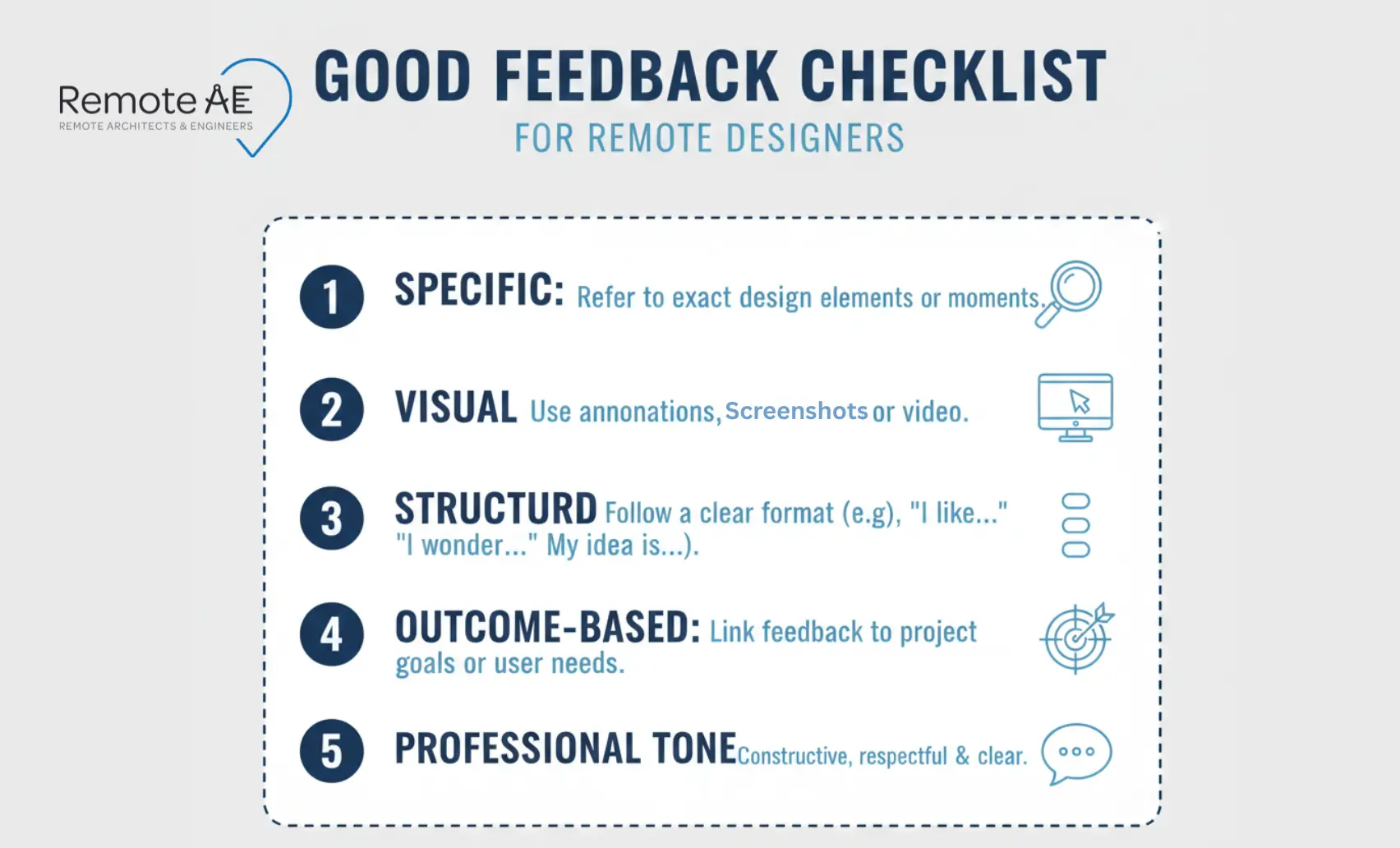
Good feedback is not long. It is clear, actionable, and connected to the work.
Be Specific and Actionable
Avoid vague instructions.
Instead of:
- “Adjust spacing”
Use:
- “Increase margin to 10mm on sheet A101”.
Actionable feedback reduces back-and-forth.
Use Visual References
In AEC, visuals are essential.
Use:
- Markups on PDF drawings
- Screenshots of BIM model views
- Clash report snapshots
- Annotated renderings
Tools like Bluebeam Studio Sessions or Revizto markups/issues allow teams to attach feedback directly to geometry or sheets. This removes ambiguity.
Keep Feedback Structured
Unstructured comments create confusion.
Use:
- Bullet points
- Numbered lists
- Issue tracking systems
A structured comment is easier to review and close.
Focus on Outcomes, Not Just Changes
Do not just say what to change. Explain why.
For example:
- “Shift wall 300mm to maintain ADA clearance.”
This connects the change to compliance or performance.
Balance Criticism with Clarity
Avoid emotional or vague comments.
Bad:
- “This doesn’t look right.”
Better:
- “Door swing conflicts with egress path”
Clear feedback improves collaboration.
Pick the right feedback “container” (match the tool to the deliverable)
Remote feedback gets messy when you use the wrong container. A long email thread is a bad container for a drawing set. A screenshot is a bad container for a coordinated model issue.
PDF drawing redlines (plans, sections, details, submittals)
For PDF sets, a markup tool with layers, clouds, and stamps is the cleanest option.
Use Bluebeam Revu / Studio Sessions when you need:
- one shared “review room.”
- markups tied to a single PDF version
- an audit trail of comments and authors
Practical setup tips
- Name the session by package + date (example: CD_Set_2026-02-21)
- Require every comment to include sheet + grid/level + action
- Use a consistent status set: Open / In progress / Ready for re-check / Closed
BIM model review (Revit/Civil files in cloud viewers)
For BIM workflows, feedback must live in the model environment.
Use:
- Autodesk BIM Collaborate
- Autodesk Construction Cloud (ACC)
These platforms support:
- Model-based markups
- Issue tracking
- Version control
This is critical for the remote BIM coordination workflow.
2D/3D coordination + field-friendly issue workflows
Coordination requires location-based tracking.
Tools like Revizto allow:
- 3D issue tagging
- Clash tracking
- Field coordination
This helps bridge design and construction.
UI boards/web comps (Figma, prototypes)
For UI or presentation design:
- Use Figma comments
- Maintain clean comment threads
Each comment should have:
- Clear action
- Owner
- Status
When a screenshot or quick video beats a paragraph
Sometimes, text is not enough.
Use:
- Screen recordings
- Short walkthrough videos
These help explain:
- Complex markups
- Navigation issues
- Coordination problems
This is essential for asynchronous communication across time zones.
The “7-step” feedback workflow AEC teams can reuse
Unstructured feedback leads to missed items, repeated RFIs, and confusion across teams. A simple, repeatable workflow helps manage remote AEC teams and keeps feedback actionable.
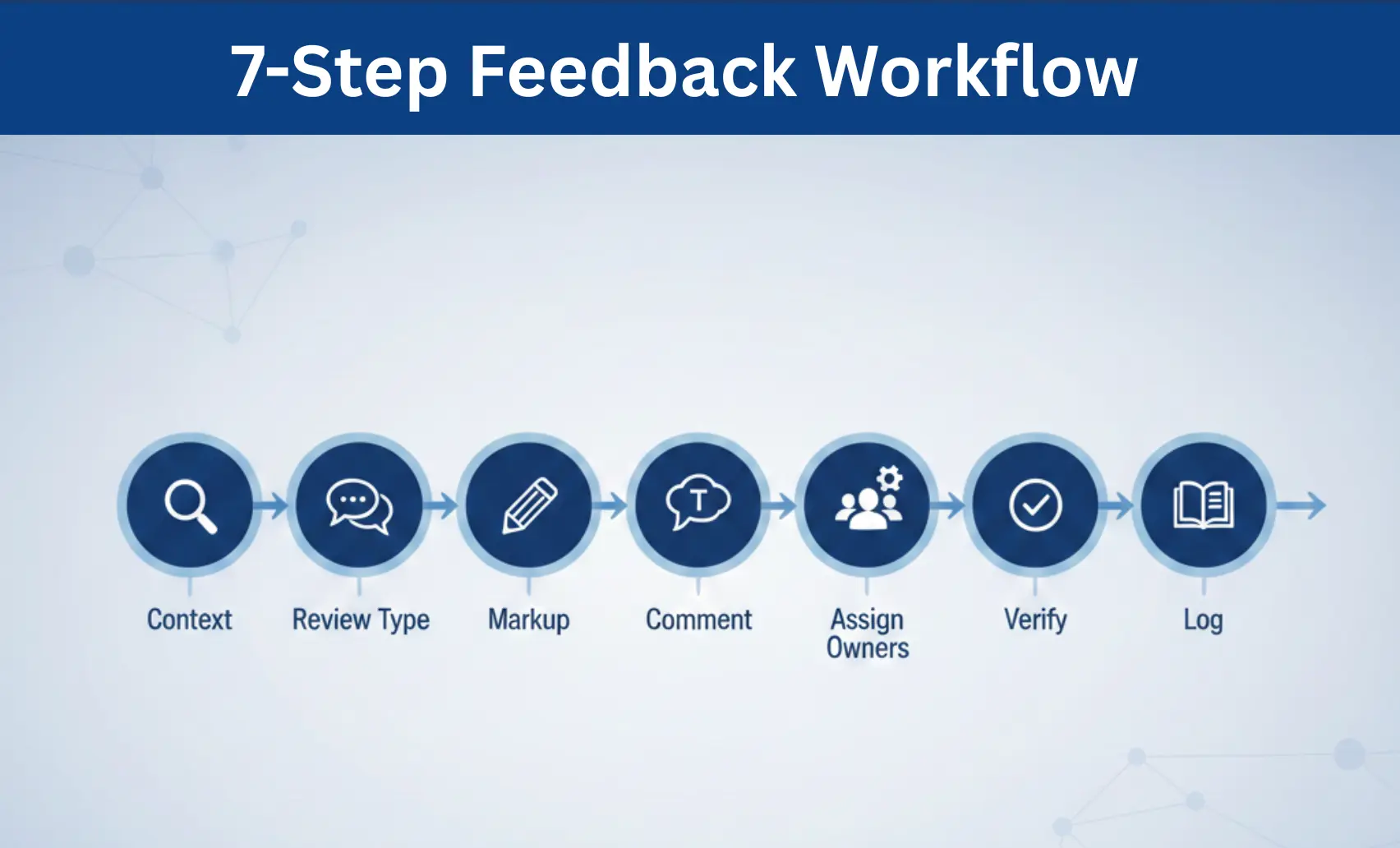
Step 1: Set context
Every review must start with context. Without it, designers guess.
Always include:
- Project name
- Sheet or BIM model version
- Design phase (SD/DD/CD)
- Due date
- Type of decision needed
Example:
“Review Sheet A301, CD set v3.2. Need approval for stair layout before submittal.”
This avoids rework caused by reviewing outdated versions.
Step 2: Define the review type
Not all reviews are the same. Clarify the intent before marking up.
Common review types in AEC:
- QA/QC review
- BIM coordination/clash detection
- Constructability review
- Client or submittal edits
When teams mix review types, feedback becomes inconsistent.
Step 3: Mark up precisely
Precision matters.
Use proper markup techniques:
- Revision clouds for visibility
- Callouts for explanation
- Dimensions for measurable changes
- References (gridline, level, detail tag)
Example:
“Align column to gridline C at Level 2. See Detail 5/A502.”
Step 4: Write comments that designers can act on
Each comment should follow a consistent structure.
Use a simple template:
- What is the issue
- Where it occurs
- Why it matters
- Required change
Example:
“Clash between duct and beam at Grid D-4. Clearance not met. Lower duct by 150mm.”
This format works well for AEC drawing redlines online and issue tracking systems.
Step 5: Assign owners and statuses
Feedback without ownership gets ignored.
Each issue should include:
- Assigned person
- Status
- Deadline
Typical statuses:
- Open
- In progress
- Ready for re-check
- Closed
Platforms like Autodesk Construction Cloud (ACC) and Revizto handle this well.
Step 6: Verify fixes
Never assume a fix is done. Always check the updated version.
Common mistake:
- The reviewer assumes the issue is resolved
- The designer misunderstood the request
Always verify against:
- Updated PDF drawings
- BIM model changes
- Revised submittals
Step 7: Capture decisions
Without a record, teams repeat the same discussions.
Maintain a simple decision log:
- What was decided
- Who approved it
- When
- Constraints
This is critical for:
- RFIs
- Submittals
- Change orders
It prevents rework later in the project.
Best Practices for AEC Teams Working with Remote Designers
Strong systems reduce dependency on individuals. These practices help teams manage remote architecture team management effectively.
Standardize Feedback Templates
Create standard templates for:
- Drawing reviews
- BIM issues
- Submittals
This ensures consistency across projects. It also helps new team members onboard faster.
Use Version Control Systems
Version control is critical.
Without it:
- Teams review outdated sheets
- Errors get reintroduced
Use:
- Autodesk Construction Cloud / BIM 360
- Procore
- Centralized CDE systems
Ensure:
- The latest version is always clear
- Older versions are archived
Schedule Feedback Loops
Feedback should not be random. Use a consistent rhythm:
- Weekly design review
- Milestone-based reviews
- Coordination sessions
This supports a weekly check-in agenda for remote project teams.
Combine Async + Sync Communication
Async communication works well for:
- Markups
- Issue tracking
- Documentation
Sync communication is useful for:
- Complex discussions
- Decision-making
Use both.
Maintain Documentation
Every decision must be documented.
Track:
- RFIs
- Submittals
- Change orders
- Approvals
This creates accountability.
Ask questions when requirements are unclear
Good feedback is not always instruction. Sometimes it is clarification.
Examples:
- “Confirm fire rating requirement for this wall?”
- “Is this clash a priority or an acceptable condition?”
This supports better decision-making.
Separate “must fix” from “nice to have”
Not all comments are equal.
Tag priorities:
- Must fix
- Coordination
- Optional
This reduces unnecessary work and helps teams focus.
How Remote AE Supports Efficient Design Feedback
Strong feedback systems require consistent execution. That is where many AEC teams struggle. The process exists, but it is not followed consistently across projects, disciplines, and time zones.
Remote AE helps close that gap by providing structured production support aligned with real AEC workflows.
Dedicated AEC Virtual Assistants
Remote AE provides virtual assistants trained specifically for Architecture, Engineering, and Construction (AEC) work.
They understand:
- PDF drawings, sheets, and submittals
- BIM models and Revit files
- RFIs, change orders, and issue tracking workflows
These are not generic assistants. They work inside technical environments where precision matters.
Experience with AEC Workflows
Remote AE teams are familiar with standard design and coordination processes.
They support:
- Design review workflows with structured markups
- AEC drawing redlines online using tools like Bluebeam Revu and ACC
- BIM model markup and issue tracking in platforms like Autodesk BIM Collaborate and Revizto
They understand how:
- Coordination affects downstream deliverables
- Version control impacts approvals
- Poor feedback increases rework
This reduces the burden on your internal team.
Streamlined Communication Process
Remote work fails when communication is unstructured.
Remote AE introduces clarity through:
- Organized comment threads and issue tracking
- Clear ownership of tasks and deliverables
- Documented decisions using simple logs
They support asynchronous communication, which is critical when teams work across time zones.
Instead of scattered feedback, everything is:
- Traceable
- Actionable
- Organized
Faster Turnaround with Clear Feedback Loops
When feedback is clear, production speeds up.
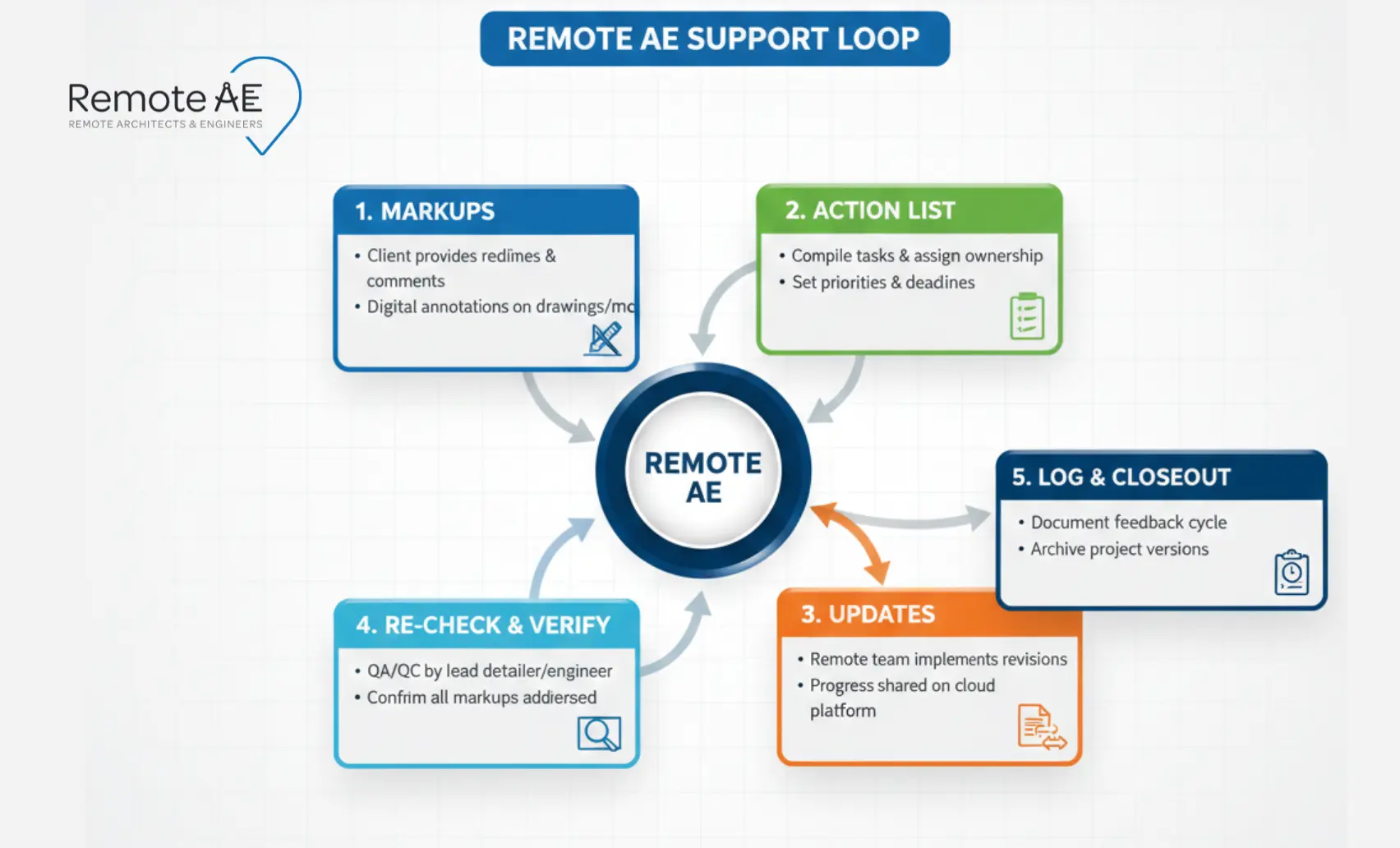
Remote AE supports structured workflows such as:
- Markups → updates → QA → recheck → issue
- Issue tracking → assignment → resolution → closure
This reduces:
- Revision cycles
- Miscommunication
- Delay in approvals
The result is faster delivery with fewer errors.
Use Remote AE for CAD/BIM Production Support
Design teams should focus on decisions. Production work should not slow them down.
Remote AE supports:
- CAD drafting and redlines
- BIM coordination updates
- Construction documentation
- Issue tracking and updates
This allows your internal team to focus on:
- Design intent
- Client communication
- Approvals
While production continues in parallel.
Turn Feedback Into Faster, Cleaner Project Delivery!
Clear feedback drives better projects. But it only works when someone executes it consistently across drawings, models, and coordination workflows.
Remote AE provides AEC-trained virtual assistants who support design review workflows, CAD/BIM production, and issue tracking under your standards and approvals. Your team stays focused on decisions, while production, updates, and coordination move forward without delays.
You keep control of decisions. We handle the production and coordination.
Schedule a call with Remote AE for a fast scope review and a clear weekly quote.
FAQs – How to Give Feedback to Remote Designers
How do you give actionable feedback to a remote designer?
Be precise and reference the exact sheet, view, or frame. State: what is wrong, why it matters, and what “good” looks like. Attach a markup or screenshot. End with a clear action and deadline. Avoid vague comments like “fix this” or “looks off.”
What should a design feedback comment include (template)?
Use a short structure:
- Location: Sheet A3.1, Detail 4
- Issue: Guardrail height conflicts with the code minimum
- Standard/Ref: IBC 1015.2
- Requested Change: Increase to 42″ and update the section
- Due: Before next coordination call
This format reduces back-and-forth and speeds closure.
Which markup tool is best for AEC PDF redlines?
Bluebeam Revu is the industry standard for PDF redlines due to measurement tools, custom toolsets, and Studio Sessions. For model-linked issues, ACC markups are strong. The best tool is the one tied to your workflow-avoid splitting comments across email and chat.
What’s the best way to handle time zones for design reviews?
Set one official project time zone for all deadlines. Hold live reviews during overlap hours and use recorded walkthroughs for others. Post markup summaries immediately after meetings. Predictable cadence reduces missed feedback and avoids version confusion.