

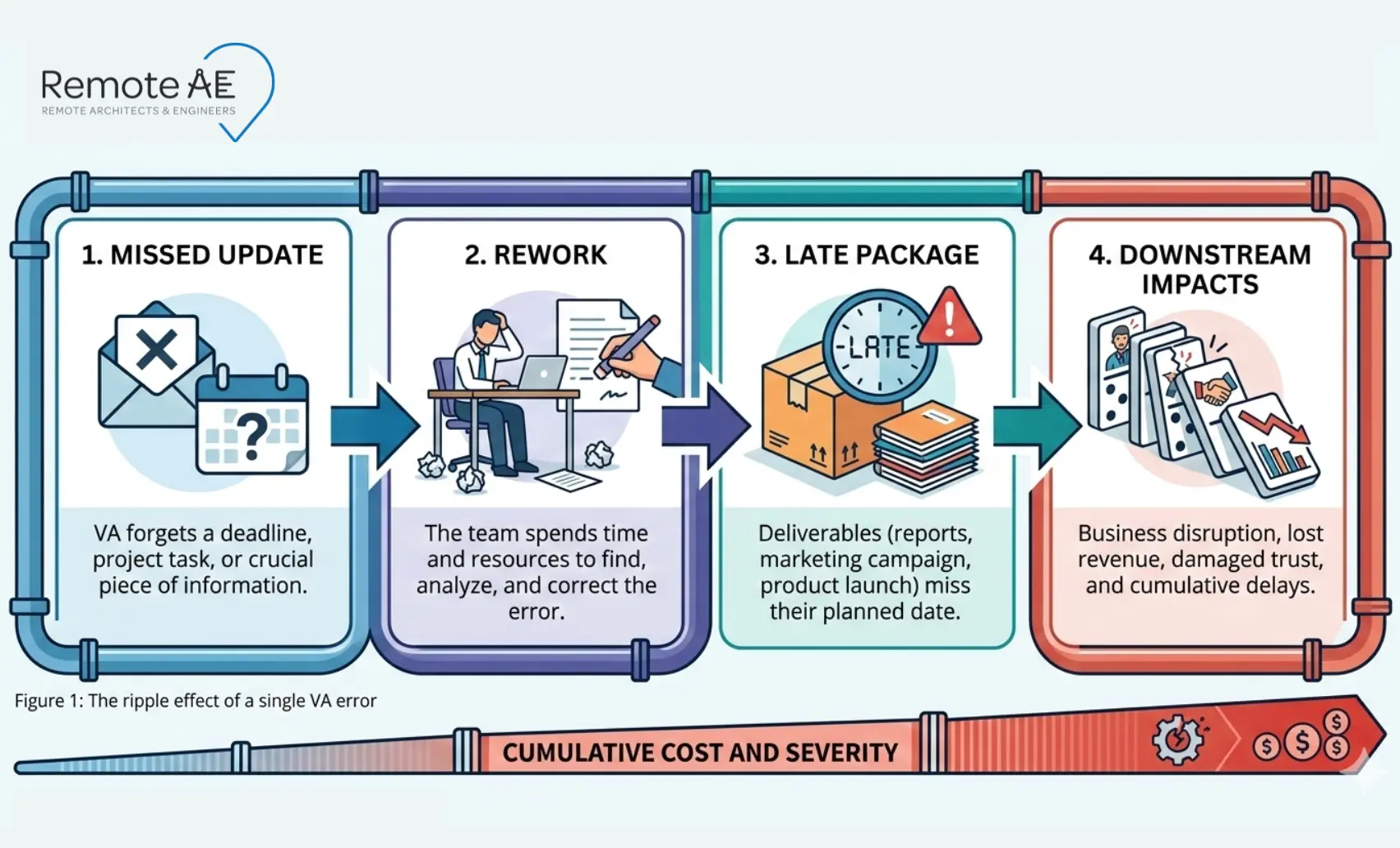
In AEC, the replace vs retrain decision is harder because handoffs, versions, and QA gates create real downstream risk. A small documentation miss can turn into RFIs, rework, and late packages. One industry report found 52% of rework was caused by poor project data and communication (FMI + PlanGrid, 2018). That’s why the right move isn’t always “replace fast” or “train forever.”
This guide gives an AEC-specific way to diagnose the real issue, recognize retrain signals vs hard replacement lines, and protect continuity if you do switch. You’ll also get KPIs and a decision matrix you can reuse.
Why is this decision harder in AEC
AEC support roles touch deliverables that get reused across phases. That makes small errors expensive.
AEC work has “handoff risk” (DD → CD → CA)
In AEC workflows, work does not stay isolated. It moves through design phases-SD, DD, CD, and construction administration (CA).
A small issue in DD can multiply by the time you reach CDs. A missed dimension, wrong detail, or incorrect model element in Revit can affect multiple sheets. By the time it reaches construction, it can trigger RFIs or change orders.
This is why deciding when to replace a virtual assistant vs retrain a virtual assistant is critical. Errors are not just mistakes. Some risks travel across phases.
Tooling is specialized (Revit, AutoCAD, ACC/BIM 360, Procore, Bluebeam)
AEC work depends on specialized tools:
- Revit, AutoCAD, and Navisworks for modeling and drafting
- Autodesk Construction Cloud (ACC) / BIM 360 for coordination and file control
- Procore for RFIs, submittals, and transmittals
- Bluebeam Revu for markups and QA/QC
These are not general admin tools. Each system requires knowledge of:
- Version control
- Naming standards
- Model coordination
- Document workflows
A virtual assistant onboarding and training checklist must include these systems. Without it, performance issues are often misdiagnosed as “people problems” instead of “training problems.”
Documentation misses can trigger RFIs, delays, and extra review time
In an architecture firm, engineering firm, or contractor environment, documentation is everything. A study using a large dataset reported an average of 796 RFIs per project, with 8 hours average review/response time per RFI (Hughes, 2013)
A simple error in a drawing register or submittal can lead to:
- RFIs from contractors
- Delayed approvals
- Extra review cycles
- Confusion between teams
For example:
A wrong file version uploaded to a Common Data Environment (CDE) can result in construction based on outdated drawings. That single mistake can cost time and money across the entire project.
This is why AEC virtual assistant KPIs must include:
- Accuracy of documentation
- RFI log completeness
- Submittal tracking accuracy
- Version control discipline
Why This Decision Matters for AEC Firms
The decision to replace or retrain a virtual assistant has a direct business impact. It is not just about performance. It is about project delivery.
Delays in drawings, bids, or documentation
If a virtual assistant struggles with AutoCAD, Revit, or documentation workflows, production slows down.
That affects:
- Drawing issuance
- Bid submissions
- Client deliverables
A delay in one area often delays the entire schedule.
Cost of mistakes in construction and engineering workflows
Errors in AEC are expensive.
A small mistake can lead to:
- Redlines and rework
- Additional QA/QC cycles
- Site confusion
- Change orders
For example:
A misaligned CAD update can force a redesign. That delay can impact contractors, subcontractors, and material orders.
Importance of accuracy in AEC tasks
AEC work requires precision. Tasks handled by a remote permitting assistant or documentation support role often include:
- CAD drafting
- Quantity takeoffs
- Scheduling updates
- Document control
Each of these requires accuracy. A small error can affect the entire project.
How the right decision saves time and budget
Choosing correctly between retraining and replacement can:
- Reduce rework
- Improve team efficiency
- Protect project timelines
- Lower operational costs
You build long-term value if you retrain the right person. If you keep the wrong person, you create an ongoing risk.
Example
A project manager assigns a CAD update through Procore. The virtual assistant updates the drawing but uploads the wrong version to BIM 360. The contractor downloads the outdated file. Construction proceeds with incorrect information.
That one error leads to:
- RFIs
- Rework
- Delays
This is why performance decisions in AEC must be structured, not reactive.
First, diagnose the real problem (before you blame the person)
Most performance issues are not “bad people.” They are mismatches between role, tools, process, and access. Diagnose first, or you’ll replace the wrong thing and repeat the problem.
4 buckets of failure
- Role mismatch: The person is capable, but not suited for the role. Example: A general admin assistant assigned to Revit modeling.
- Skill gap: They lack training in tools or standards. Example: Not understanding layer standards in AutoCAD or model structure in Revit.
- System gap: There are no SOPs or clear instructions. Example: No defined process for submittals or RFIs.
- Access gap: They cannot do the work properly. Example: No access to templates, libraries, or correct folders in the CDE.
Quick “symptom → likely cause” map
Use this to avoid guessing:
- Symptom: Good worker, wrong output format
- Likely cause: standards/SOP issue (templates missing, “done” undefined)
- Fix: provide a “golden sample” deliverable + checklist
- Symptom: Same mistake repeats after feedback
- Likely cause: coaching + QA problem or fit issue
- Fix: tighter QA gate + smaller scope until trend improves
- Symptom: Slow work, but accurate
- Likely cause: learning your stack and CDE path
- Fix: task batching + short daily check-ins for 2 weeks
- Symptom: Frequent “I can’t access it” blockers
- Likely cause: permissions/access gap
- Fix: access map + least-privilege baseline
- Symptom: Missed deadlines despite a clear scope
- Likely cause: capacity mismatch or poor time management
- Fix: change workload or consider replacement
Signs you should retrain (and what retraining looks like)
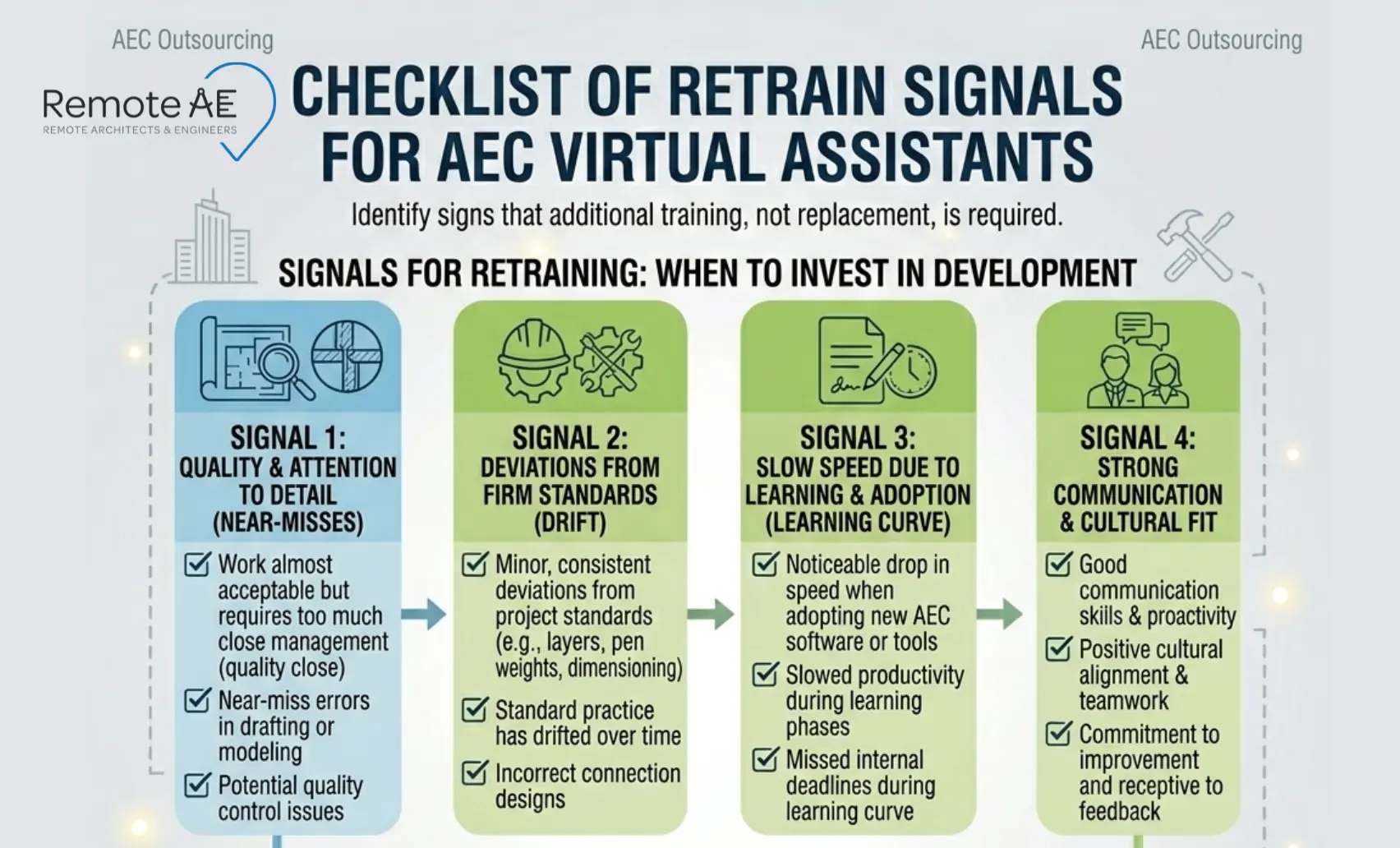
Retraining is the right move when intent is solid, and quality is close. In AEC, that usually means the person is capable but needs your standards and tool habits.
Retrain signals
Quality is close, but standards drift
The work is mostly correct, but:
- Layers are inconsistent
- Families are incorrect
- Sheet setup varies
This is a standards issue, not a capability issue.
Speed is low because they’re learning your stack and CDE path
If the assistant is new to:
- Autodesk Construction Cloud
- BIM 360
- Procore workflows
Slower speed is expected.
Communication is good; intent is solid; gaps are teachable
If the person:
- Asks questions
- Follows instructions
- Shows improvement
Retraining is usually the right path.
Skill Gaps, Not Attitude Problems
If errors are due to lack of knowledge, not lack of effort, training will work.
Willingness to Learn
The most important signal. If the person is willing to improve, invest in them.
The AEC retraining plan
Retraining is often the faster and lower-risk option if the person has the right attitude and baseline skills. The goal is simple: fix gaps without slowing down project delivery.
Focus on clarity, structure, and measurable progress.
Identify the Exact Skill Gap
Do not retrain broadly. Target the real issue. Start by separating:
- Technical gaps → Revit modeling, AutoCAD standards, Navisworks coordination, Bluebeam Revu markups
- Communication gaps → unclear updates, missed questions, poor documentation in RFIs or submittals
Create SOPs (Standard Operating Procedures)
Most performance issues come from missing or unclear SOPs. Build simple, repeatable instructions for key tasks:
- Updating a drawing register
- Preparing RFIs, submittals, and transmittals
- File naming and versioning in your Common Data Environment (CDE)
- Uploading models to Autodesk Construction Cloud (ACC) or BIM 360
Use:
- Step-by-step written guides
- Recorded walkthrough videos (short, task-based)
- Templates and examples
If the process is not documented, you cannot expect consistency.
Set Measurable KPIs
Retraining without metrics does not work.
Define clear AEC virtual assistant KPIs:
- Accuracy rate (errors per drawing or task)
- Turnaround time (hours or days per task)
- Response time (to messages or issues)
- QA/QC compliance (following checklists, naming standards)
- Log accuracy (RFI log, submittal log, drawing register updates)
Tie these KPIs to your SLA where possible. Review them weekly.
Provide AEC-Specific Training
Generic training is not enough. Focus on real project workflows used by your architecture firm, engineering firm, or contractor teams. Train on:
- CAD and BIM tools → Revit, AutoCAD, Navisworks
- Document control systems → ACC, BIM 360, Procore
- Construction workflows → RFIs, submittals, transmittals
- QA/QC processes → markups, version control, issue tracking
Set a Timeline for Improvement
Retraining must have a clear deadline. Use a 2–4 week evaluation window:
- Week 1–2: small tasks, daily feedback
- Week 3–4: full tasks, QA/QC review
At the end, review:
- KPI trends
- Error reduction
- Communication quality
If performance improves, continue. If not, move to replacement.
Signs you should replace (and how to do it without chaos)
Replacement is the right move when the risk is high, and improvement doesn’t show up after clear expectations, training, and review gates.
Replace signals (hard lines)
These are non-negotiable.
Repeated missed deadlines / poor quality after clear expectations
If you have:
- Provided SOPs
- Set clear KPIs
- Given feedback and training
…and performance does not improve, the issue is not a skill gap anymore. It is a fit problem.
Trust breach or unsafe behavior with access/data
This is critical in AEC environments where data is sensitive.
Examples:
- Sharing files outside approved systems
- Misusing access in ACC, BIM 360, or Procore
- Ignoring NDA or confidentiality rules
Replacement is immediate if trust is broken.
Inability to follow AEC documentation rules
AEC documentation relies on discipline. If someone cannot follow:
- Version control rules
- Naming conventions
- Drawing register updates
- Transmittal workflows
…it creates project risk. These are not optional skills.
Communication Breakdown
Remote teams depend on communication.
If the assistant:
- Does not respond
- Misunderstands instructions repeatedly
- Avoids clarification
…it blocks progress.
Cultural or Process Misalignment
If the person cannot adapt to your workflows, tools, or standards, retraining may not fix it.
Replace without losing continuity (handover checklist)
Replacing someone should not disrupt your project. Use a structured handover.
Step 1: Freeze scope (1 week)
Avoid assigning new work. Focus on closing or documenting existing tasks.
Step 2: Capture knowledge into SOPs
Document:
- File naming standards
- Folder structure in CDE
- Revit / AutoCAD workflows
- QA/QC steps
Aim for 5–10 key SOPs.
Step 3: Export project status
Make sure you capture:
- RFI log
- Submittal log/submittal register
- Drawing register
- Open issues list
This protects continuity.
Offboarding and access safety (non-negotiables)
Security matters. When replacing, act immediately:
- Revoke access to ACC, BIM 360, and Procore
- Rotate credentials
- Remove permissions from shared drives
- Check access logs
Follow least privilege principles going forward. No exceptions.
Replace vs Retrain: A Simple Decision Framework
Use a system so you don’t decide in the heat of a deadline.
Ask These 5 Questions
Use these before making a decision.
- Is the issue skill or attitude?
Skill issues can be trained. Attitude issues rarely improve. - Has performance improved with feedback?
If yes → retrain
If no → consider replacement - What is the cost of errors?
High-risk roles (CAD, BIM, document control) require faster decisions. - How critical is the role?
If the role impacts project delivery, delays are expensive. - How long can you wait for improvement?
If deadlines are tight, replacement may be safer.
Decision Matrix Table
| Situation | Action |
| Skill gap with a good attitude | Retrain |
| Learning new tools (Revit, ACC, Procore) | Retrain |
| Quality improving over time | Retrain |
| Repeated errors after feedback | Replace |
| Missed deadlines consistently | Replace |
| Data security issues | Replace |
| Poor communication | Replace |
The Remote AE Advantage
In AEC, speed matters, but reliability matters more. The Remote AE model is designed to reduce onboarding time, protect standards, and make staffing changes without derailing delivery.
Pre-Trained AEC Virtual Assistants
Remote AE provides virtual assistants trained specifically for:
- Architecture firm workflows
- Engineering firm documentation
- Contractor coordination processes
They understand tools like:
- Revit
- AutoCAD
- Navisworks
- Bluebeam Revu
- Autodesk Construction Cloud (ACC)
- BIM 360
- Procore
This reduces onboarding time.
Reduced Training Time
With pre-trained assistants, you avoid long ramp-up periods.
They already understand:
- RFIs, submittals, and transmittals
- Drawing registers
- Document control processes
- QA/QC expectations
This means faster productivity.
Scalable Staffing
AEC workloads fluctuate. Remote AE allows you to:
- Add resources quickly
- Replace underperforming assistants
- Scale based on project needs
No long hiring cycles.
Proven Processes
Remote AE follows structured workflows:
- SOP-driven execution
- KPI tracking
- QA/QC checks
- Industry-Specific Expertis
- Guaranteed Quality & Reliabilit
- No Long-Term Commitment
- From 499$/week
How Remote AE handles onboarding + replacement options
Remote AE simplifies staffing challenges:
- No upfront costs
- Fast onboarding aligned to your systems
- Risk-free replacement (up to two assistants in the first year)
You always have the right support.
Common Mistakes to Avoid
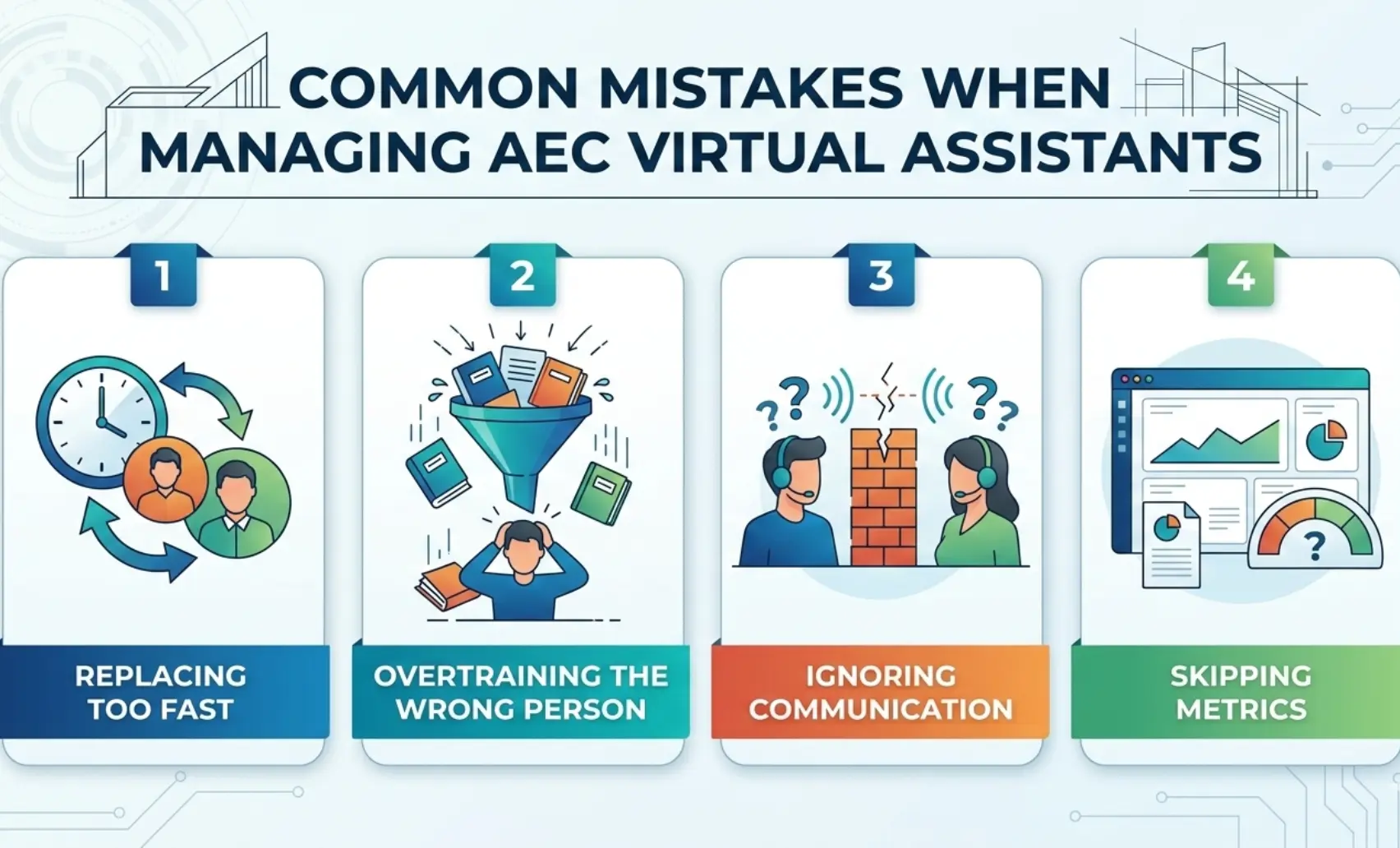
These mistakes cause teams to churn staffing instead of fixing the system.
- Replacing too quickly without feedback. Sometimes the problem is unclear SOPs or missing training. Fix the system first.
- Overtraining the wrong person. If performance does not improve after structured feedback, do not extend the timeline. It increases risk.
- Ignoring communication issues. Even skilled assistants fail without clear communication. Address communication early.
- Not tracking performance metrics. Without KPIs, decisions are subjective. Track:
- Turnaround time
- Quality
- Accuracy
- Communication
Data drives better decisions.
Make the Right Call – Without Risking Your Projects!
If you want reliable AEC production support with a clear path for retraining or replacement, Remote AE can help. Remote AE provides AEC-trained virtual assistants who understand your tools, workflows, and documentation requirements. You stay in control of quality, standards, and approvals. We provide the production support that keeps your projects moving.
Schedule a call with Remote AE today for a fast scope review and a clear weekly quote.
FAQs – When to Replace vs Retrain Your Virtual Assistant
How long should I give a new virtual assistant to ramp up in AEC?
Give a new assistant about 2 to 4 weeks for basic tasks and up to 6 to 8 weeks for complex BIM or coordination work. Progress depends on clear SOPs, training files, and feedback speed. Review weekly to confirm improvement.
What are the clear signs it’s time to replace a virtual assistant?
Repeated errors after feedback, missed deadlines, and poor communication are key signs. If quality does not improve after retraining, it becomes a risk to project delivery. Also, watch for a lack of ownership or ignoring standards.
How do I retrain a virtual assistant who keeps making the same mistakes?
Start by identifying the exact mistake pattern and giving clear examples. Provide step-by-step SOPs or screen recordings and set a short review cycle. If errors continue after structured retraining, consider replacement.
What KPIs should I track for an AEC virtual assistant (VEA/VCA/VAA)?
Track output quality, turnaround time, and on-time delivery rate. Measure error rates (major vs minor), rework frequency, and communication response time. You can also track task completion volume and adherence to standards.
How do I safely offboard a virtual assistant?
Revoke access to all systems immediately, including email, cloud storage, and project platforms. Transfer ownership of files, models, and documentation before removal. Change passwords, collect assets, and confirm data deletion.