

Construction firms are among the fastest-growing targets for ransomware and data loss events, and most are underprepared. IBM’s 2023 Cost of a Data Breach Report stated that the global average breach cost was $4.45M in 2023, and the average breach lifecycle was 277 days. For remote Architecture, Engineering, and Construction teams managing Revit models, CAD files, and Building Information Modeling coordination data across distributed endpoints, the risk is compounded at every sync point, every third-party access grant, and every cloud misconfiguration. This article delivers a practical, AEC-specific backup and disaster recovery framework your team can implement immediately.
Why Remote AEC Projects Need a Different Backup and Recovery Plan
Generic IT backup guidance was written for business files, documents, spreadsheets, and emails. AEC project data differ categorically in size, complexity, interdependency, and recovery consequences.
A corrupted Revit central file on an active construction project is not a productivity inconvenience. It is a potential schedule event with real contractual and financial exposure.
What Makes AEC Data High-Risk
The file types remote AEC teams produce and manage carry risks that standard backup configurations are not designed to handle.
- Revit models: Central files with active worksets can exceed 500MB. Corrupt a worksharing central file, and every team member loses their local changes simultaneously. Recovery requires not just the file, but the correct version of the file at a precise point in the coordination timeline.
- CAD files: AutoCAD DWG files with external references (Xrefs) are interdependent. Restore the wrong version of one Xref, and the entire drawing set references incorrect geometry without any visible error flag.
- Point clouds: Scan data files routinely exceed several gigabytes per scan location. They are expensive to recapture, slow to upload, and often irreplaceable once a site condition changes during construction.
- Sheet sets and drawing registers: Issued-for-construction drawing sets carry contractual status. Losing the version history of an issued set creates disputes about what was on site at a given date.
- RFIs, submittals, and markups: These are the legal record of project decisions. Loss or corruption of RFI response logs and submittal approval records creates liability exposure that extends well beyond the data recovery event itself.
- Contracts and site documentation: Loss of signed contracts, change order records, and daily site reports removes the evidential foundation of any future dispute resolution process.
Why Remote Teams Raise the Stakes
Co-located teams have a single, controllable network environment. Remote AEC teams do not.
- More endpoints: Every remote team member, whether working from a home office, a site trailer, or a co-working space, represents an independent endpoint with its own hardware, connectivity, and security posture. Each endpoint is a potential data loss vector.
- More third-party access: Remote BIM coordination involves consultants, subcontractors, and virtual assistants accessing shared Common Data Environment folders, BIM 360 models, and Autodesk Construction Cloud coordination spaces. Each access grant is a potential misconfiguration or permission error.
- More sync points: Files moving between local drives, OneDrive, SharePoint, BIM 360, and Autodesk Construction Cloud pass through multiple sync events per day. Each sync is a potential overwrite, version conflict, or silent data corruption event.
- More chances for version drift and accidental overwrite: When five remote engineers are working on connected Revit files across three time zones, the risk of a team member publishing an outdated local file to the central model, overwriting two days of coordinated work, is not theoretical. It happens on active projects.
Common Risks in Remote AEC Environments
An awareness of the specific threat landscape your remote AEC team faces is the first step toward building a backup and disaster recovery plan. A plan that actually addresses your real exposure, not a generic checklist.
- Accidental file deletion: The most common cause of data loss in remote teams. A virtual assistant cleaning up a shared SharePoint folder deletes a folder structure that was not obviously active. The files go to the recycle bin, which empties automatically after 93 days. If no one notices within that window, the data is gone.
- Ransomware and cyberattacks: Construction firms are increasingly targeted. Ransomware attacks on remote teams typically enter through unsecured remote desktop connections, weak VPN credentials, or phishing emails targeting team members on personal devices.
- Cloud misconfigurations: Misconfigured permissions in Autodesk Construction Cloud, BIM 360, or SharePoint can expose project files to unauthorized access or silently prevent backups from running correctly. A folder with incorrect inheritance settings may not sync to your backup destination without generating an error notification.
- Version overwrite issues across teams: Without enforced version control through a properly configured Common Data Environment aligned with ISO 19650 standards, remote teams regularly overwrite current files with older versions, particularly when working across different local time zones with asynchronous file sync schedules.
- Hardware failures in remote setups: Remote team members working on local machines, particularly those using laptops on construction sites or in temporary offices, face hardware failure rates higher than those in a controlled office environment. Local Revit backup folders and AutoCAD BAK files stored only on a failing local drive are not recoverable.
- Weak access control from distributed teams: Role-based access control failures are both a security risk and a recovery complication. When too many team members have write access to shared CDE folders, identifying the source of a corruption or overwrite event and determining which version preceded it becomes a forensic exercise rather than a straightforward restore.
Backup vs Disaster Recovery: What’s the Difference?
Most AEC firms use these three terms interchangeably, which is exactly why their data protection strategy has gaps. Each layer covers different risks, operates on different timelines, and fails in different scenarios.
What Backup Covers
Backup is a point-in-time copy of your data stored separately from the primary source. It answers one question: if the primary data disappears or becomes corrupted, can we restore a known-good version?
- Backup protects against accidental deletion, hardware failure, ransomware encryption, and catastrophic platform failure
- Effective backup requires copies stored in at least one location that is physically or logically separated from the primary data, an off-site backup, an immutable backup, or a cross-region cloud copy
- Backup does not protect against data that was already corrupted before the backup ran, which is why backup frequency and Recovery Point Objective matter so much in active AEC production environments
What Disaster Recovery Covers
Disaster recovery is the process and infrastructure that brings your systems back online after a major failure, not just the data, but the environment your team needs to access and use it.
- Disaster recovery covers system restoration, application access, user authentication, network connectivity, and CDE platform availability, everything required for a remote BIM team to resume productive work
- A firm with excellent backups but no disaster recovery plan knows where the data is, but has no structured process for restoring it, validating it, and getting the team back to work within a defined timeframe
- Recovery Time Objective defines the maximum acceptable downtime before a business function must be restored. For an active construction project, an RTO of 72 hours may be acceptable for archive systems, but four hours may be the ceiling for active Revit model access
What Remote AEC Firms Should Protect First
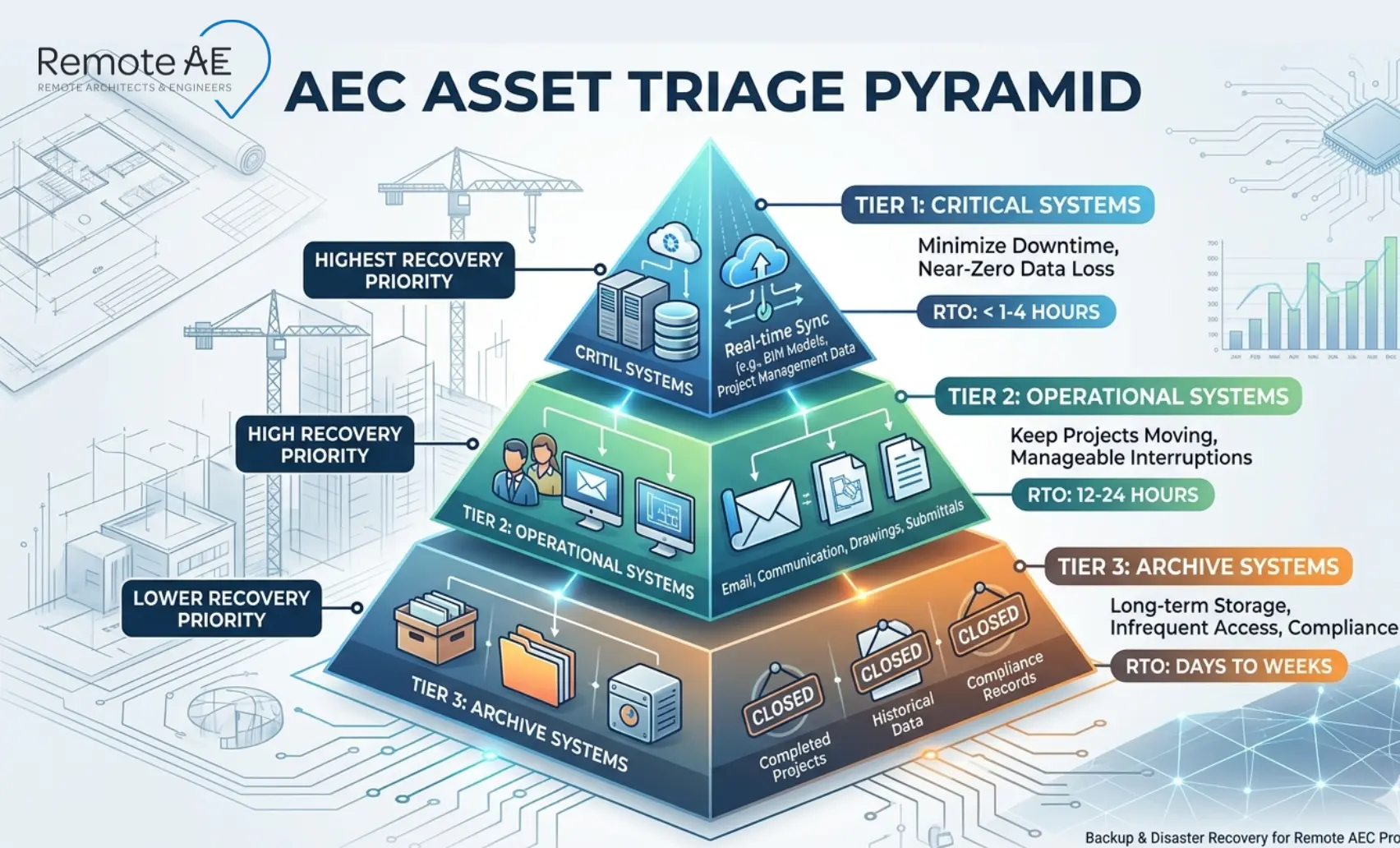
Not all AEC data carries equal recovery priority. A structured triage approach ensures that when a recovery event occurs, your team restores the systems that matter most, not the ones that are easiest to reach.
Tier 1 Systems: Protect and Recover First
These systems are directly on the critical path of active project delivery. Any outage here stops production immediately.
- Active BIM and CAD models: Revit central files, AutoCAD drawing sets with Xref dependencies, and coordination models in BIM 360 or Autodesk Construction Cloud. These are your highest-value, highest-risk assets; back them up most frequently and restore them first.
- CDE and document repositories: The Common Data Environment, whether hosted in Autodesk Construction Cloud, SharePoint, or a dedicated BIM platform, holds the authoritative version of every project document. ISO 19650 defines the CDE as the single source of truth for project information. Loss of CDE access stops document control, RFI processing, and submittal management simultaneously.
- Project email: Email threads contain project decisions, change order negotiations, and client approvals that do not exist in any other system. Email is a Tier 1 asset in AEC, not an afterthought.
- Identity and access systems: If your team cannot authenticate, cannot log in to Autodesk Construction Cloud, cannot access the VPN, cannot reach the remote desktop environment, no amount of successfully backed-up data is accessible. Identity infrastructure is Tier 1 by definition.
Tier 2 Systems: Restore After Tier 1 Is Stable
These systems support project delivery but do not stop production immediately if they are unavailable for 24 hours.
- Project management platforms, scheduling tools, procurement tracking, and cost management systems
- Specification libraries and firm standard templates
- BIM standards documentation and project execution plan repositories
- Training materials and onboarding resources for remote assistants and new team members
Restore Tier 2 systems once Tier 1 is confirmed stable and the active project team is back to productive work.
Tier 3 Systems: Restore Last
These systems have no immediate impact on active project delivery.
- Completed project archives and historical drawing registers
- Marketing files, portfolio images, proposal templates, and award submissions
- Older reference data, superseded standards, legacy project documentation, pre-BIM drawing archives
Tier 3 restoration can wait until Tier 1 and Tier 2 are fully operational, and in a severe recovery scenario, Tier 3 can be deprioritized for days without material consequence to any active project.
The Right Backup Architecture for Remote BIM and CAD Workflows
Having data backed up somewhere is not the same as having a backup architecture that survives the scenarios your remote AEC team will actually face. Here is what a purpose-built AEC backup architecture looks like.
Why the 3-2-1 Rule Still Matters
The 3-2-1 backup rule, three copies of data, on two different media types, with one copy offsite, remains the most widely validated baseline for data protection. (National Institute of Standards and Technology, SP 800-209)
For remote AEC teams, apply it as follows:
- Copy 1: Primary data in your CDE, Autodesk Construction Cloud, BIM 360, or SharePoint
- Copy 2: Automated cloud backup to a separate storage account, Azure Blob, AWS S3, or a dedicated backup platform, in a different region from your primary CDE
- Copy 3: Offsite or immutable backup, a copy that cannot be modified, encrypted, or deleted by ransomware or an administrator error
Three copies means a single failure, platform outage, ransomware attack, or accidental deletion never results in permanent data loss.
Why One Copy Should Be Offline or Otherwise Isolated
Ransomware attacks increasingly target connected backup systems. An attacker who gains access to your network or cloud environment will encrypt or delete backup copies if they are reachable from the same credentials as the primary data.
An immutable backup, a copy stored in a write-once, read-many format that cannot be modified after it is created, is the primary defense against this attack vector. Most enterprise cloud storage providers offer immutable storage tiers. Configure at least one backup destination as immutable for all Tier 1 AEC data.
Offline backup, a physical copy stored on disconnected media, provides additional isolation for firms managing extremely sensitive project data, government contracts, or high-value infrastructure projects where data sovereignty requirements apply.
Where Cloud Snapshots and Cross-Region Copies Fit
- Cloud snapshots: Point-in-time captures of your CDE storage state, fast to create, fast to restore, but stored in the same platform as the primary data. Protect against accidental deletion and minor corruption. Do not protect against platform-wide outages or ransomware that targets the platform directly.
- Cross-region copies: A backup of your primary CDE data replicated to a geographically separate cloud region. Protects against regional outages and data center failures. Accessible via failover if the primary region becomes unavailable.
Use both in combination for Tier 1 AEC data. Snapshots for fast recovery from minor events. Cross-region copies for platform resilience.
How Often to Back Up Large AEC Files
Backup frequency must match your RPO, which must reflect how much work your team can afford to redo after a loss event.
- Revit central files: Back up every two to four hours during active production. Revit’s local backup folder, configured in Revit Options, creates automatic local copies, but these are not a substitute for an off-machine backup of the central file itself.
- AutoCAD DWG files: Back up after every significant work session. AutoCAD’s BAK file provides one version back, but only on the local machine. Sync DWG files to your CDE after every session and confirm the backup job runs within the same hour.
- CDE document repositories: Daily full backup with incremental backups every four to six hours during business hours across all active time zones
- Project email: Daily backup minimum, email platforms typically offer continuous backup options that should be enabled for all project-facing accounts
Why Restore Testing Matters More Than Backup Success Alerts
A backup job that completes without errors is not proof that your data is recoverable. It is proof that the backup process ran. These are not the same thing.
Restoring testing, actually recovering a file, a folder, or a full system from backup to confirm the restore process works, is the only way to validate your backup architecture.
Run restore tests on a defined schedule:
- Monthly: Restore a random sample of Revit model files and AutoCAD drawing sets from backup. Confirm they open correctly, that Xref links resolve, and that Revit worksets are intact.
- Quarterly: Restore a full project folder from backup to a test environment. Confirm that document control structures, CDE permissions, and version histories are intact.
- Annually: Full disaster recovery simulation, restore Tier 1 systems from backup, and measure actual RTO against your target. Adjust the architecture wherever the measured RTO exceeds the objective.
You do not have a backup strategy if you have never tested a restore. You have a backup habit, which is not the same thing.
What a Disaster Recovery Runbook Should Look Like
A disaster recovery plan that lives in a presentation deck is not a runbook. A runbook is a step-by-step operational document that a team member can follow under pressure, during an active ransomware attack, a platform outage, or a critical data loss event, without needing to make judgment calls that require information they don’t have.
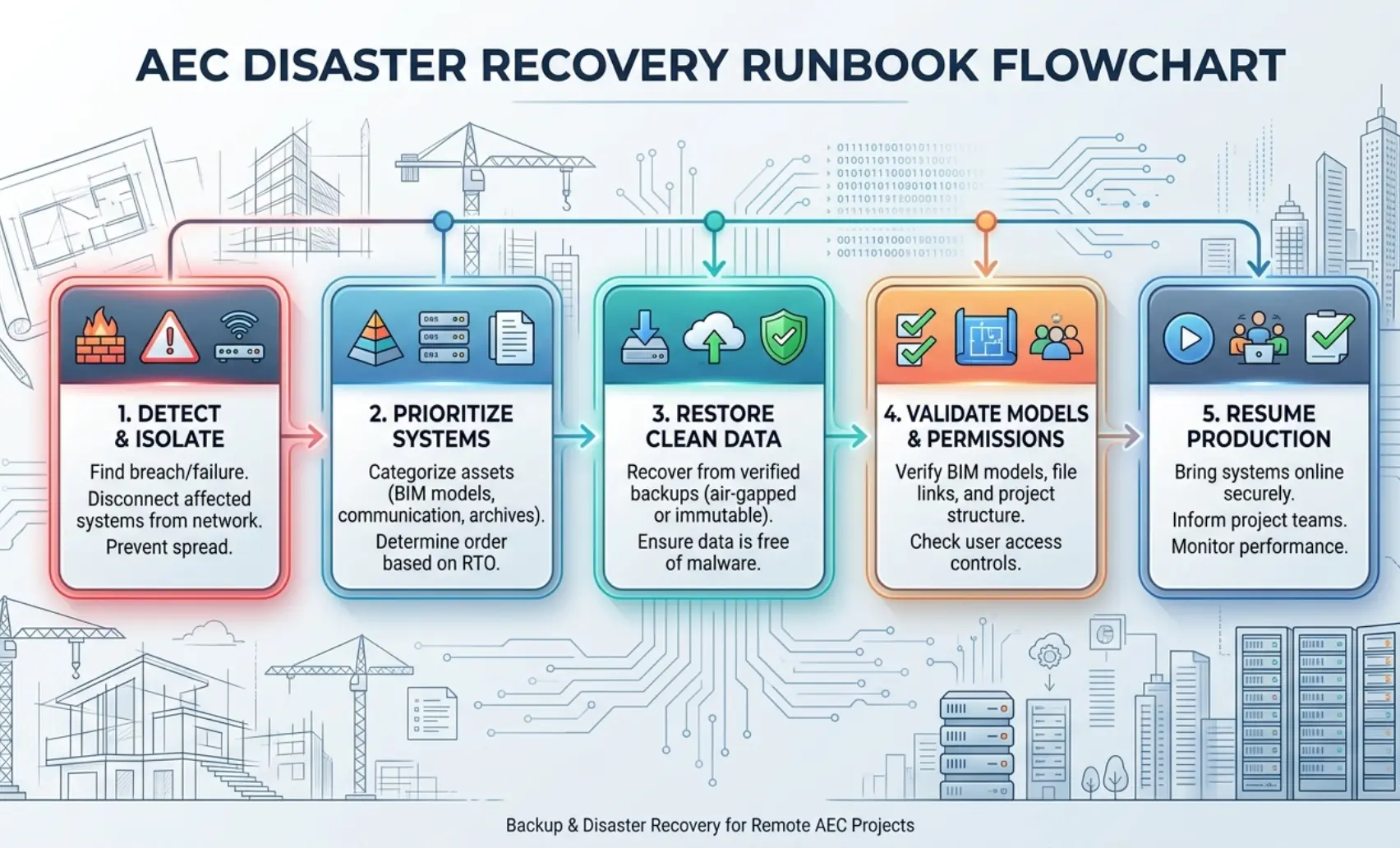
Here is the five-step structure every remote AEC firm’s disaster recovery runbook should follow.
Step 1: Detect and Isolate
The first 30 minutes of a recovery event determine how far the damage spreads. Speed of isolation matters more than speed of recovery at this stage.
- Detection triggers: Unusual file encryption activity, mass file deletion alerts, backup job failures, user reports of inaccessible Revit models or CDE folders, or ransomware notification screens on remote team member devices
- Immediate isolation actions:
- Disconnect affected endpoints from the network, including VPN sessions and remote desktop connections, to prevent lateral spread
- Revoke active sessions in Autodesk Construction Cloud, BIM 360, and SharePoint for accounts that may be compromised
- Suspend sync clients, OneDrive, and SharePoint sync on all remote endpoints to prevent corrupted or encrypted files from propagating to the CDE
- Notify your IT lead, BIM manager, and firm principal simultaneously. This is not a one-person decision
- Do not: Attempt to decrypt ransomware-encrypted files independently. Do not pay a ransom without legal and cybersecurity counsel. Do not resume production on affected systems before the incident scope is confirmed.
Step 2: Decide What Systems Come Back First
Once the incident is contained, the recovery sequence must follow your pre-defined tier structure, not the path of least resistance.
- Confirm which Tier 1 systems are affected, active BIM models, CDE repositories, identity and access systems, and project email
- Assess the blast radius, how many team members are affected, which projects are impacted, and what the contractual schedule implications are if production is delayed beyond 24 hours
- Identify the last known-good restore point for each affected system, using your version register, backup job logs, and CDE version history to confirm the most recent clean copy
- Assign recovery ownership explicitly: who is restoring the Revit central files, who is rebuilding CDE permissions, and who is validating the AutoCAD drawing set integrity. One owner per system. No ambiguity.
Communicate the recovery sequence and estimated timeline to project managers and active clients before they ask. Proactive communication during a recovery event protects client relationships more effectively than a fast but silent recovery.
Step 3: Restore Clean Data
Restoration must come from a confirmed clean source, not the most recent backup, which may itself contain encrypted or corrupted data if the incident preceded the last backup run.
- Identify the restore point that predates the incident, using backup job timestamps and CDE version history to confirm the last clean state
- Restore Tier 1 systems first, active Revit models, and the CDE document repository, before any Tier 2 or Tier 3 systems
- For ransomware recovery specifically, restore from your immutable backup copy, not from a connected cloud snapshot that may have been reached by the attacker
- Restore to a clean environment where possible, a freshly provisioned cloud storage account, or a rebuilt CDE folder structure, rather than restoring over the potentially contaminated primary environment
- Confirm that restored Revit central files open correctly, that workset structures are intact, and that AutoCAD Xref paths resolve before declaring the restore complete
Step 4: Validate Models, Links, Sheets, and Permissions
Restoration is not recovery. Validation is the step that confirms the restored data is actually usable by your remote AEC team.
Revit validation checklist:
- Central file opens without corruption warnings
- All worksets are present and correctly assigned
- Linked models, structural, MEP, and architectural, resolve correctly
- The sheet set is complete and matches the last issued drawing register
- Revision history reflects the correct sequence up to the restore point
AutoCAD validation checklist:
- DWG files open without missing Xref warnings
- All Xref paths resolve to the correct current versions
- Layer standards and plot styles are intact
- Sheet set manager references are correct
CDE and permissions validation:
- Role-based access control settings are restored correctly, confirm that remote assistants, consultants, and contractors have the correct permission levels, not elevated access from a misconfigured restore
- ISO 19650 folder structure and naming conventions are intact
- Version history for Tier 1 documents is accessible and reflects the correct sequence
- Autodesk Construction Cloud and BIM 360 coordination spaces are accessible to all authorized team members
Do not release restored systems to the production team until every item on the validation checklist is confirmed.
Step 5: Resume Production and Document Lessons Learned
Once Tier 1 systems are validated and the production team is back online, the recovery event is not over. The lessons learned step is what prevents the same event from happening again.
- Conduct a post-incident review within 48 hours, while the event is still fresh and the team can identify exactly what failed and why
- Document: the initial detection trigger, the isolation actions taken, the recovery sequence, the actual RTO achieved versus the target, and any validation failures encountered during restoration
- Identify the root cause, ransomware entry point, misconfigured permission, sync error, hardware failure, and implement the specific control that would have prevented it
- Update the disaster recovery runbook to reflect any steps that were unclear, missing, or incorrect during the actual recovery event
- Schedule the next restore test; do not wait for the annual cycle if the incident revealed a gap in your backup architecture
A Practical Recovery Checklist for Architecture, Engineering, and Construction Teams
Use this checklist to assess your firm’s current data protection posture and identify the specific gaps to close before the next recovery event.
Minimum Controls for Small Firms
Small architecture and engineering firms, under 15 staff, often operate without dedicated IT support. These are the non-negotiable baseline controls.
- All active Revit models and AutoCAD drawing sets backed up to a cloud destination separate from the primary CDE, minimum daily, ideally every four hours
- SharePoint and OneDrive version history enabled and retention window confirmed, 93-day recycle bin window acknowledged and supplemented with a separate backup
- At least one immutable or off-site backup copy of all Tier 1 project data
- Role-based access control is configured in Autodesk Construction Cloud or BIM 360, and no team member has broader access than their role requires
- Multi-factor authentication is enabled on all accounts that access project data, Autodesk, Microsoft 365, and VPN
- Recovery Point Objective and Recovery Time Objective are defined, even informally, before a recovery event forces the conversation
- At least one restore test has been completed in the past 12 months
Mid-Market Controls for Multi-Office Teams
Firms with multiple offices, distributed remote teams, or more than 15 staff need additional controls that address the complexity of managing data across multiple endpoints and platforms simultaneously.
- 3-2-1 backup architecture implemented, three copies, two media types, one offsite or immutable
- Automated backup jobs are configured for all Tier 1 and Tier 2 systems, with no manual backup dependencies
- Cross-region cloud backup configured for CDE, primary data, and backup in separate geographic regions
- Disaster recovery runbook documented and accessible to all recovery-role owners, not stored only on the systems that may be unavailable during a recovery event
- RPO and RTO are formally defined per tier, reviewed annually, or after any recovery event
- Quarterly restore tests for Tier 1 systems, monthly for firms with active construction delivery on multiple concurrent projects
- Incident response contacts documented, IT lead, cybersecurity counsel, platform support contacts for Autodesk, Microsoft, and any other CDE provider
- ISO 19650-aligned version control enforced across CDE, naming conventions, status codes, and revision numbering that make restore point identification unambiguous
Controls for Firms Using Remote Assistants or Outsourced BIM Support
Firms that extend CDE access to remote assistants, virtual construction assistants, or outsourced BIM support teams carry additional access control and data governance obligations.
- Role-based access control configured specifically for remote assistant accounts, access limited to the project folders and platforms required for their defined scope
- Remote desktop and VPN access secured with multi-factor authentication and session logging, unsecured RDP is one of the most common ransomware entry vectors in distributed AEC teams
- NDAs and data handling agreements are in place before any remote assistant accesses project files
- Offboarding process confirmed, access revocation for remote assistant accounts is immediate upon scope completion, not deferred
- Handoff documentation standards defined, remote assistants follow ISO 19650 naming conventions and CDE folder structure so that the file state at any recovery point is unambiguous
- Backup frequency increased during high-velocity remote production phases, when multiple remote assistants are publishing Revit model updates and CDE documents simultaneously, a four-hour RPO may be insufficient
- Recovery contact escalation path includes the remote assistant provider, so that a recovery event affecting remote team members is communicated and coordinated, not managed in isolation
How Remote AE Helps Reduce Recovery Risk in Remote Delivery
Data loss events in AEC are rarely caused by a single catastrophic failure. They compound, a poorly named file overwrites a current version, a permission error exposes a shared folder, a remote handoff skips the version check, and three weeks later, a project manager discovers that two weeks of coordination work is gone.
Remote AE has been providing virtual assistants tailored specifically for the Architecture, Engineering, and Construction industry for more than 15 years. Every assistant arrives trained in the document control disciplines, file management standards, and platform protocols that prevent the small operational failures that turn into large recovery events.
Remote Document Control and Permissions Support
Poorly maintained document control is the most common precursor to a data loss event in remote AEC environments.
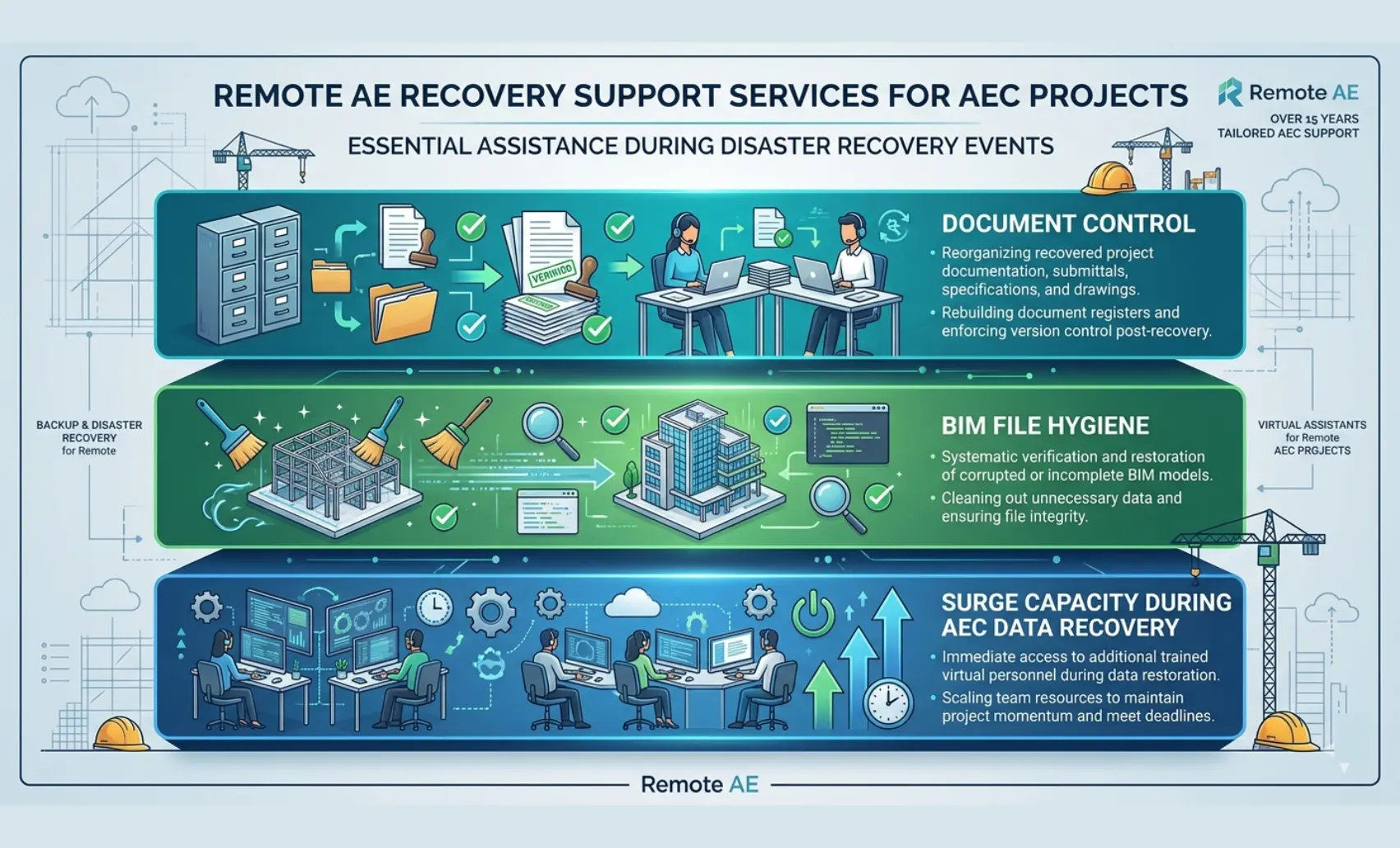
Remote AE virtual assistants provide ongoing document control support that keeps these risks in check:
- Maintaining ISO 19650-aligned CDE folder structures and naming conventions across Autodesk Construction Cloud, BIM 360, SharePoint, and OneDrive
- Auditing role-based access control settings weekly
- Managing document registers, version logs, and issue records so that the last known-good state of every Tier 1 project file is identifiable at any point without a forensic search
- Processing RFI logs, submittal registers, and markup records in Procore and Autodesk Construction Cloud with the consistency and naming discipline that makes version history meaningful
BIM/CAD File Hygiene, Naming, and Handoff Discipline
The most damaging data loss scenarios in remote BIM and CAD workflows are not the dramatic ones, such as ransomware attacks, server failures, or platform outages. They are the quiet ones: a Revit central file published with the wrong workset configuration, an AutoCAD drawing set with broken Xref paths handed off to the next team member, a BIM 360 coordination model updated with an outdated NWC file that no one caught before the weekly clash detection run.
Remote AE assistants bring the file hygiene and handoff discipline that prevents these quiet failures:
- Verifying Revit central file integrity before and after each publish event
- Maintaining AutoCAD DWG files with correct Xref paths, purged unused content, and CDE-compliant naming before every handoff
- Following structured handoff protocols, version check, status code update, and folder confirmation
- Flagging version anomalies, naming standard violations, and permission issues before they reach the CDE published zone
Extra Production Capacity During Cleanup and Recovery After Disruption
When a data loss or ransomware event hits a remote AEC team, the recovery workload lands on the people who were already at production capacity before the incident.
Remote AE provides surge production capacity during recovery, additional virtual assistant support that absorbs the administrative and coordination workload while your core team focuses on restoring systems and managing project impact.
Remote AE engagement terms:
- Industry-specific expertise: Virtual assistants trained in AEC document control, BIM file management, and CDE platform administration, with no onboarding lag during a recovery event when speed matters most
- Guaranteed quality and reliability: Document control and file hygiene standards are maintained consistently, reducing the baseline risk of the operational failures that precede data loss events
- No long-term commitment: Engage on a project basis, for a defined recovery period, or as an ongoing document control resource
- Staffing from $499/week: Accessible for firms at every scale
Protect Your Remote AEC Projects Before the Next Recovery Event!
Backup architecture and disaster recovery planning are not IT projects. They are the project delivery infrastructure, the systems that determine whether your firm can honor its schedule commitments when something goes wrong.
Remote AE places pre-vetted virtual assistants trained in AEC document control, BIM file management, CDE platform administration, and ISO 19650-aligned naming standards. The operational disciplines that reduce recovery risk before a backup architecture ever has to activate.
Stop discovering your recovery gaps during an active recovery event.
Book a Free Consultation with Remote AE Today; no obligation, no pressure. Just a direct conversation about reducing operational risk across your remote AEC project delivery.
FAQs – Backup & Disaster Recovery for Remote AEC Projects
What is the difference between backup and disaster recovery for an AEC firm?
Backup is the protected copy of your files and data. Disaster recovery is the plan for restoring operations after ransomware, deletion, outage, or corruption. In practice, backup answers “what can we restore,” while disaster recovery answers “how fast can we get BIM models, documents, and teams working again.”
Is Autodesk Construction Cloud or BIM 360 enough as a backup?
Not by itself for most firms. Autodesk provides version history, model recovery options, published versions, and cloud-model restore paths, but Autodesk’s own support articles also describe separate backup approaches, such as publishing frequently and saving or downloading copies. For real recovery planning, most firms still want an independent backup strategy.
How often should AEC firms test backups and restores?
Regularly, and not just the backups themselves. NIST stresses checking backup integrity before restoration and running recovery processes against accepted criteria. For AEC firms, that means testing whether you can restore not just files, but also usable Revit models, sheet sets, permissions, and current project folders.
What should be restored first after a ransomware attack?
Restore in business order: first, the systems and data needed to resume essential operations, then less critical content. For most AEC firms, that means current project documents, live BIM models, access control, and the platforms teams use to coordinate work. NIST recommends restoring from backups that have been identified, checked, and accepted.
How do you protect project files when using remote assistants, consultants, and subcontractors?
Use least-privilege access, MFA, audit logs, and a controlled CDE instead of email attachments or open shared drives. Keep project data in managed platforms, separate published files from working files, and restrict downloads where possible. Microsoft and Autodesk both emphasize controlled versions, restores, and cloud-governed access over ad hoc file handling.