

Remote work in construction is real, but it’s rarely “fully remote.” Most firms use a hybrid model where field teams build on-site while off-site teams run scheduling, drawings, RFIs, submittals, and document control. Hiring pressure is a big driver: 92% of construction firms report difficulty finding workers, and 45% say labor shortages cause project delays (AGC, 2025).
Remote work also grows because tools now support cloud-based collaboration and a common data environment approach (Autodesk, 2024–2025). This guide breaks down what remote construction work is, what can be done off-site, common myths, and the beginner-friendly roles that make projects move faster.
What is Remote Work in Construction?
Remote work in construction means construction delivery tasks are done off-site using digital systems. It usually supports field execution rather than replacing it.
Remote vs hybrid vs field-based construction work
Remote work in construction refers to tasks completed away from the jobsite using digital tools.
It typically falls into three categories:
- Remote work: Fully off-site roles such as estimators, BIM modelers, and document control specialists
- Hybrid work: Roles split between office and jobsite, such as construction management or project coordinators
- Field-based work: On-site roles like supervisors and tradespeople
Most construction roles are not fully remote. Instead, they combine digital workflows with physical site activity.
Why remote work is growing in AEC
The shift toward remote construction jobs is driven by technology and workforce demand.
AGC reports 92% of firms have a hard time finding workers, and 45% link labor shortages to project delays.
Modern platforms like Procore, Autodesk Construction Cloud, and BIM 360 allow teams to manage:
- RFIs
- Submittals
- scheduling updates
- project documentation
This makes remote construction management more practical than ever.
Common myths about remote construction jobs
Many people still misunderstand work-from-home construction jobs.
Myth 1: Construction cannot be remote
Reality: Many roles, such as estimating, BIM modeling, and document control, are fully digital.
Myth 2: Remote work reduces quality
Reality: Quality depends on QA processes, not location.
Myth 3: Only admin roles can be remote
Reality: Technical roles like quantity takeoff, BIM, and VDC coordination are now remote-friendly.
Can Construction Really Be Done Remotely?
Some tasks are ideal for off-site execution. Others need a job site presence. Most construction roles land in the middle.
What can be done off-site?
A large portion of construction workflows happens before and after site work.
These tasks can be performed remotely:
- Quantity takeoff and estimating
- BIM modeling and clash detection
- drawing markups using Bluebeam
- managing RFIs and submittals
- document control and scheduling
Example:
An estimator working remotely can prepare cost estimates using digital drawings and quantity takeoff software without visiting the site.
What still requires a jobsite presence
Certain activities must remain on-site.
These include:
- physical construction
- site inspections
- safety supervision
- material installation
Even with advanced tools, construction still involves physical execution.
Why most construction roles are hybrid, not fully remote
Most roles in the AEC industry combine digital and physical work.
For example:
- A project coordinator manages documentation remotely but attends site meetings when needed
- A construction manager reviews schedules online but visits the jobsite regularly
This hybrid model allows firms to benefit from both remote efficiency and on-site control.
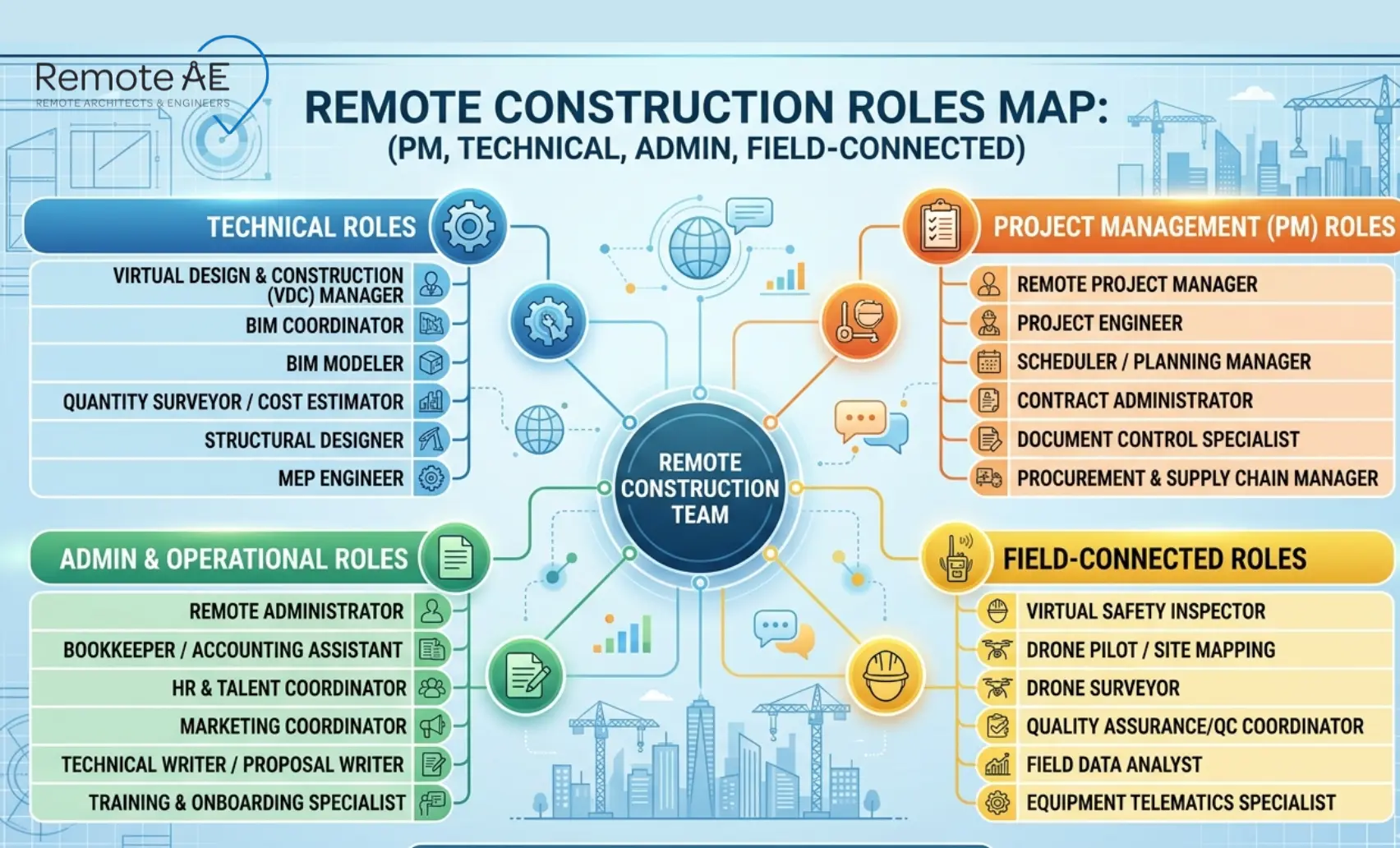
Types of Remote Roles in Construction
Remote roles in construction usually support delivery workflows: tracking, packaging, coordination, and documentation. These roles reduce field interruptions and keep decisions traceable.
Project Management Roles
Remote project management support has become common in construction.
Key roles include:
- remote project coordinators
- scheduling specialists
These professionals manage:
- project timelines
- document tracking
- coordination between teams
They often use tools like Procore and Autodesk Construction Cloud to monitor project progress.
Example:
A scheduling specialist updates project timelines remotely while coordinating with contractors through shared dashboards.
Design & Technical Roles
Many technical roles are fully compatible with remote work.
These include:
- architects working remotely
- CAD drafters
- BIM modelers
These professionals rely on Revit, AutoCAD, and BIM workflows to produce coordinated designs.
Example:
A BIM modeler in another country updates a coordinated model overnight using BIM 360, allowing the local team to review it the next morning.
Administrative & Support Roles
Support roles are among the most common remote construction jobs.
Examples include:
- estimators
- quantity surveyors
- virtual construction assistants
These roles handle:
- quantity takeoffs
- cost estimation
- documentation management
They reduce workload for project managers and engineers.
Field-Connected Remote Roles
Some remote roles still interact with the jobsite.
Examples include:
- remote monitoring using cameras or drones
- remote quality control support
These roles allow teams to supervise progress without being physically present at all times.
Skills You Need for Remote Work in Construction
Remote work in construction requires more than basic technical ability. Professionals must combine construction knowledge with digital skills and strong communication habits.
A major industry report estimated 52% of rework was caused by poor project data and communication (FMI + PlanGrid, 2018).
Construction knowledge and drawing literacy
Even for remote construction jobs, an awareness of construction fundamentals is essential.
You must be able to:
- read construction drawings
- interpret plans, sections, and details
- understand how buildings are assembled
This applies to roles such as:
- estimators
- BIM modelers
- project coordinators
Without drawing literacy, remote assistants struggle to support real project delivery workflows.
BIM, takeoff, scheduling, and PM software skills
Modern remote work in construction depends on software.
Key tools include:
- Revit for BIM modeling
- AutoCAD for drafting
- Bluebeam for markups and redlines
- Procore and Autodesk Construction Cloud for project management
Professionals also need experience with:
- quantity takeoff
- scheduling tools
- document tracking systems
Understanding BIM and VDC workflows allows remote teams to coordinate effectively with architects, engineers, and contractors.
Communication, documentation, and async handoffs
Remote work requires clear communication. Unlike on-site teams, remote professionals rely on written updates and structured handoffs.
Key practices include:
- clear comments on drawings and markups
- structured updates on RFIs and submittals
- documenting changes in shared systems
Async communication is critical when working across time zones. Tasks must be passed clearly from one team to another without confusion.
Data security and file management basics
Remote construction work involves sensitive project data.
Professionals must follow secure practices such as:
- managing access to project files
- using structured folders and naming conventions
- working within a Common Data Environment (CDE)
Standards such as ISO 19650 help define how project information is managed. Security practices aligned with ISO 27001 help protect data when working remotely.
Tools That Make Remote Construction Work Possible
Remote construction workflows run on tools that manage drawings, logs, and review cycles. The goal is simple: everyone works from current files, with clear accountability.
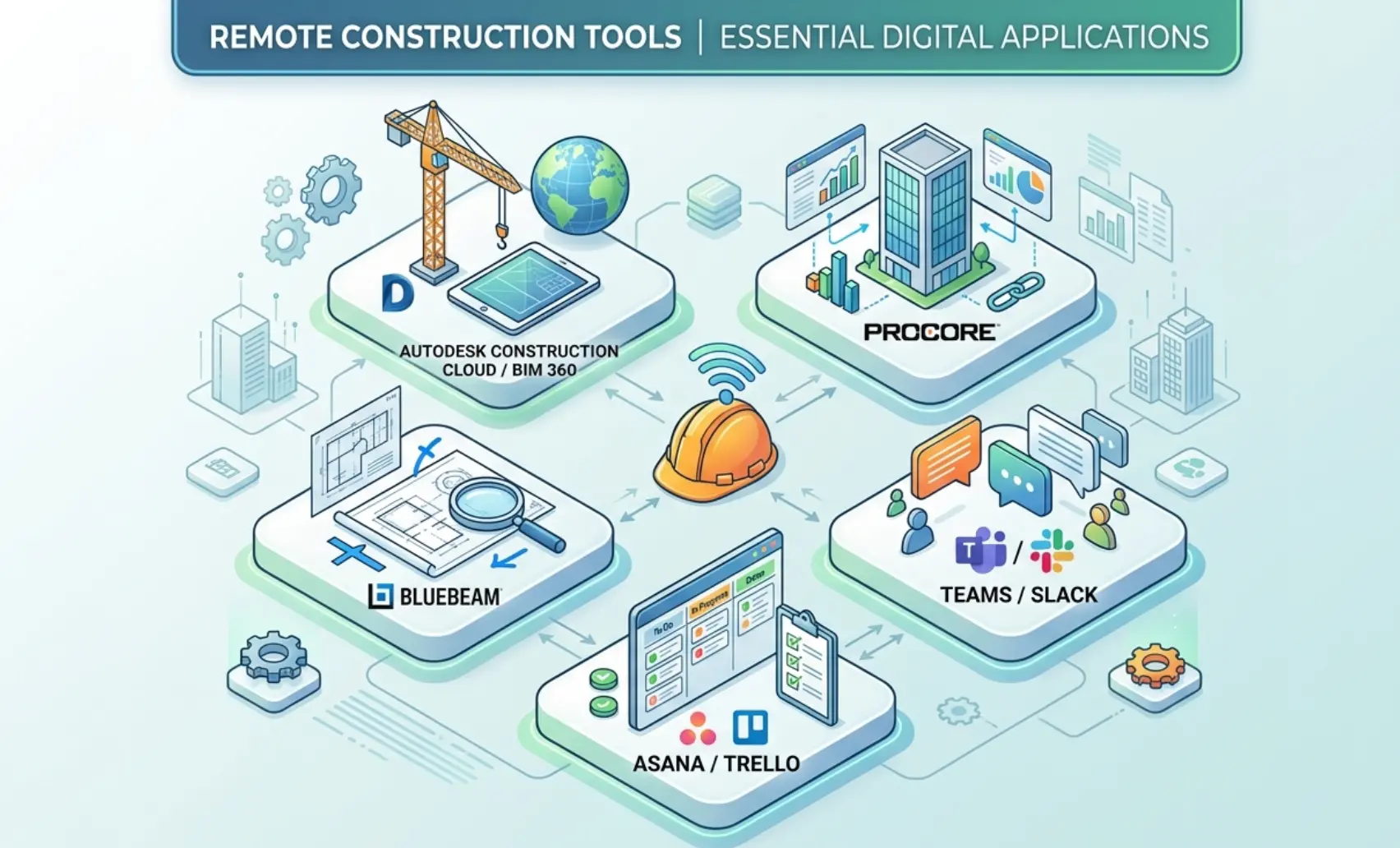
Autodesk Construction Cloud, BIM 360, Procore, Bluebeam
Core construction platforms enable teams to collaborate remotely.
- Autodesk Construction Cloud and BIM 360 manage BIM models and document sharing
- Procore supports project management, RFIs, submittals, and reporting
- Bluebeam is widely used for markups, drawing reviews, and redlines
These tools allow teams to work on the same project data without being in the same location.
Slack, Microsoft Teams, Asana, Trello
Communication and task management tools support daily collaboration.
Common tools include:
- Slack and Microsoft Teams for communication
- Asana and Trello for task tracking
These platforms help project teams stay aligned, even when working remotely.
Shared folders, naming conventions, version control
File management is critical in remote construction workflows.
Teams must maintain:
- consistent folder structures
- clear file naming conventions
- version control for drawings and models
A structured document control process ensures that everyone works on the correct version of a file. This reduces errors and prevents costly rework.
Pros and Cons of Remote Work in Construction
Remote work can increase throughput, but it also creates new failure points if review gates are weak.
Benefits for firms
Construction companies benefit from remote work in several ways:
- access to global talent
- reduced staffing costs
- improved scalability
- faster turnaround for production tasks
Firms can hire remote AEC assistants to support drafting, BIM, estimating, and documentation without expanding internal teams.
Benefits for professionals
For individuals, work-from-home construction jobs offer flexibility.
Benefits include:
- better work-life balance
- access to international projects
- reduced commuting time
Professionals such as estimators, BIM modelers, and project coordinators can build careers without being tied to a specific location.
Risks, delays, and quality-control issues to watch
Remote work also comes with risks.
Common challenges include:
- communication gaps across time zones
- inconsistent documentation practices
- lack of structured quality control
- coordination issues between teams
These risks often lead to delays or rework if not managed properly. Strong workflows, clear communication, and structured review processes help mitigate these issues.
How Construction Firms Can Start Using Remote Support
Adopting remote work in construction does not require a full operational shift. Most firms start small, test workflows, and expand once processes are stable.
The goal is to integrate remote AEC assistants into existing workflows without disrupting project delivery.
Tasks to delegate first
The best way to start is by assigning repeatable, well-defined tasks.
Good entry points include:
- CAD drafting updates
- BIM model adjustments in Revit
- quantity takeoff and estimating support
- managing RFIs and submittals
- document control tasks
These tasks are structured and easier to standardize. They also reduce workload for project managers, engineers, and site teams.
How to set up review loops and reporting
Remote teams perform best when workflows are clearly defined.
Firms should establish simple review loops:
- Assign tasks with a clear scope
- review outputs using tools like Bluebeam
- Provide feedback through structured comments
- Finalize deliverables after approval
Weekly reporting helps maintain visibility.
Typical reports include:
- completed tasks
- pending RFIs or submittals
- schedule updates
- coordination issues
These workflows ensure remote assistants stay aligned with internal teams.
How to onboard a remote construction assistant
Effective onboarding is critical.
Firms should provide:
- access to project files through a Common Data Environment (CDE)
- clear folder structures and naming conventions
- training on tools such as Procore, BIM 360, and Autodesk Construction Cloud
- documented SOPs for drafting, BIM, and documentation
A structured onboarding process reduces confusion and speeds up productivity.
Many firms choose to work with providers like Remote AE that specialize in Architecture, Engineering, and Construction (AEC) staffing.
Remote AE offers:
- access to pre-trained virtual construction assistants
- faster onboarding compared to hiring internally
- industry-specific expertise in BIM, CAD, and documentation
This allows firms to start remote workflows without building systems from scratch.
Why Remote AE is Built for This Shift
Remote work in construction requires more than general outsourcing. It requires industry knowledge, structured workflows, and reliable delivery.
Remote AE focuses specifically on the AEC industry, supporting architecture, engineering, and construction firms with trained remote professionals.
Services include:
- Virtual construction assistants
- BIM and CAD specialists
- construction documentation support
- estimating and coordination assistance
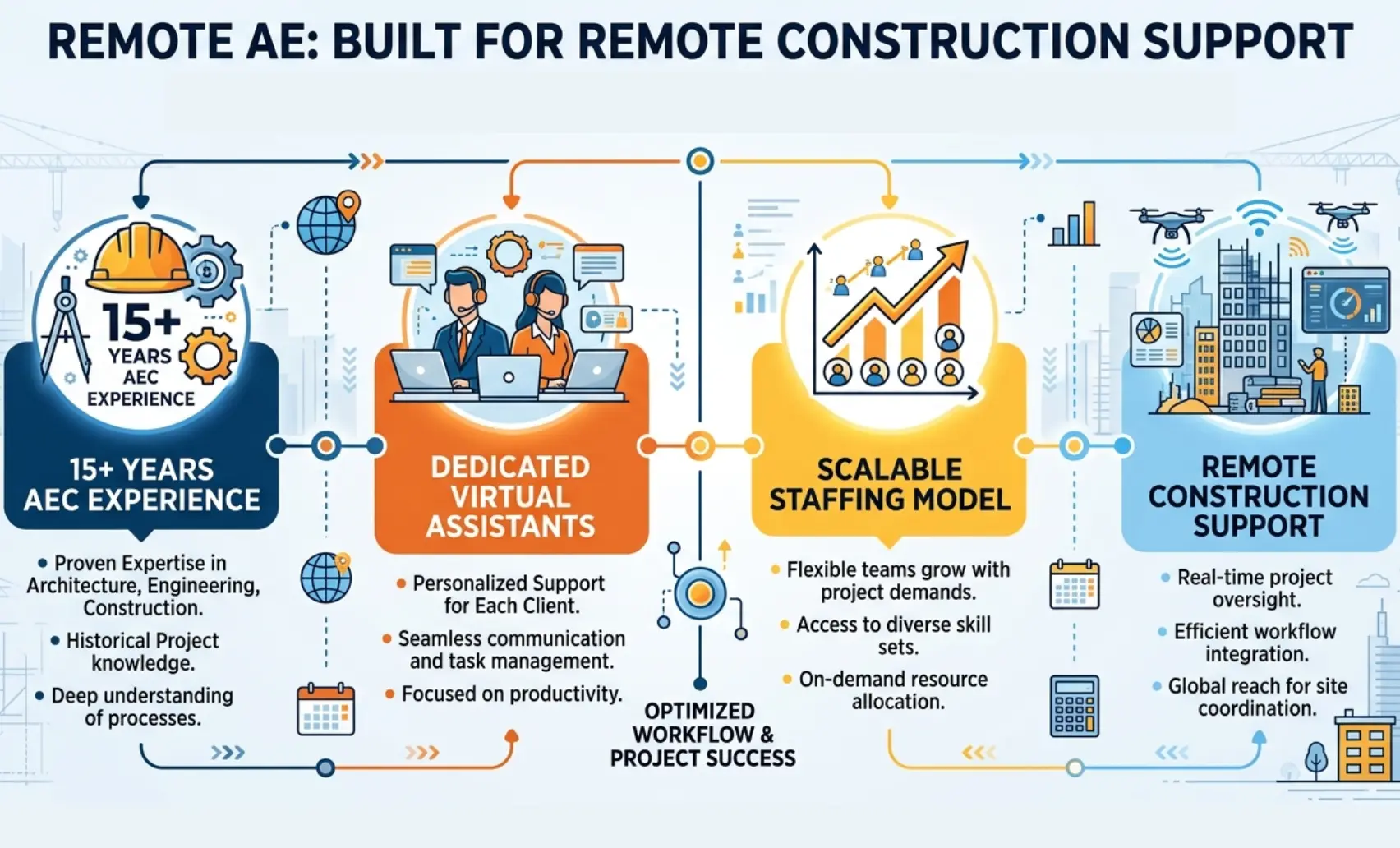
With over 15 years of experience, Remote AE understands how construction workflows operate across design, coordination, and execution phases.
Key strengths include:
- Industry-Specific Expertise
- Guaranteed Quality & Reliability
- No Long-Term Commitment
- pricing starting from $399/week
Remote AE also offers:
- No upfront costs before engagement
- risk-free replacement of up to two assistants within the first year
This model allows firms to scale their workforce while maintaining control over quality and workflows. The focus is not just on outsourcing. It is structured, industry-focused support designed for real construction workflows.
Build a Remote Construction Team That Actually Delivers!
You need more than just remote workers. You need professionals who understand construction management, BIM workflows, RFIs, submittals, and document control, and can work within your systems using tools.
Remote AE provides trained virtual construction assistants who integrate into your workflow from day one. Our professionals support estimating, scheduling, BIM coordination, and documentation while following your standards and processes.
You stay in control of decisions, coordination, and project direction. We handle the production support.
Schedule a call today to review your workflow and see how remote AEC assistants can help you scale without increasing overhead.
FAQs – Remote Work in Construction
Can construction jobs be done remotely?
Yes, some construction jobs can be done remotely, but not all. Estimating, BIM/VDC, documentation, scheduling, procurement support, and parts of project management are commonly advertised as remote or hybrid. Site supervision, physical inspections, and field coordination still require in-person presence.
What construction roles can work from home?
The most common work-from-home construction roles are estimators, BIM/VDC specialists, BIM coordinators, document controllers, procurement support staff, and some project managers or project engineers. Job postings also show remote openings for BIM specialists and construction estimators, while many field-heavy roles remain hybrid or on-site.
Can construction estimators work remotely?
Yes. Remote estimating is one of the clearest remote paths in construction. Current job listings show fully remote estimator roles focused on quantity takeoffs, scope review, pricing support, and bid preparation, which makes estimating a strong fit for remote work compared with site-dependent roles.
Can project managers in construction work remotely?
Sometimes, but usually not fully remote for every project. Remote and hybrid construction PM roles do exist, especially for preconstruction, owner-side coordination, and multi-site reporting. Still, many PM jobs require occasional site visits, meetings, or inspections, so a hybrid is often more realistic than a fully remote one.
What tools do remote construction teams use?
Remote construction teams usually rely on BIM/VDC tools, drawing and document platforms, video meetings, and shared issue tracking. Employer postings and construction platforms point to model/document collaboration workflows, with teams exchanging drawings, estimates, RFIs, and coordination data through centralized software environments.