

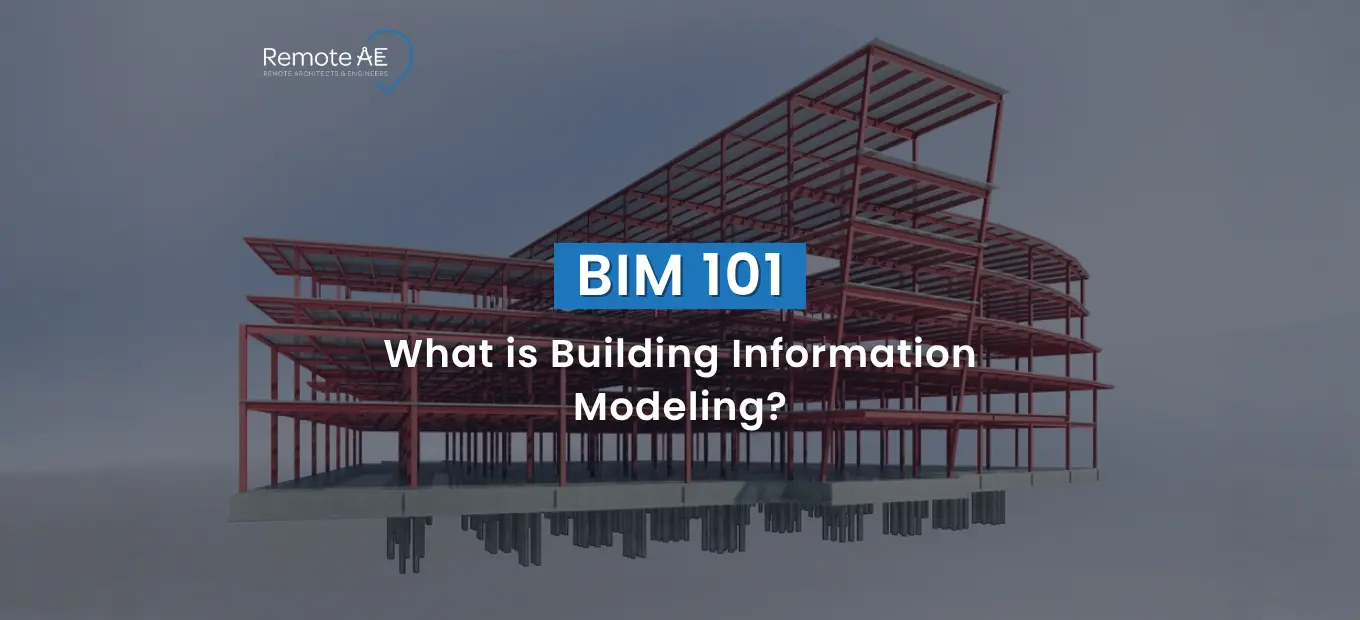
Building Information Modeling (BIM) is how AEC teams design, coordinate, and deliver buildings using a shared model that contains geometry plus project data. BIM matters because it reduces coordination misses and supports better decisions across design, construction, and operations. The BIM market is also growing fast, Grand View Research estimates $8.53B in 2024 and $9.70B in 2025. Public-sector demand is rising too. A 2024 study cited by the EU BIM Task Group notes that 12 EU countries have introduced some form of BIM mandate in public procurement (EU BIM Task Group, 2025).
What is BIM?
Building Information Modeling (BIM) is a digital process used to create and manage information about a building throughout its lifecycle.
In simple terms:
- It’s not just a 3D model
- It’s a data-rich model that includes geometry, materials, costs, and timelines
BIM Is a Process, Not Just Software
Many people think BIM is just software like Revit. That’s not correct.
BIM is a process, supported by tools such as:
- Revit (by Autodesk)
- Other BIM platforms used in design and coordination
The real value comes from how teams use BIM to:
- Share data
- Collaborate in real time
- Manage project information in a structured way
This is why BIM is central to modern BIM in construction workflows.
What Information Lives Inside a BIM Model
Depending on the project, BIM models can include:
- element properties (type, size, material)
- quantities (counts, areas, volumes)
- classification and naming
- parameters used for schedules
- coordination notes and issue references
- Lifecycle fields for operations
This information is often stored and managed in a Common Data Environment (CDE), ensuring all stakeholders work from the same source.
Standards like IFC (Industry Foundation Classes) and COBie help structure and exchange this data across platforms. Organizations like buildingSMART promote openBIM, making collaboration easier between different tools and teams.
Why BIM Matters in Architecture, Engineering, and Construction
BIM reduces friction between disciplines because everyone works from a coordinated source of truth.
McKinsey reported that 5D BIM can produce savings of up to 10% of contract value through clash detection in some cases (McKinsey, 2017).
Better Coordination and Clash Reduction
One of the biggest advantages of BIM is coordination.
With BIM:
- Teams can run clash detection before construction begins
- Conflicts between systems (like HVAC and structure) are identified early
This reduces costly on-site errors.
Better Visualization for Clients and Teams
BIM improves how projects are understood.
Instead of flat drawings:
- Teams use 3D models
- Clients can clearly see the design
This leads to faster approvals and fewer misunderstandings.
More Reliable Quantity, Schedule, and Asset Data
BIM models are data-driven.
They provide:
- Accurate quantities
- Reliable scheduling data
- Asset information for long-term use
This helps teams make better decisions throughout the project lifecycle.
Shift from Traditional CAD to BIM
The shift from CAD to BIM is a major change in the industry.
2D Drawings vs Intelligent Models
- CAD → lines and shapes
- BIM → intelligent objects with data
For example:
- A wall in CAD is just lines
- In BIM, it includes material, thickness, cost, and performance data
Limitations of CAD
Traditional CAD tools:
- Lack of data integration
- Do not support lifecycle management
- Make coordination harder
This is why many firms are moving toward BIM.
Industry Demand for BIM
BIM adoption is growing fast.
Reasons include:
- Government mandates in many countries
- Increasing project complexity
- Need for better coordination across teams
Today, BIM is no longer optional for many AEC firms. It’s becoming a standard requirement.
How BIM Works (Step-by-Step)
BIM works best when teams treat it as a shared workflow with clear handoffs, not a single person “building a model.”
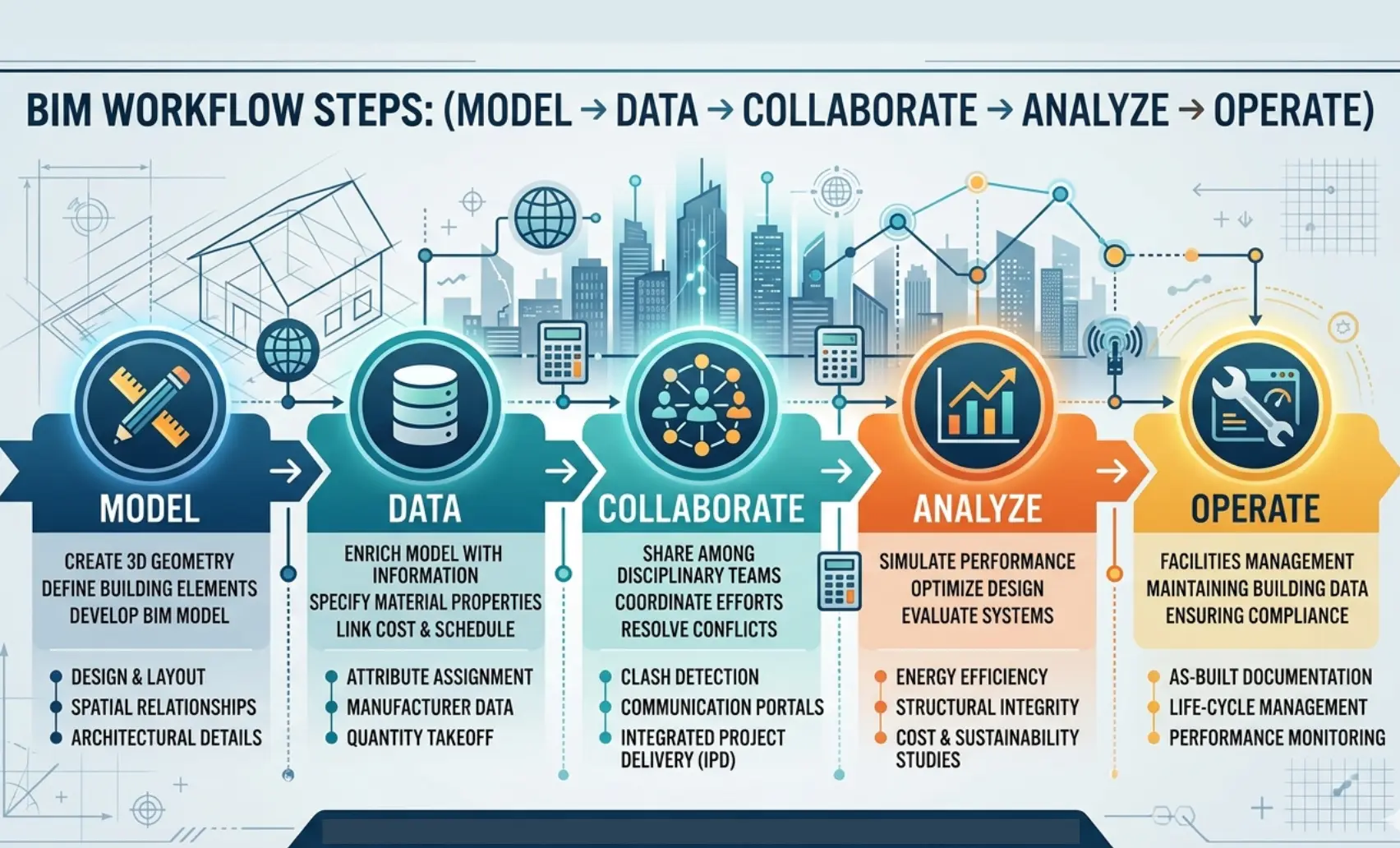
Step 1: Create a 3D Model
The BIM process starts with creating a detailed 3D model. This model is not just visual. It represents the physical and functional aspects of a building.
Teams from Architecture, Engineering, and Construction (AEC) collaborate from the beginning. The Architect develops the design, while structural and MEP engineers add their systems into the same model. Tools like Revit by Autodesk are commonly used to build these integrated models.
Unlike CAD, where drawings are separate, BIM keeps everything connected. A change in one element updates across the model automatically.
Step 2: Add Data to the Model
Once the model is created, teams begin adding information. This is what makes BIM powerful.
Each element in the model carries data such as:
- Material specifications
- Cost information
- Construction timelines
This transforms the model into a central source of truth. Data is often stored and managed in a Common Data Environment (CDE), where all stakeholders can access updated information.
Standards like IFC (Industry Foundation Classes) and COBie ensure that this data can be shared across platforms without loss.
Step 3: Collaboration Across Teams
BIM enables real collaboration, not just file sharing. Architects, engineers, and contractors work on the same model. Changes are visible to everyone in real time. This reduces miscommunication and keeps the project aligned.
The concept of openBIM, supported by organizations like buildingSMART, allows different software tools to work together. This is critical for large projects where multiple teams use different platforms.
Step 4: Simulation & Analysis
Once the model is enriched with data, teams can test and analyze it before construction begins.
Key activities include:
- Clash detection to identify conflicts between systems
- Energy analysis to evaluate building performance
This step helps teams fix issues early. It reduces costly changes during construction and improves overall project quality.
Step 5: Lifecycle Management
BIM continues to provide value even after construction is complete. The model evolves into a long-term asset. It supports:
- Facility management
- Maintenance planning
- Operational efficiency
This is where the concept of a digital twin comes into play. A digital twin is a live version of the building that reflects real-time data and performance. From design to operation, BIM supports the entire lifecycle of a project.
Key Components of BIM
BIM is not one feature. It’s a set of components that must work together.
3D Modeling (Geometry)
At its core, BIM starts with geometry.
The 3D model represents:
- Building shape
- Spatial relationships
- System layouts
But unlike traditional modeling, every element in BIM is intelligent. Each object knows what it is and how it behaves.
Data Integration (Information Layer)
The real strength of BIM lies in its data layer. The information layer turns geometry into something teams can query:
- type parameters
- schedules
- quantity fields
- asset tags
Collaboration Tools
BIM relies on strong collaboration systems.
A Common Data Environment (CDE) confirms:
- All teams access the same information
- Updates are tracked and controlled
- Version conflicts are minimized
This creates a single source of truth for the project.
BIM Dimensions Explained
BIM goes beyond 3D modeling. It includes multiple dimensions that add depth to project planning.
- 3D – Design: Visual representation of the building
- 4D – Time: Construction scheduling and sequencing
- 5D – Cost: Budgeting and cost estimation
- 6D – Sustainability: Energy performance and environmental impact
- 7D – Facility management: Operations and maintenance
These dimensions show how BIM supports every stage of a project, not just design.
BIM vs CAD: What’s the Difference?
BIM and CAD can both produce drawings. The difference is what the “source” represents.
Geometry vs Data-Rich Objects
The core difference between BIM and CAD lies in how information is handled. CAD focuses on geometry. It uses lines, arcs, and shapes to represent a building. These elements carry little to no intelligence.
BIM, on the other hand, uses data-rich objects. A wall in BIM is not just a shape. It includes material type, thickness, cost, and performance data. This allows teams to extract insights directly from the model instead of relying on separate documents.
2D Drafting vs Lifecycle Information Management
CAD is mainly used for 2D drafting. It produces drawings that represent different parts of a project, often in isolation.
BIM supports lifecycle information management. It connects design, construction, and operations into a single workflow. Changes made in one area automatically update across the model.
This makes BIM far more effective for modern BIM in construction projects, where coordination and data accuracy are critical.
When CAD Still Makes Sense
Despite the shift toward BIM, CAD still has its place.
It works well for:
- Simple projects with limited complexity
- Quick drafting tasks
- Legacy workflows where BIM adoption is not yet practical
However, for larger or more complex projects, BIM provides far greater value.
| Feature | BIM | CAD |
| Model Type | Intelligent | Static |
| Collaboration | Real-time | Limited |
| Data | Rich | Minimal |
| Lifecycle Use | Full | Design only |
Where BIM Is Used Across the Project Lifecycle
BIM is useful because it stays relevant beyond design. It supports coordination, sequencing, and handover.
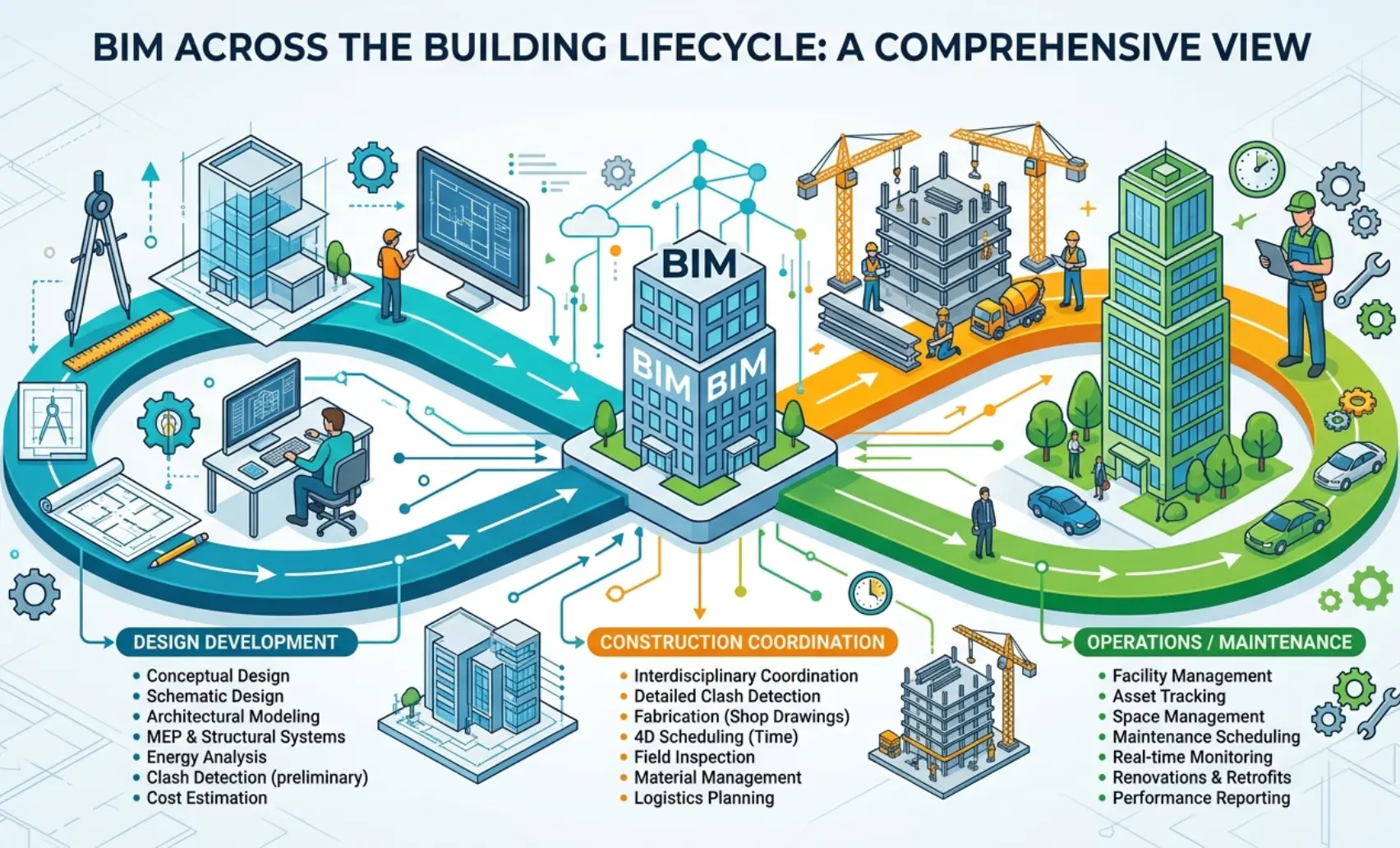
Design Development
During design development, BIM helps teams refine ideas into buildable solutions.
Architects and engineers use BIM to:
- Develop coordinated models
- Test design options
- Align systems early
This reduces the risk of conflicts later in the project.
Construction Coordination and Sequencing
In construction, BIM becomes a coordination tool.
Teams use it to:
- Plan sequencing using 4D models
- Detect issues through clash detection
- Improve communication between the site and design teams
Contractors rely on BIM to reduce delays and improve execution.
Operations, Maintenance, and Facilities Management
After construction, BIM continues to deliver value.
The model supports:
- Facility management
- Maintenance scheduling
- Asset tracking
When connected to a digital twin, the building can be monitored in real time. This improves long-term performance and reduces operational costs.
Common BIM Software and Standards
Software matters, but standards matter more when teams are distributed.
Revit, Navisworks, Archicad, ACC, Tekla Structures, and Related Tools
Several tools support BIM workflows.
Common BIM software for architects and engineers includes:
- Revit (developed by Autodesk) for modeling and documentation
- Navisworks for coordination and clash detection
- Archicad for architectural design
- Autodesk Construction Cloud (ACC) for collaboration
- Tekla Structures for structural modeling
These tools help teams manage complex projects more efficiently than traditional CAD systems.
IFC, openBIM, COBie, and Interoperability
BIM relies on open standards to ensure smooth data exchange.
Key standards include:
- IFC (Industry Foundation Classes) for model data exchange
- COBie for asset and facility data
- openBIM for cross-platform collaboration
Why Standards Matter for Distributed Teams
Standards reduce friction when:
- Teams use different software
- models must be exchanged across firms
- Handover data must be usable later
Autodesk also ties ISO 19650 and CDE thinking to Autodesk Construction Cloud usage for controlling shared project data
Benefits of BIM for AEC Companies
BIM helps AEC teams make fewer coordination mistakes, communicate intent faster, and keep deliverables aligned across disciplines.
Rework impact: A widely cited construction study found 52% of rework was caused by poor project data and communication (FMI + PlanGrid, 2018).
Better Collaboration
BIM improves teamwork across all stakeholders.
With a centralized model:
- Everyone works from the same data
- Updates are visible in real time
- Miscommunication is reduced
Reduced Errors & Rework
One of the biggest benefits is fewer errors. Through clash detection, teams can identify and fix issues before construction begins. This reduces rework and saves time.
Cost & Time Savings
BIM improves planning accuracy.
Teams can:
- Generate accurate estimates
- Optimize schedules
- Avoid costly delays
This leads to better project outcomes.
Improved Visualization
BIM makes designs easier to understand.
Clients can:
- View realistic 3D models
- Understand design intent clearly
- Make faster decisions
Data-Driven Decisions
BIM supports better decision-making.
With real-time data:
- Teams can evaluate options quickly
- Adjust plans based on accurate information
- Improve overall project performance
Common BIM Roles on a Modern AEC Team
BIM roles are different for a reason. Clarity on responsibility prevents confusion and missed reviews.
BIM Modeler vs BIM Coordinator vs BIM Manager
A successful BIM workflow depends on clearly defined roles. Each role handles a different part of the process.
- BIM modeler: builds and updates the model, adheres to standards, and produces views and sheets.
- BIM coordinator: manages coordination cycles, clash triage, issue lists, and model exchange timing.
- BIM manager: defines standards, permissions, publishing rules, and the overall BIM delivery system.
What Remote BIM Support Can Take Off Your Team’s Plate
Many firms struggle to maintain in-house BIM capacity, especially during peak workloads.
A Virtual construction Assistant can support your team by handling:
- Model creation and updates
- Drawing extraction and documentation
- Data management within the Common Data Environment (CDE)
- Coordination support for clash resolution
This allows your core team to focus on design decisions and client coordination instead of repetitive tasks.
Is BIM Right for Small and Mid-Sized Firms?
BIM is not “big firm only.” Small and mid-sized teams can use BIM when the coordination load and client expectations demand it.
Signs You’ve Outgrown CAD-Only Workflows
Many small and mid-sized firms still rely heavily on CAD. But as projects grow, this approach starts to show limitations.
You may need BIM if:
- Coordination issues are increasing
- Projects involve multiple disciplines
- Rework and errors are affecting timelines
- Clients demand more detailed visualization and data
At this stage, shifting from CAD to BIM becomes a practical step.
In-House Hiring vs Remote BIM Staffing
Building an in-house BIM team requires time and cost.
Challenges include:
- Hiring skilled professionals
- Training staff on tools like Revit and other Autodesk platforms
- Managing workload fluctuations
Remote BIM staffing offers a flexible alternative. It allows firms to scale resources based on project needs without long-term commitments.
How Remote BIM Staffing Supports Your Projects
Why Companies Outsource BIM Work
Many AEC firms are turning to the construction industry’s outsourcing to stay competitive.
Key reasons include:
- Better cost control
- Access to global talent
- Faster project delivery
This approach helps firms handle complex projects without increasing overhead.
Benefits of Virtual BIM Assistants
A Virtual construction Assistant provides immediate value.
Benefits include:
- Flexible scaling based on workload
- Faster turnaround on modeling and documentation
- Consistent support across multiple project phases
This ensures that deadlines are met without compromising quality.
What Remote AE Offers
Remote AE has been supporting the AEC industry for more than 15 years.
They provide:
- Virtual architects
- Engineering assistants
- Construction support staff
Key advantages:
-
- Industry-specific expertise
- Guaranteed quality and reliability
- No long-term commitment
- Pricing starting from $499/week
Additional benefits:
- No upfront costs before the contractual phase
- Risk-free replacement of up to two virtual assistants within the first year
This model allows firms to scale efficiently while maintaining control over project quality.
Graphic: “Remote staffing support loop” (tasks → review → publish → log)
Future of BIM in Construction
BIM is moving toward cloud-first workflows, stronger data handover, and tighter links to operations.
AI + BIM Integration
BIM is evolving with new technologies.
AI is being integrated to:
- Automate design tasks
- Improve model accuracy
- Predict project risks
This will further improve efficiency across AEC workflows.
Digital Twins
The concept of a digital twin is becoming more important. A digital twin connects the BIM model with real-time data from the built environment. This allows building owners to monitor performance and make informed decisions.
Cloud Collaboration
Cloud platforms are changing how teams work.
With cloud-based systems:
- Teams collaborate in real time
- Data is stored centrally in a Common Data Environment (CDE)
- Updates are instantly accessible
This supports distributed teams and global projects.
Smart Cities & IoT
BIM is also playing a role in smart city development.
When combined with IoT:
- Buildings become connected systems
- Data flows between infrastructure and operations
- Urban planning becomes more efficient
This shows how BIM is expanding beyond individual projects.
Ready to Scale Your BIM Capability Without Hiring Delays?
If your team is struggling with coordination issues, slow modeling workflows, or limited BIM capacity, it’s time to rethink your approach.
Remote AE gives you access to:
- Skilled virtual architects and engineers
- Reliable BIM modeling and documentation support
- Scalable teams without long-term commitments
Schedule a call today to explore how remote BIM staffing can help you deliver faster, reduce errors, and stay competitive.