

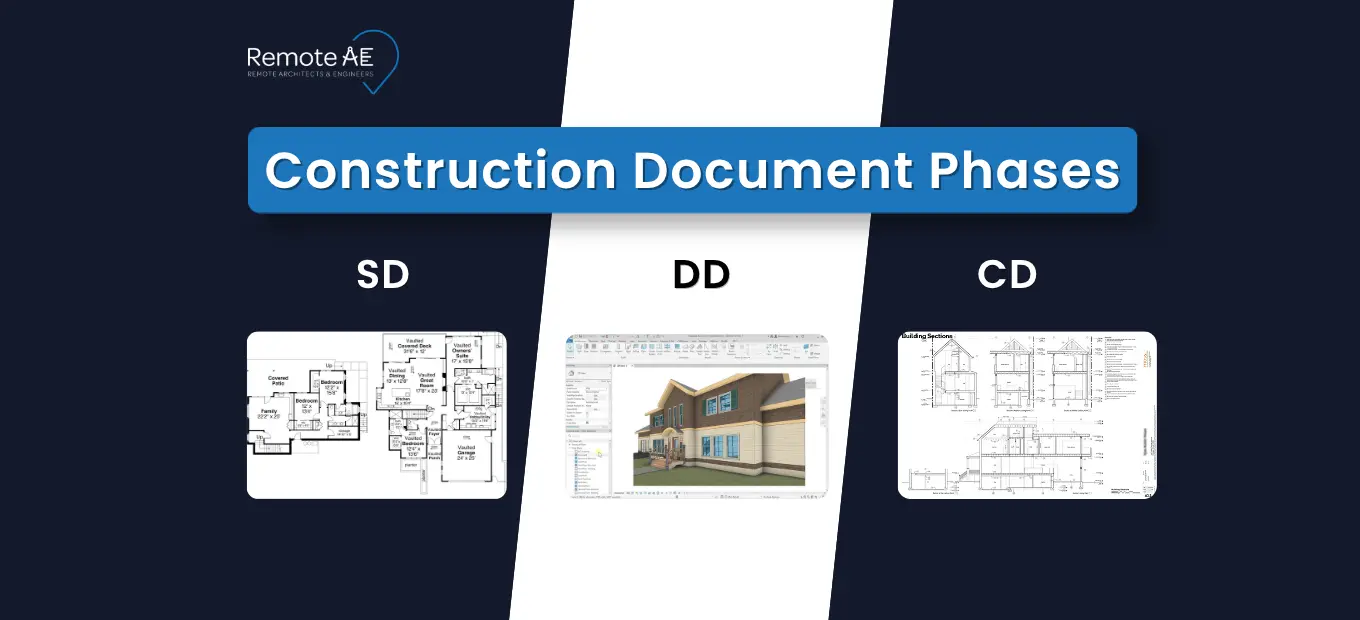
SD, DD, and CD are the core phases that move a project from idea to build-ready instructions. They exist to reduce risk, align stakeholders, and keep change under control before it becomes expensive. One major construction study found 52% of rework was caused by poor project data and communication (FMI + PlanGrid, 2018). That’s why clear phase gates, disciplined revisions, and coordinated deliverables matter.
This guide explores what each phase means, what belongs in SD vs DD vs CD, and what teams commonly get wrong between phases, where Virtual AEC support and Remote AE can help with drafting, BIM coordination, and documentation speed, without moving decision authority out of your team.
What Are Construction Document Phases?
Construction document phases are a step-by-step process that takes a project from an early idea to detailed, build-ready plans.
Think of it like this:
- SD (Schematic Design) → defining the idea
- DD (Design Development) → refining the design
- CD (Construction Documents) → preparing for construction
This structure ensures that nothing important is missed before work begins on-site.
Why These Phases Exist
These phases are not just formalities. They solve real problems in construction.
They help to:
- Reduce risk by catching issues early
- Improve coordination between:
- Architects
- Engineers
- Contractors
- Align expectations with the Owner
- Control budget through accurate cost estimate planning
Without clear phases, projects often face delays, redesigns, and cost overruns.
The 3 Core Phases
Here’s a quick breakdown of schematic design vs design development vs construction documents:
| Phase | Focus | Output |
| Schematic Design (SD) | Concept and vision | Sketches, basic layouts |
| Design Development (DD) | Refinement and coordination | Detailed plans, systems defined |
| Construction Documents (CD) | Execution | Final drawings, Specifications, permit-ready sets |
The American Institute of Architects describes DD as taking initial schematic documents “one step further” and laying out MEP/structural/architectural details. That’s the handoff point where coordination becomes the main job.
Phase 1: Schematic Design (SD)
What Is Schematic Design?
Schematic Design is the starting point of any project.
At this stage:
- The Architect explores ideas
- The focus stays on the big picture
- Details are kept minimal
This is where vision begins to take shape.
Key Goals of SD
The main goal is clarity, not perfection.
During SD, teams aim to:
- Define the project vision
- Establish layout and scale
- Align with Owner expectations
- Set early direction for design decisions
A rough cost estimate may also be introduced to guide feasibility.
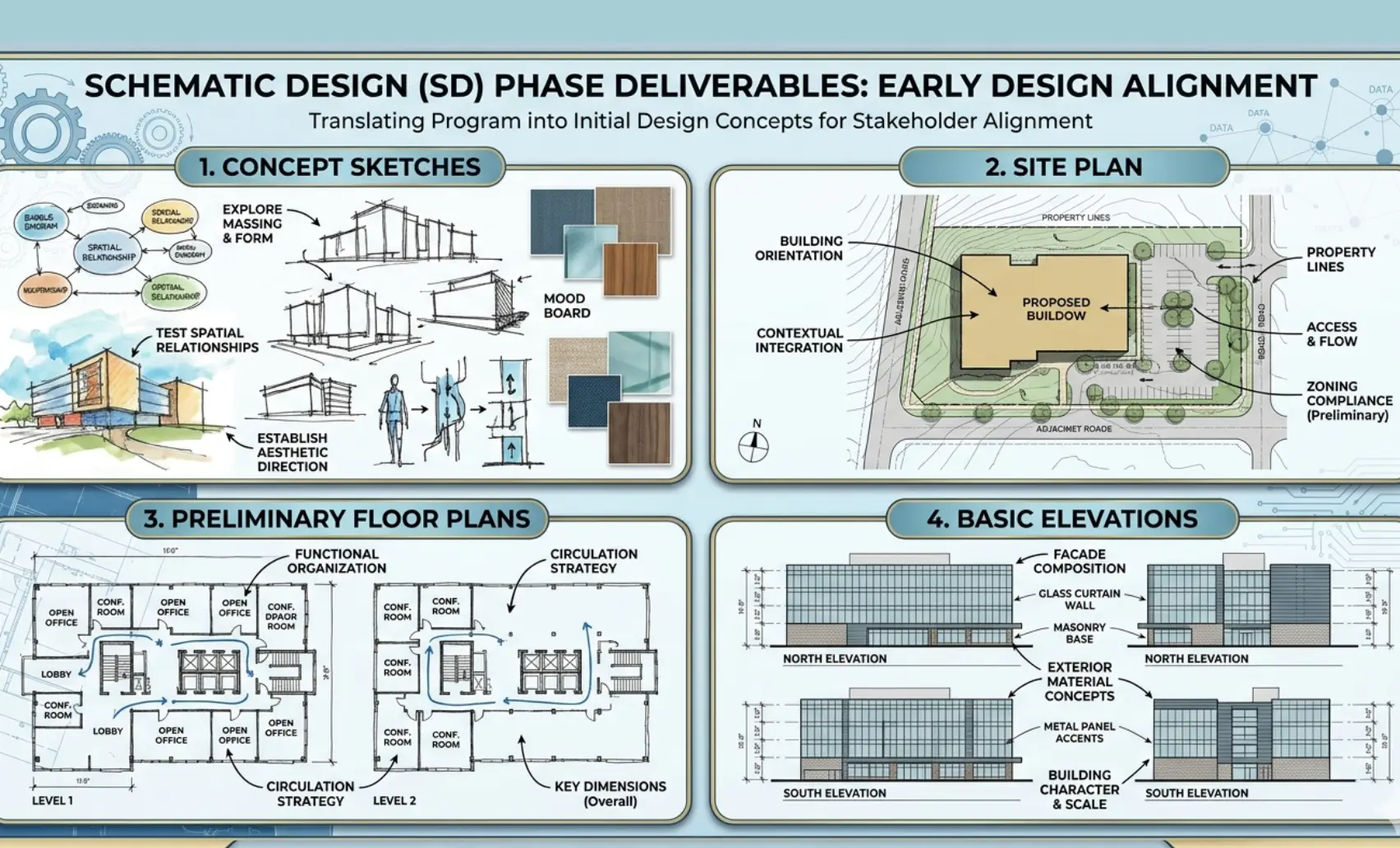
What’s Included in SD Deliverables
Deliverables at this stage are simple but important.
Typical outputs include:
- Concept sketches
- Site plans
- Preliminary floor plans
- Basic elevations
These are often created using BIM tools or drafting platforms like Revit and AutoCAD to speed up iteration.
What Should Not Be Pushed Past SD
Do not push these decisions past SD without clear buy-in:
- core layout direction (major planning moves)
- basic building scale and massing
- key program adjacencies
- early site constraints that drive everything else
Benefits of Schematic Design
A strong SD phase sets the tone for the entire project.
Key benefits:
- Faster decision-making
- Clear communication between stakeholders
- Reduced redesign later
- Early alignment on scope and budget
It also gives the Contractor a general idea of project direction before detailed planning begins.
How Virtual AEC Support Helps in SD
Many firms now use remote teams to support early-stage design.
A Virtual construction Assistant can:
- Draft concepts quickly
- Support architects with early documentation
- Create initial BIM models
- Help visualize ideas using Revit
This approach reduces workload while keeping timelines tight.
Phase 2: Design Development (DD)
What Is Design Development?
Design Development is where ideas start becoming real.
In simple terms:
- SD defines what the project is
- DD defines how it will be built
This phase answers the question: What is design development in construction? It’s the stage where concepts turn into coordinated, detailed designs ready for technical validation.
Key Goals of DD
The focus shifts from vision to precision.
During DD, teams work to:
- Refine design decisions
- Select materials and building systems
- Coordinate between disciplines (architectural, structural, MEP)
- Align design with budget using updated cost estimate
The Architect works closely with engineers and consultants to ensure everything fits together.
What’s Included in DD Deliverables
Deliverables become more detailed and technical.
Typical outputs include:
- Detailed floor plans
- Structural layouts
- MEP coordination drawings
- Material Specifications
At this stage, BIM plays a key role. Teams use tools like Revit to build coordinated models and AutoCAD for precise drafting.
Benefits of Design Development
A well-executed DD phase creates stability.
Benefits include:
- Better coordination across teams
- Fewer surprises during construction
- More accurate cost estimate
- Strong foundation for permit and construction drawings
It also confirms the Owner fully understands what will be delivered before final documentation begins.
Common Challenges in DD
Two common DD failures show up fast:
- Coordination conflicts
A beam lands where a duct needs to run. A riser cuts through a stair. - Budget mismatches
Material choices and system selections outpace the target budget.
If not addressed, these issues can carry into the Construction Documents phase and cause delays.
Role of Remote AEC Teams in DD
Remote teams are especially valuable during DD.
A remote AEC team can:
- Provide BIM modeling support
- Assist with clash detection
- Speed up revisions and updates
- Maintain documentation accuracy
This is where the construction industry’s outsourcing becomes highly effective. It allows firms to scale resources without increasing overhead.
Phase 3: Construction Documents (CD)
What Are Construction Documents?
Construction Documents are the final, build-ready drawings. This is the most critical stage in the construction document phase in architecture.
These documents:
- Guide the Contractor during construction
- Support approvals like the Building permit
- Serve as a legal reference for the project
Key Goals of CD
Precision is everything in this phase.
The main goals are:
- Provide exact instructions for construction
- Verifies compliance with building codes and regulations
- Prepare documents for bidding and permitting
Standards like AIA, WBDG, and ISO 19650 often guide how documentation is structured and managed.
What’s Included in CD Deliverables
This phase produces the most detailed documentation.
Typical deliverables include:
- Detailed drawings (architectural, structural, MEP)
- Technical Specifications
- Schedules and notes
You’ll also see:
- Equipment schedules
- Finish schedules
- Door and window schedules
Benefits of Construction Documents
Strong CDs lead to smooth execution.
Key benefits:
- Clear instructions for the Contractor
- Fewer on-site errors
- Faster approvals for the Building permit
- Better coordination during construction administration
It also improves workflows like:
- Submittal reviews
- Shop drawing approvals
Common Challenges in CD
Errors at this stage are costly.
Common issues include:
- Drawing inconsistencies leading to rework
- Miscommunication between design and site teams
- Missing details that trigger RFI (Requests for Information)
Each RFI slows progress and increases cost.
CD Drawings vs Specifications vs Schedules
Understanding these components is critical.
- Drawings → Visual representation of design
- Specifications → Written instructions on materials and methods
- Schedules → Organized data (quantities, finishes, equipment)
All three work together to guide construction accurately.
Permit Set vs Bid Set vs Issued-for-Construction Set
Not all document sets serve the same purpose.
- Permit set → Submitted for Building permit approval
- Bid set → Used by contractors to estimate project cost
- Issued-for-construction set → Final approved documents used on-site
This clarifies the difference between permit set vs construction documents, a common source of confusion.
SD vs DD vs CD: Key Differences at a Glance
| Phase | Purpose | Level of Detail | Primary Audience | Decision-Making Milestone | Deliverables |
| Schematic Design (SD) | Define project concept | Low | Owner, Architect | Approve concept and scope | Sketches, site plans, basic layouts |
| Design Development (DD) | Refine and coordinate design | Medium | Architect, engineers | Approve materials and systems | Detailed plans, system layouts, and material Specifications |
| Construction Documents (CD) | Execute construction | High | Contractor, authorities | Issue for construction & permit | Final drawings, schedules, and technical Specifications |
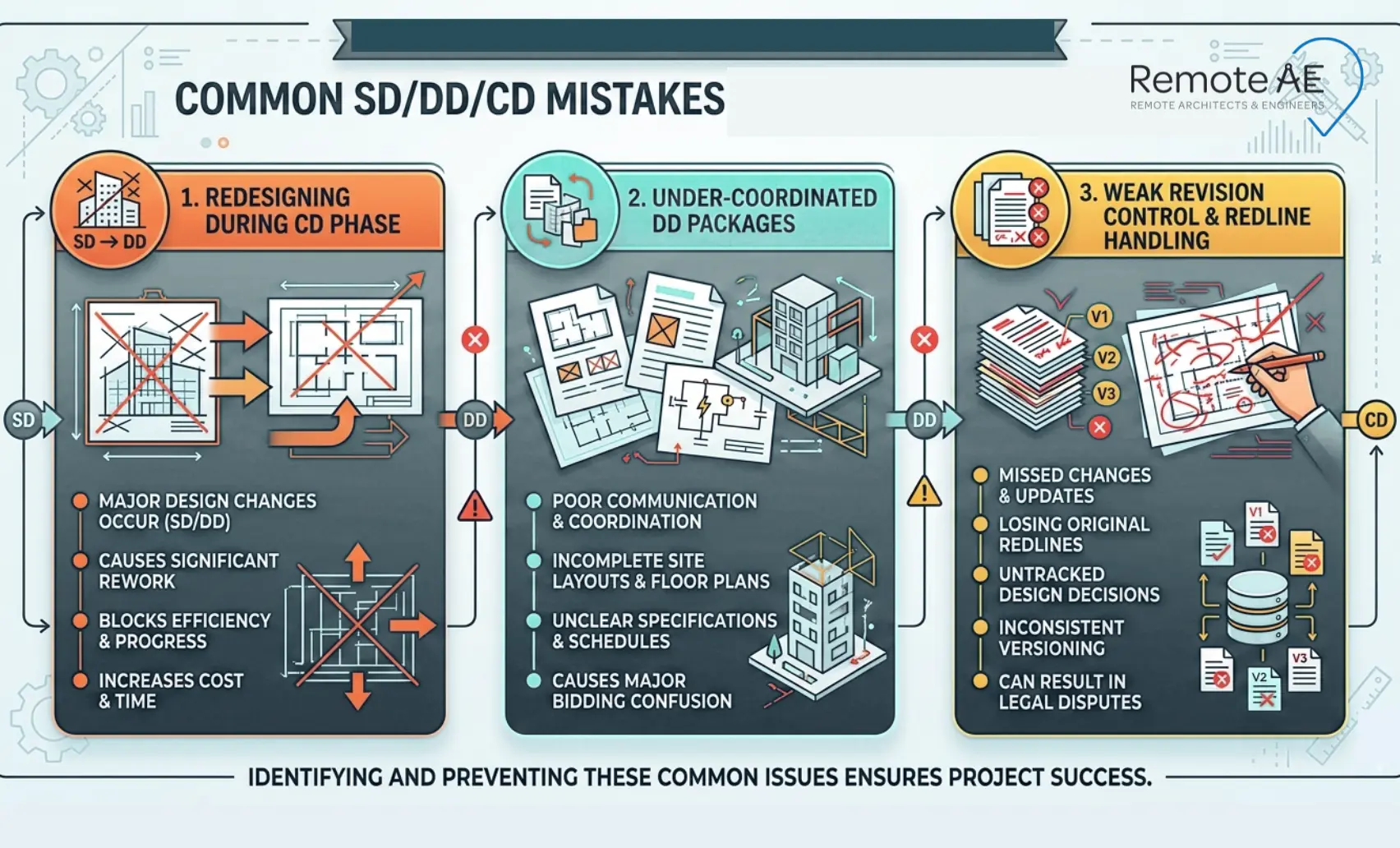
Common Mistakes Teams Make Between SD, DD, and CD
The biggest risk is letting phase work “bleed” forward and create a late redesign.
Redesigning During CDs
CDs should document. They should not reinvent the plan. If you redesign in CDs, the team pays twice:
- more drafting time
- more coordination churn
- more field confusion
Under-Coordinated DD Packages
If DD lacks proper coordination, issues carry forward.
Common gaps:
- Conflicts between structural and MEP systems
- Missing details in BIM models
- Incomplete Specifications
This leads to errors in the final Construction Documents.
Weak Revision Control and Redline Handling
Poor document management confuses.
Typical issues:
- Outdated drawings used on-site
- Misaligned revisions between Revit and AutoCAD files
- Lack of proper tracking under standards like ISO 19650
Strong revision control is critical, especially during construction administration.
Who Does What in Each Phase?
Clear roles reduce confusion and speed up delivery.
Architects and Engineers
The Architect leads design across all phases.
Responsibilities include:
- Developing concepts in SD
- Coordinating systems in DD
- Producing final drawings in CD
Engineers support with structural, mechanical, and electrical systems.
Owners and Estimators
The Owner plays a key role in approvals.
They:
- Approve design direction in SD
- Review materials and systems in DD
- Finalize the budget using the updated cost estimate
Estimators support cost planning across all phases.
How remote drafting and documentation support fit in
Remote support fits best where work is measurable and reviewable:
- drafting updates and sheet setup
- model cleanup and documentation support
- Redline consolidation and packaging
- change logs and revision tracking support
How Remote AE Supports Every Phase
Remote AE provides end-to-end support across all construction document phases.
Remote AE offers:
- Virtual architects
- Engineering assistants
- Full Construction Documents support
They integrate with your team and tools like BIM, Revit, and AutoCAD.
Benefits
Working with Remote AE gives you:
- 15+ years of experience in the AEC industry
- Cost savings without hiring full-time staff
- Faster turnaround on drawings and documentation
- Scalable teams based on project needs
- Industry-specific expertise
- Guaranteed quality and reliability
- No long-term commitment
Pricing starts from $499/week.
Additional advantages:
- No upfront costs
- Risk-free replacement within the first year (up to two virtual assistants)
Why capacity matters: 51% of engineering firms reported turning down work due to workforce shortages (ACEC Research Institute, 2024). Remote staffing helps firms protect delivery when hiring can’t keep up.
Best Practices for Managing SD, DD, and CD Phases
Managing construction document phases effectively requires discipline and the right systems. Small gaps early can turn into major issues later.
Keep Communication Clear
Poor communication is one of the main causes of delays.
To avoid this:
- Hold regular coordination meetings
- Align the Architect, engineers, and Contractor early
- Keep the Owner informed at key decision points
Use Standardized Templates
Consistency matters across all phases.
Best practices include:
- Use standardized drawing templates
- Maintain uniform Specifications formats
- Follow documentation guidelines from AIA and WBDG
This improves clarity and helps teams work faster.
Leverage BIM Tools
Modern projects rely heavily on BIM.
Using tools like Revit and AutoCAD helps:
- Improve coordination between disciplines
- Detect clashes early
- Keep models and drawings aligned
Following standards like ISO 19650 ensures proper data management throughout the project lifecycle.
Use Remote Teams for Workload Balance
Workloads often spike during DD and CD phases.
Using a Virtual construction Assistant helps:
- Handle drafting and documentation tasks
- Maintain quality during tight deadlines
- Support Submittal and Shop drawing reviews
This approach keeps your core team focused on critical decisions while maintaining speed.
Alt text: Checklist showing best practices for managing SD, DD, and CD phases: clear communication, standardized templates, BIM tools, and balanced workloads with remote support
Stop Project Delays Before They Start!
If your team struggles with delays, coordination gaps, or documentation overload, it’s time to rethink how you handle construction document phases.
Remote AE gives you access to:
- Skilled virtual architects and engineers
- Reliable Construction Documents support
- Scalable teams without long-term commitments
Even if you need help with Schematic Design, Design Development, or final documentation, Remote AE fits seamlessly into your workflow.
Schedule a call today to explore how remote AEC support can help you deliver faster, reduce errors, and stay competitive!
FAQs – Construction Document Phases: SD, DD, CD
What is the difference between SD, DD, and CD in construction?
SD (Schematic Design) defines the concept, layouts, massing, and basic systems. DD (Design Development) adds detail, dimensions, materials, and coordination between disciplines. CD (Construction Documents) are the final, build-ready drawings with full details, notes, and specifications used for permitting and construction.
What does a 100% DD set include?
A 100% DD set typically includes dimensioned plans, key sections, major details, preliminary MEP layouts, structural framing concepts, and material selections. It is coordinated enough to understand the scope and systems, but not fully detailed for construction like a CD set.
Are construction documents the same as permit drawings?
Not always. Permit drawings are a subset of construction documents focused on code compliance and approval. Construction documents (CDs) are more detailed and include everything needed to build. Some projects submit a permit set first, then issue a fuller CD set.
Can a project skip DD and go straight to CDs?
Technically yes, but it’s risky. Skipping DD often leads to coordination gaps, more RFIs, and costly changes later. DD acts as a checkpoint to align design, structure, and systems before detailed documentation begins.