

“As-builts” are the fastest way to remove guesswork from renovation, due diligence, and facilities work. They show what is actually installed, not what someone assumed was installed. That difference prevents surprises like hidden MEP reroutes, shifted walls, or undocumented equipment swaps. This guide explains what as-built drawing services include, when you need existing conditions documentation, and why it matters for permits, planning, and stakeholder alignment. How reality capture (manual measure, LiDAR/laser scanning, and photogrammetry) feeds CAD/BIM deliverables, what drives cost and timeline, and how Remote AE supports accurate drafting under your standards.
What Are As-Built Drawing Services?
As-built drawing services document what actually exists in the field. They capture real-world conditions after construction, renovation, or over time. These drawings reflect dimensions, layouts, and systems as installed, not as originally designed.
They are also known as:
- As-built plans
- Existing conditions drawings
- Record drawings (as-constructed drawings)
The goal is simple: remove guesswork.
As-Built Drawings vs Record Drawings vs Design Drawings
People mix these up, which leads to bad assumptions during planning.
Key Differences Table
| Type | Purpose | Accuracy |
| Design Drawings | Show design intent before construction | Based on assumptions |
| Record Drawings | Updated drawings from redlines during construction | Partially accurate |
| As-built Drawings | Verified field conditions after completion | Highly accurate |
Design drawings represent intent.
Record drawings rely on redlines and updates during construction.
But as-built drawing services verify conditions through site measurements, scanning, and modeling.
Why As-Built Drawings Are More Reliable
As-built documentation reflects actual field conditions, not assumptions.
This matters because:
- Field changes happen during construction
- Contractors adjust routing and layout
- MEP systems rarely match the design exactly
Using outdated or inaccurate drawings leads to errors. Accurate existing conditions documentation removes that risk.
When You Need Existing Conditions Documentation
Existing conditions documentation is most valuable when unknowns turn into costs.
Renovations & Tenant Improvements
Renovations depend on accurate information.
Example: A retail rebrand project requires MEP reroutes. If existing ductwork or panels are not documented, redesign becomes guesswork. With proper existing conditions drawings, teams can:
- Route new systems correctly
- Avoid clashes
- Reduce change orders
Adaptive Reuse
Example: Converting a warehouse into office space.
Older buildings often lack accurate documentation. Structural systems, slab levels, and utilities must be verified.
As-built drawing services provide:
- Verified dimensions
- Structural layouts
- Existing MEP systems
This is critical for safe reuse.
Due Diligence + Property Transactions
Accurate documentation supports property evaluation.
- Area verification (aligned with BOMA standards)
- Lease planning
- Investment analysis
Outdated drawings create risk. Accurate record drawings (as-constructed drawings) improve decision-making.
Facilities & Lifecycle Work
Facility teams rely on current data. For maintenance and upgrades:
- Shutdown planning
- Equipment replacement
- Safety upgrades
Accurate as-built plans reduce downtime and errors.
Why Existing Condition Documentation Matters
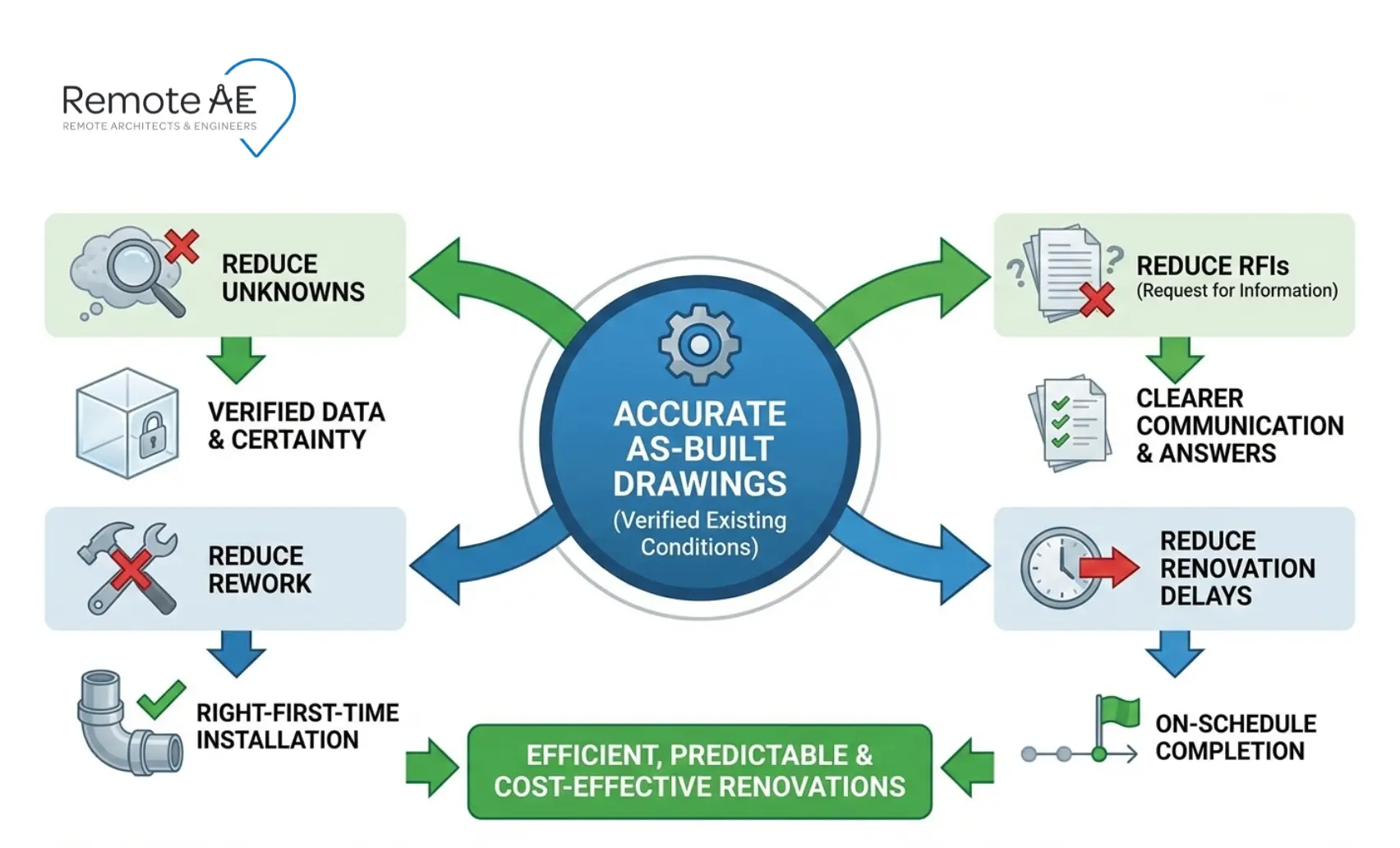
Existing condition documentation protects the schedule and budget because it reduces unknowns. It also gives every stakeholder one shared reference point.
Rework impact stat: A construction industry report estimated that 52% of rework was caused by poor project data and communication, with major cost implications.
Prevents Costly Errors
Without accurate data, projects fail early.
Common issues:
- Unknown structural elements
- Hidden MEP conflicts
- Incorrect dimensions
These lead to:
- Rework
- Delays
- Budget overruns
Accurate as-built drawing services reduce these risks.
Supports Accurate Planning
Designers need reliable inputs. Architects, engineers, and BIM modelers use existing conditions drawings to:
- Develop layouts
- Plan system upgrades
- Coordinate disciplines
Without accurate data, even the best design fails.
Improves Communication
Projects involve many roles:
- Architect
- Engineer
- Contractor
- Owner
Clear as-built plans align everyone. They act as a shared reference point.
Ensures Compliance
Permits and approvals depend on accurate data. Authorities require:
- Verified layouts
- Safety compliance
- Updated documentation
Accurate record drawings (as-constructed drawings) support approvals.
What’s Included in a Good As-Built Package
A good as-built package is more than a floor plan. It’s a coordinated set that matches the scope and supports real decisions.
Why scope definition matters: Missing or inconsistent project information is a leading cause of rework and coordination churn
Architectural
Architectural as-builts usually include:
- floor plans with verified dimensions
- reflected ceiling plans (RCP) where ceilings matter
- key elevations and sections where changes affect fit-out
- door/window schedules if replacements or egress routes are involved
Structural
Structural scope depends on access. It typically documents:
- column locations and sizes where visible
- major beams and framing where exposed or observable
- slab edges and openings
- foundations only where visible or confirmed by records
MEP/FP
MEP/FP as-builts often cover:
- equipment locations and tags
- duct and piping routes (especially above ceilings)
- electrical panels, feeders, and key circuits (as scoped)
- sprinkler heads and mains, where they affect the layout
Site / Utility Documentation
When in scope:
- Utility connections
- Site layouts
- External systems
Scope depends on project needs.
Additional Deliverables
Typical outputs include:
- DWG, RVT, IFC, PDF files
- Point cloud files (E57, RCP/RCS)
- Equipment schedules
- Coordinated plans
Each deliverable aligns with project requirements.
How Existing Conditions Are Captured
Accurate as-built drawing services depend on how well data is captured in the field. The method you choose affects speed, accuracy, and cost.
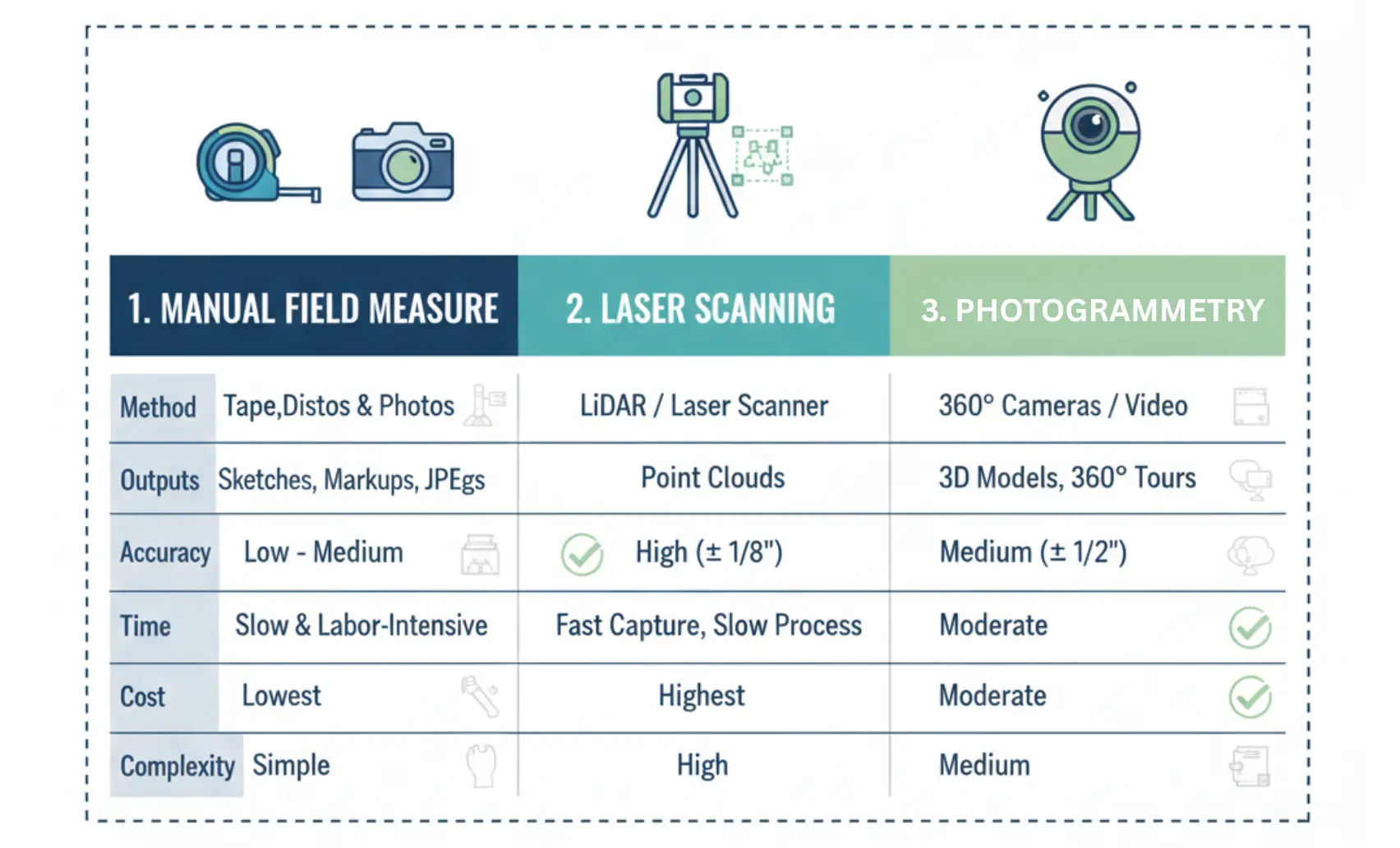
The U.S. GSA notes that laser scanning can provide accurate, information-rich data for buildings, supporting documentation, and modeling workflows (GSA, 2020).
Manual Field Measure + Photo Log
This is the traditional approach.
A surveyor, CAD drafter, or technician visits the site and collects:
- Tape or laser measurements
- Field sketches
- Photo documentation
This method works best for:
- Small spaces
- Simple layouts
- Limited budgets
However, it has limitations:
- Human error risk
- Missed elements
- Time-intensive process
Manual methods rely heavily on experience. Accuracy depends on the person collecting data.
LiDAR / Laser Scanning + Point Clouds
This is the most reliable method for documenting modern existing conditions.
LiDAR and laser scanning capture millions of points to create a point cloud. This digital representation reflects real-world geometry with high precision.
Key components include:
- Point cloud data (dense spatial information)
- Registration (aligning multiple scans)
- Control points (ensuring accuracy and scale)
Benefits:
- High accuracy (aligned with Level of Accuracy (LOA) standards)
- Faster site capture
- Full spatial coverage
Outputs typically include:
- E57 files
- RCP/RCS formats
These are used in scan to BIM/point cloud to Revit workflows.
Photogrammetry / 360 Tours
This method uses images to create 3D representations.
Tools like:
- Matterport
- Photogrammetry software
These help with:
- Visual reference
- Site walkthroughs
- Documentation support
However, photogrammetry has limits:
- Lower geometric accuracy
- Not ideal for precise modeling
It works best as a supplement, not a replacement for LiDAR.
Reality Capture Handoff: What to Ask For
When hiring a reality capture vendor, ask for both raw and processed data.
You should receive:
- Raw scan files (E57, RCP/RCS)
- Registered point cloud
- Coordinate system alignment
- Cleaned dataset (noise removed)
- Field notes and photos
Without proper handoff, downstream modeling becomes difficult.
From Point Cloud to CAD / BIM
Once data is captured, the next step is converting it into usable drawings. This is where CAD drafters, BIM modelers, and QA reviewers play a key role.
Point Cloud Formats and Common Pipelines
Common formats include:
- E57 (open standard)
- RCP/RCS (Autodesk formats)
- IFC (for model exchange)
Typical pipeline:
- Import the point cloud into the software
- Align with project coordinates
- Clean and segment data
- Model geometry from point cloud
- Produce 2D drawings or 3D models
This forms the basis of scan to BIM/point cloud to Revit workflows.
Drafting / Modeling Workflow in Revit and AutoCAD
A typical process looks like this:
- Import point cloud into Revit or AutoCAD
- Trace geometry for walls, floors, and ceilings
- Model MEP systems were visible
- Add annotations and dimensions
- Generate sheets and schedules
Deliverables are then exported as:
- DWG files
- RVT models
- IFC models
- PDF sets
Each output supports different project needs.
Quality Considerations
Accuracy depends on:
- Level of Development (LOD)
- Level of Accuracy (LOA)
- QA processes
A proper QA reviewer checks:
- Dimensions
- Alignment
- Completeness
- Consistency with the point cloud
Cost + Timeline Drivers (What Actually Moves the Number)
Not all as-built drawing services are priced the same. Several factors affect cost and timeline.
Area, Access, Complexity, Ceiling Height, MEP Density
These factors change capture time and drafting time.
- Area: More square footage increases capture and modeling hours.
- Access: night work, occupied spaces, and restricted rooms add friction.
- Complexity: irregular geometry and phased fit-outs increase ambiguity.
- Ceiling height: Tall spaces require more scan positions and safety planning.
- MEP density: packed ceilings require dense capture and careful tracing.
Deliverable Depth
Scope affects pricing significantly.
Examples:
- 2D drawings only (lower cost)
- 3D BIM models (RVT) (higher cost)
- Architectural only vs full MEP modeling
More detail means more modeling time.
Turnaround Expectations
Timeline impacts cost.
Faster delivery requires:
- Larger teams
- Parallel workflows
Laser scanning can reduce field time, but still requires processing and modeling.
Benefits of Outsourcing As-Built Drawing Services
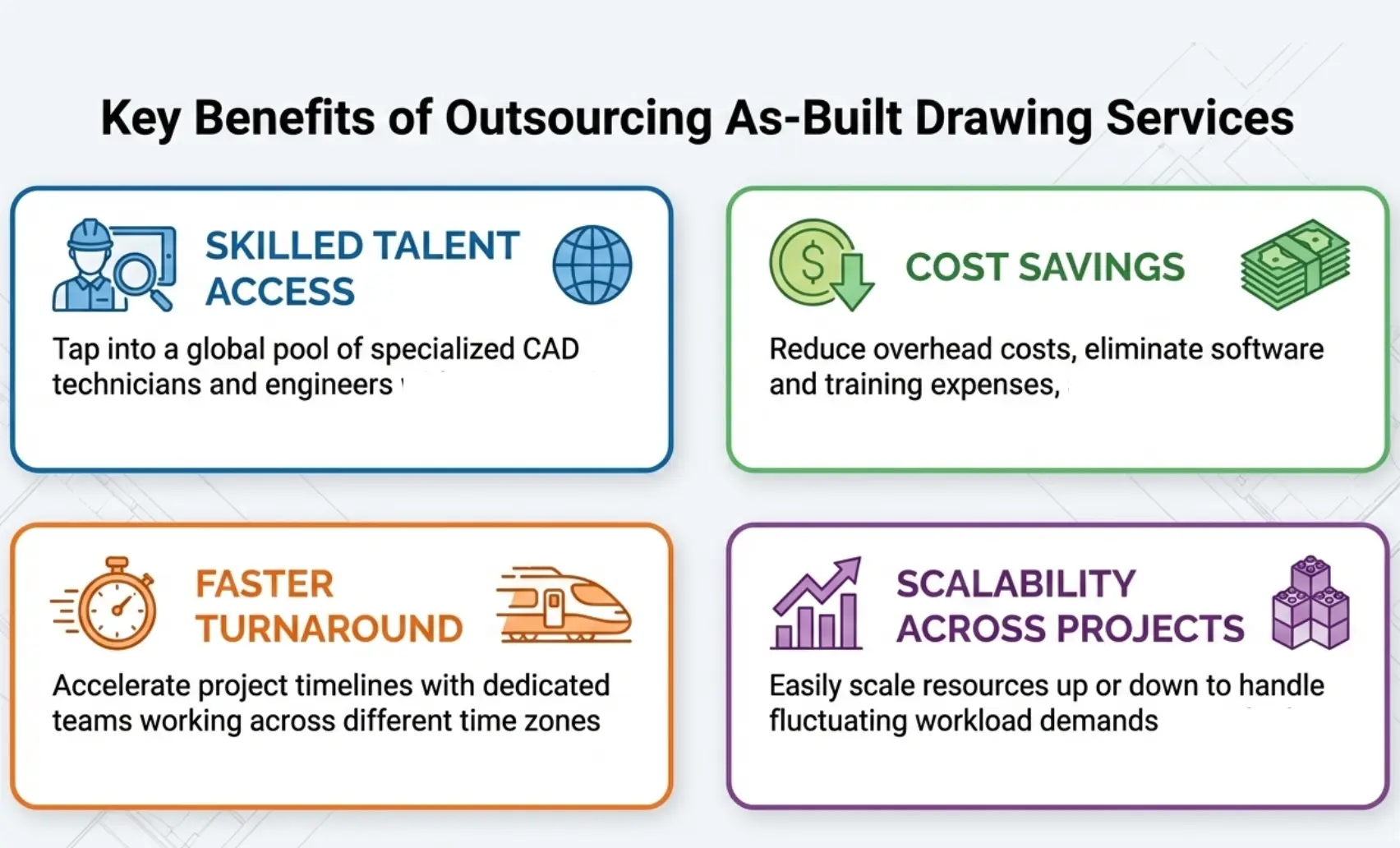
Outsourcing allows firms to scale without building internal teams.
Access to Skilled Talent
Outsourcing gives you trained CAD and BIM professionals who know how to:
- interpret field conditions
- work from point clouds
- produce permit-ready sheets and clean models
Cost Savings
Outsourcing avoids:
- Hiring costs
- Software licenses
- Equipment investment
You pay for deliverables, not overhead.
Faster Turnaround
Dedicated remote teams like Remote AE can:
- Work across time zones
- Deliver faster outputs
This is critical for tight schedules.
Scalability
Handle multiple projects without delays.
- Small project → small team
- Large project → scale up
No hiring lag.
Why Choose Remote AE for As-Built Drawing Services
Choosing the right partner for as-built drawing services is not just about drafting. It is about accuracy, consistency, and reliability across every project.
Remote AE provides a structured approach to existing conditions documentation, combining experienced AEC talent with proven workflows.
AEC-Focused Expertise
Remote AE has supported architecture, engineering, and construction teams for over 15 years.
Our teams understand:
- As-built plans and record drawings (as-constructed drawings)
- Scan to BIM/point cloud to Revit workflows
- Project coordination and QA processes
Each resource has a minimum of 5 years of industry experience.
This is not generic outsourcing. This is AEC-specific production support.
Virtual Staffing Model
Remote AE provides dedicated remote assistants, not rotating freelancers.
You can hire:
- CAD drafters
- BIM modelers
- Reality capture technicians
- QA reviewers
- Project managers
They work within your systems:
- Revit, AutoCAD, Autodesk Construction Cloud / BIM 360
- Your file naming standards
- Your QA processes
Flexible Engagement
Your workload is not constant. Your staffing should not be either.
Remote AE allows you to:
- Scale up for large projects
- Scale down when work slows
- Support multiple projects at once
No long-term commitment required.
Quality and Accuracy
Accuracy is critical in existing conditions drawings.
Remote AE ensures quality through:
- Structured QA workflows
- Defined LOD and LOA targets
- Review checkpoints before delivery
Key benefits include:
- Industry-Specific Expertise
- Guaranteed Quality & Reliability
- From 499$/week
Additional support includes:
- No upfront costs
- Risk-free replacement (up to two assistants in the first year)
Get Accurate As-Built Drawings Without Slowing Your Project!
You need as-built drawing services that reflect real field conditions, not assumptions. Remote AE provides experienced AEC professionals who deliver precise existing conditions drawings, from scan to BIM/point cloud to Revit workflows to detailed floor plans, elevations, sections, and MEP plans, backed by consistent QA processes. We help you scale without overhead, without delays, and without losing control.
Schedule a call today for a fast scope review and a clear weekly quote.
You stay in control. We handle the production.
FAQs – As-Built Drawing Services
What is included in as-built drawings?
As-builts show what was actually installed, not what was designed. Typical content includes updated plans, sections, key dimensions, equipment locations, routing changes for MEP, approved substitutions, and field changes captured during construction. Good as-builts also include revision notes, dates, and references to RFIs, submittals, and change orders.
As-built vs record drawings: what’s the difference?
As-builts are usually field-marked updates created during construction (often by the contractor). Record drawings are a cleaned, finalized set based on those as-builts and approved changes, often prepared at closeout. Record drawings aim to be more consistent and “publishable” for the owner’s archive.
Who is responsible for as-built accuracy: contractor, architect, or owner?
In most projects, the contractor is responsible for maintaining as-builts because they control installation and field changes. The architect/engineer may produce record drawings if contracted to do so, but typically they rely on contractor markups. The owner defines the required accuracy and deliverables in the contract.
Should I use laser scanning or manual measurement?
Use laser scanning when geometry is complex, ceilings are congested, or accuracy matters for fabrication and coordination. Manual measurement works for small spaces, simple layouts, and low-risk scopes. A common hybrid approach is scanning critical areas (MEP rooms, shafts, tight corridors) and measuring the rest.
What file formats should I request?
Request formats based on how you’ll use the data. PDF is the baseline for review. DWG supports 2D drafting workflows. RVT is best if you coordinate in Revit. IFC helps with cross-platform sharing. For scan-based work, request the point cloud (RCP/RCS or E57) plus the modeled deliverable.