

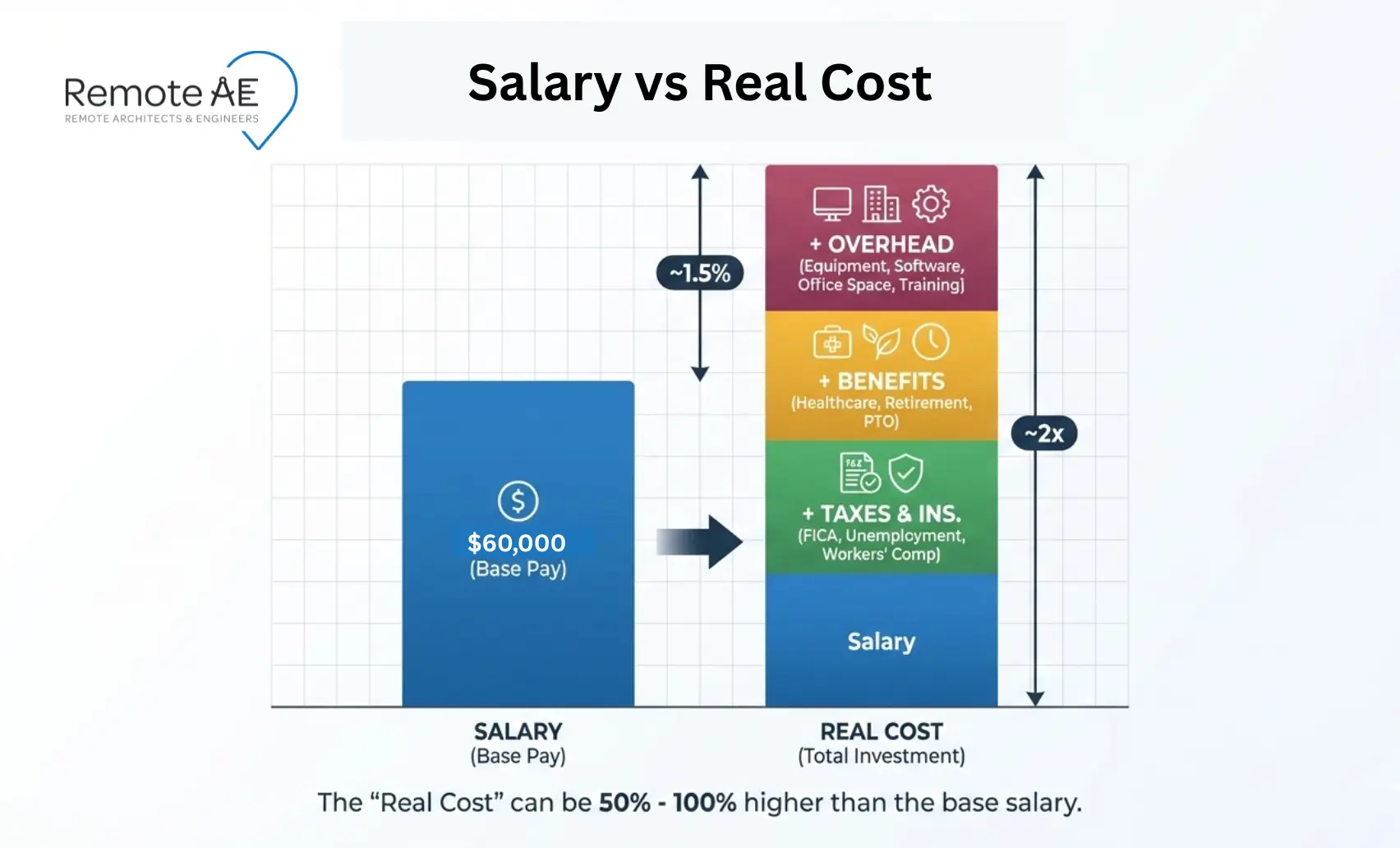
A full-time CAD technician can look affordable on paper. Then the real costs show up: payroll taxes, benefits, paid time off, recruiting, software, hardware, office space, IT support, and the hidden “productivity valley” during onboarding. Add rework risk, version-control failures, and turnover, and the true budget impact can surprise even experienced AEC leaders. The true cost of hiring a CAD technician often reaches 1.5x–2x the base salary. That gap impacts margins, delivery timelines, and team capacity.
This guide breaks down the hidden costs of hiring full-time CAD technicians and compares in-house vs outsourced CAD drafting costs. Moreover, how flexible staffing models help firms control risk while maintaining quality output.
What Does a Full-Time CAD Technician Really Cost?
Hiring a CAD technician or drafter may seem simple on paper: salary, benefits, and a workstation. But real AEC operations are more complex. You are not just hiring a person.
You are funding a production system that includes tools, management, and risk.
Average salary range (AEC context)
Start with the baseline. In the U.S., drafters (a common proxy for CAD-heavy roles in AEC) had a median annual wage of $65,380 in May 2024 (BLS, 2024). Typical salary ranges vary by role and location:
- CAD technician: $50K–$75K
- BIM modeler: $60K–$90K
- CAD manager: $90K–$120K+
These are base numbers, not “typical”. They do not reflect the loaded cost of a CAD drafter.
A simple formula for Total Cost of Ownership (TCO)
To understand the hidden costs of hiring full-time CAD technicians, use this formula:
TCO = Salary + (benefits % + payroll taxes) + recruiting + tools + space + management + risk
Example:
- $60K salary
- 25–30% benefits
- 7–10% payroll taxes (FICA, FUTA)
- tools and overhead
Real cost: $90K–$120K per year. That gap is where most budgets fail.
The Most Overlooked Hidden Costs of Hiring CAD Technicians
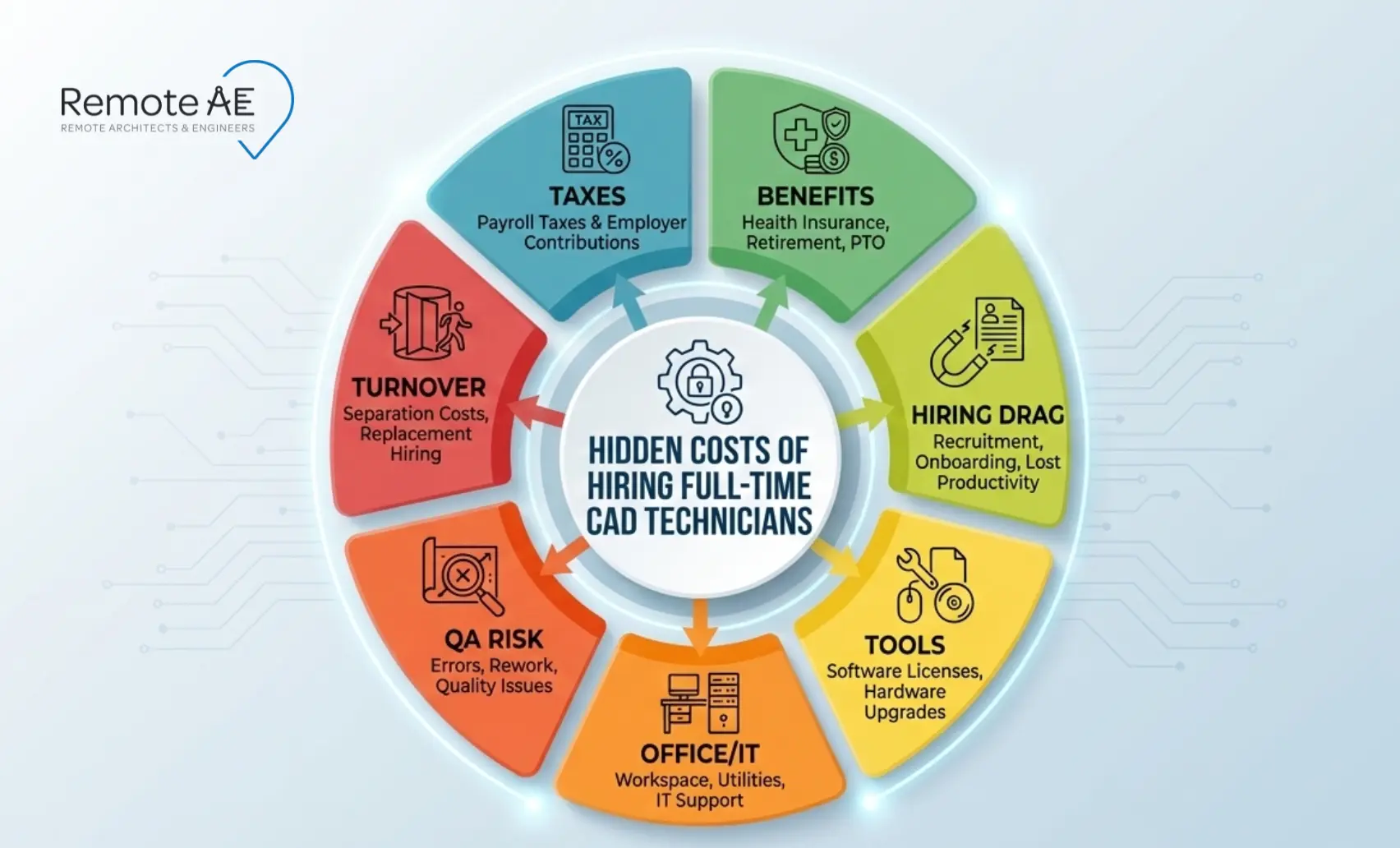
The gap between “salary” and “real cost” comes from costs that don’t show up on a CAD technician’s offer letter. But you still pay them.
Mandatory payroll costs you still pay (even with a “good salary”)
Even if your CAD drafter accepts a competitive salary, you still carry statutory costs.
FICA (Social Security + Medicare)
- Paid by the employer on top of the salary
- Scales with compensation
FUTA (Federal Unemployment Tax)
- Applies even in stable teams
- Credit reductions increase costs in some states
- FUTA is 6.0% on the first $7,000 per employee, before credits
Workers’ compensation insurance
- Required even for desk roles
- Claims can still occur
These costs are fixed. They do not change with performance or workload.
Benefits and paid time that reduce usable production hours
Benefits are a major part of in-house CAD drafting costs. For private industry, benefits were 29.8% of total compensation in June 2025.
Typical employer costs include:
- Health insurance
- Retirement contributions
- Paid leave
But the bigger issue is lost production time. A CAD technician is not billable 2,080 hours per year.
You lose time to:
- PTO
- Holidays
- Sick leave
- Training
- You pay 40 hours/week. You don’t get 40 hours/week of usable output every week.
That reduces effective production capacity. Then comes overtime.
- Crunch weeks increase burnout
- Burnout increases turnover
- Turnover increases cost
Quality also drops under pressure. Rework follows.
Hiring, onboarding, and the productivity valley
Hiring is not just a recruiting fee. It is a time drain on your senior staff.
Costs include:
- Job posting and screening
- Interviews and technical reviews
- HR processing
SHRM benchmarking is widely cited at ~$4,700 average cost per hire.
Then comes onboarding. Every CAD technician must learn:
- Layer standards
- CTBs and plotting rules
- Title blocks and sheet sets
- BIM execution plan (BEP)
- CDE (common data environment) structure
This training is not free. It takes time from:
- CAD managers
- Project managers
- Senior designers
This is the productivity valley. For the first 4-8 weeks:
- Output is low
- Errors are higher
- Review time increases
Your most experienced people carry the load.
Software, hardware, and AEC toolchain costs (often missed)
Toolchain costs are easy to underestimate because they show up across multiple budgets.
- AutoCAD
- Revit
- Civil 3D
- Navisworks
- Autodesk AEC Collection
Autodesk’s official product pricing lists AutoCAD at $2,095/year and the Architecture, Engineering & Construction Collection at $3,675/year.
These licenses are not optional. They must also stay version-aligned across teams.
That creates:
- Upgrade costs
- Compatibility issues
- IT support overhead
Then comes hardware. AEC drafting requires:
- High-performance workstations
- Dual monitors
- Graphics cards
- Storage and backups
And finally, your data environment.
- Autodesk Construction Cloud
- BIM 360
- Cloud storage
- Version control systems
These systems are essential for:
- QA gates
- Collaboration
- Model coordination
But they add recurring costs.
Space + IT overhead that finance rarely attributes to “one hire”
A single CAD technician also requires physical and digital infrastructure.
Office space costs include:
- Desk and equipment
- Utilities
- Meeting space allocation
IT overhead includes:
- Device setup and management
- Access control systems
- Backup solutions
- Cybersecurity
Cybersecurity is a growing concern. IBM reported an average global breach cost of $4.88M in 2024. AEC firms hold valuable IP:
- Construction documents
- Models
- Client data
A breach can expose instruments of service and project details. This is not a minor risk. It is a financial liability.
Quality failures are a cost center (not a “small mistake”)
CAD output touches schedule, coordination, and procurement. Small file-control gaps can trigger big rework loops.
One construction industry report estimated 52% of rework was caused by poor project data and communication (FMI + PlanGrid, 2018).
- Redlines
- Coordination conflicts
- Sheet-set revisions
This creates rework loops. Rework consumes:
- CAD technician time
- Engineer review time
- Project manager oversight
Poor version control makes it worse. If naming conventions are inconsistent:
- Teams use the wrong files
- Models fall out of sync
- Errors multiply
Small gaps turn into major issues. This is where QA gates matter:
- Review checklists
- File naming standards
- Controlled approvals
Without them, costs increase fast.
Turnover and replacement costs (the silent budget killer)
Turnover is one of the most expensive factors in in-house CAD drafting costs.
SHRM has reported that each employee departure costs about one-third of the worker’s annual earnings when you count recruiting, replacement coverage, and ramp-up time (SHRM, 2019).
Replacing a CAD technician includes:
- Recruiting cost
- Onboarding cost
- Lost productivity
But the real cost is knowledge loss.
You lose:
- Project history
- Client preferences
- Standards familiarity
- Detail libraries
This leads to:
- Rework
- Delays
- Lower quality
To measure turnover cost, look at:
- Rework hours
- Missed deadlines
- Review cycles
Turnover is not just HR cost. It is a production risk.
These hidden factors define the true cost of hiring a CAD technician. And they explain why many firms are rethinking their staffing model.
In-House vs Remote CAD Technicians: Cost Comparison
The goal is not “cheap.” The goal is predictable cost and reliable output without paying for idle time and overhead.
Cost Breakdown Comparison Table
| Cost Category | In-House CAD Technician | Remote CAD Technician |
| Salary / Fees | $65,380/year | $1,257 per week |
| Payroll Taxes (FICA, FUTA) | Employer pays | Not applicable |
| Benefits (health, PTO) | Employer pays | Not included |
| Recruiting & Onboarding | High cost + time | Minimal or none |
| Software (AutoCAD, Revit, Civil 3D, Navisworks) | Employer pays | Often included or flexible |
| Hardware & IT | Workstation + setup | Minimal client burden |
| Office space | Required | None |
| Turnover risk | High impact | Lower (replaceable resource) |
| Production flexibility | Fixed capacity | Scalable |
| Downtime cost | Paid regardless | Pay for active work |
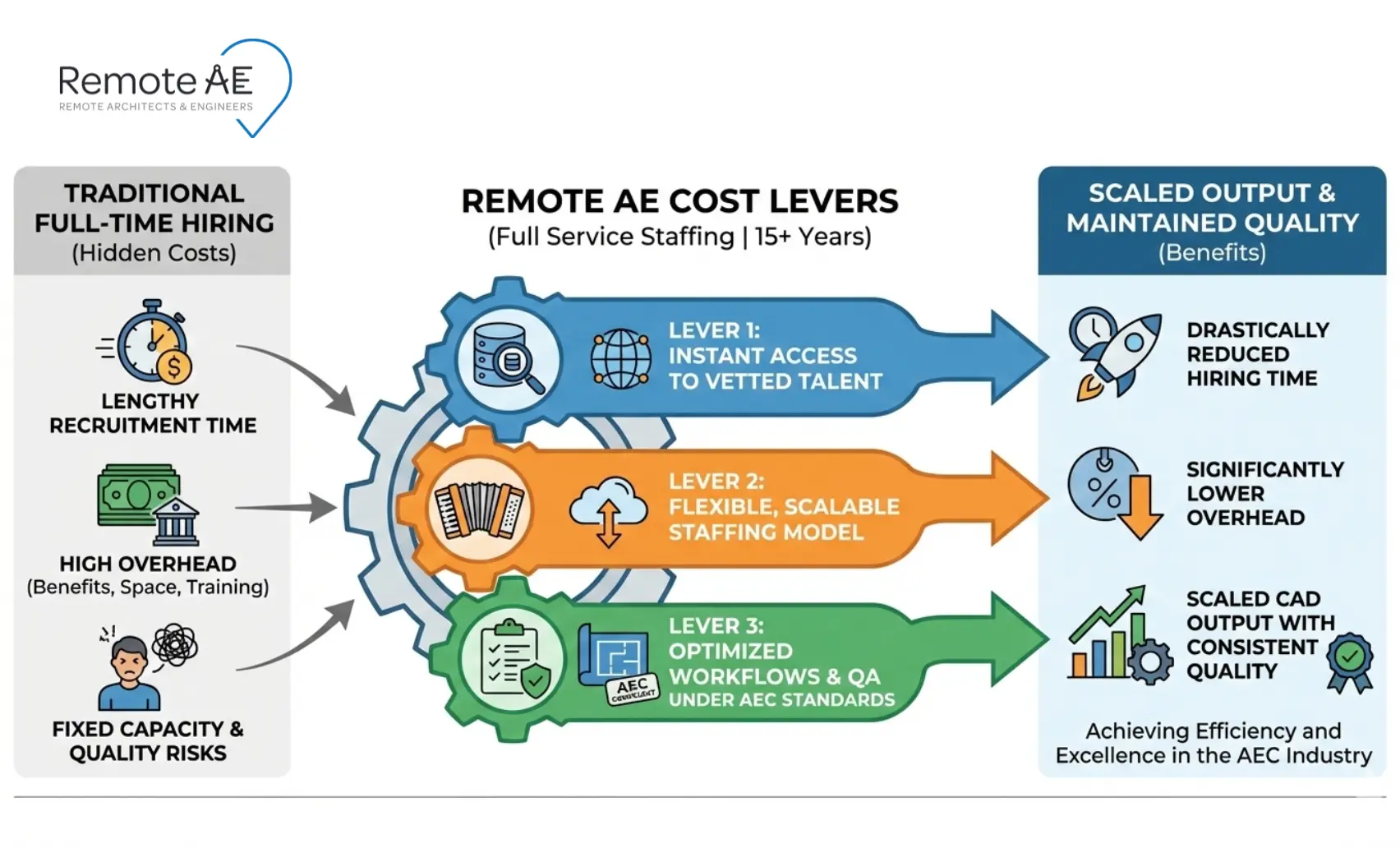
Key Cost Advantages of Remote Staffing
Remote models change how AEC firms manage production.
No office expenses
- No desk, utilities, or equipment costs
- No expansion of physical space
Reduced hiring time
- No long recruiting cycles
- Faster onboarding
Pay only for active work
- Scale up during deadlines
- Scale down when the workload drops
Access to global talent
- CAD technicians, BIM modelers, and specialists
- Experience across project types
Lower risk of turnover impact
- Replace resources quickly
- Maintain continuity
This is why firms are re-evaluating the in-house vs outsourced CAD drafting cost. It is not just about price. It is about control over capacity.
Why AEC Firms Are Moving to Flexible Staffing Models
AEC workloads are not consistent. They spike. Then they slow down. This creates a mismatch with fixed teams.
Increasing project-based work
Most firms operate on:
- Bids
- Deadlines
- Phased delivery
Workloads are uneven. A fixed CAD team struggles to keep up during peak periods. And sits idle during slow periods.
Need for scalability
Projects require different skill sets:
- CAD technician for drafting
- BIM modeler for coordination
- CAD manager for standards
Hiring full-time for each role is expensive. Flexible staffing allows you to:
- Add capacity quickly
- Adjust team size as needed
Budget control
Fixed salaries create fixed costs.
Even when revenue fluctuates.
Remote staffing converts:
- Fixed costs → variable costs
This improves financial control.
Global talent access
AEC tools are standardized:
- AutoCAD
- Revit
- Civil 3D
- Navisworks
This allows firms to access talent globally. You are not limited to local hiring.
Faster turnaround times
With distributed teams:
- Work continues across time zones
- Deadlines are easier to meet
This is especially valuable for:
- Redlines
- Sheet updates
- Documentation tasks
Speed improves without increasing internal pressure.
How Remote AE Helps Reduce CAD Staffing Costs
Solving the cost problem requires the right model. Remote AE is built for AEC firms that need production capacity without overhead.
15+ years in AEC staffing
Remote AE focuses only on the AEC industry.
That means:
- CAD technicians understand standards
- BIM modelers understand coordination
- Remote Assistants understand documentation workflows
This reduces training time.
Access to vetted CAD professionals
Each assistant has:
- Minimum 5 years of experience
- Familiarity with AEC tools and processes
They can work with:
- AutoCAD
- Revit
- Civil 3D
- Navisworks
- Autodesk AEC Collection
They also understand:
- CDE structures
- Version control
- QA gates
- BIM execution plans (BEP)
This is AEC-focused production support.
Flexible hiring models
Remote AE offers:
- Weekly staffing from $499
- No long-term contracts
- Easy scaling
You can:
- Add a CAD drafter for a deadline
- Expand to a team for a large project
- Reduce capacity when work slows
This aligns cost with workload.
No overhead or infrastructure cost
Remote AE removes:
- Payroll taxes
- Benefits
- Office costs
- Hardware expenses
Plus:
- No upfront costs
- Risk-free replacement (up to 2 assistants in the first year)
- Industry-Specific Expertise
- Guaranteed Quality & Reliability
- No Long-Term Commitment
Stop Paying for Idle CAD Capacity!
You don’t need more full-time hires to keep up with fluctuating workloads. What you need is flexible production capacity that adjusts to your project demands without adding fixed overhead. This is where Remote AE comes. Remote AE helps you reduce the hidden costs of hiring full-time CAD technicians, eliminate unnecessary overhead, and scale drafting support exactly when you need it. You get experienced AEC professionals who maintain quality while increasing your team’s output.
Schedule a call with Remote AE for a fast scope review and a clear weekly quote. No upfront cost. No long-term commitment.
FAQs – Hidden Costs of Hiring Full-Time CAD Technicians
What is the true cost of a full-time CAD technician (loaded cost)?
The loaded cost includes salary, payroll taxes, benefits, software, hardware, office space, and management time. A technician earning $60,000 may cost $75,000–$95,000+ per year once fully loaded. The exact number depends on benefits, licensing costs, and overhead structure.
Is it safe to outsource CAD drafting work?
It can be safe if you use clear standards, defined review gates, and secure file access. Most firms successfully outsource repeatable production tasks. The risk increases when the scope, code assumptions, or revision control are unclear. Strong QA and documented workflows reduce exposure.
What CAD tasks are risky to outsource vs safe to outsource?
Safe tasks: redlines, sheet setup, dimensioning, annotation cleanup, as-builts, and model updates.
Higher-risk tasks: code interpretation, design decisions, structural layout changes, and anything tied to professional stamping. Keep liability-heavy or client-facing decisions in-house and outsource production support.
How do firms test CAD skills before hiring?
Firms use a short-term test (60–90 minutes) with a marked-up plan and detail. Candidates apply layers or view templates, add dimensions, set up a sheet, and export a clean PDF. Grading focuses on accuracy, standards compliance, and how assumptions are handled.